Verfahrensdokumentation: from a compliance MVP to a white-label SaaS, in two milestones.
Live since 2024, V1 to V2 shipped, V3 in progress. A German process-management consultant hired me solo to build the V1 MVP in 2024, then brought me back for the V2 full-product extension in 2025. V1 shipped the multi-tenant admin platform with the document layer, the role-based access, and the merge-PDF download. V2 extended that foundation with Bubble.io sub-apps so partner agencies can offer the product under their own brand, a usage-based licence model, PDF Monkey and n8n for document generation, an AI integration that writes compliance language from plain answers, the IKS module, and row-field-level version comparisons. Same product, same client, two milestones, V3 currently in development.
- Client
- German Compliance Software
- Timeline
- 2024 to present, ongoing
- Stack
- [Bubble.io][AirDev Canvas][Sub-apps][PDF Monkey][n8n][OpenAI][Stripe]
Sections
- 00 A compliance product, two milestones 364 w
- 01 V1: the multi-tenant admin platform 372 w
- 02 Schema and relation-based UI 249 w
- 03 Canvas + workload units 194 w
- 04 GoBD structurally, GDPR on top 396 w
- 05 CRUD forms and hierarchy access 192 w
- 06 Quality of life at the seams 234 w
- 07 V2: white-label SaaS and IKS 541 w
- 08 Sub-apps for the partner channel 429 w
- 09 The partner licence model 203 w
- 10 The document pipeline 338 w
- 11 Webhooks, diffs, IKS audit 251 w
- 12 What changed 206 w

GoBD · BMF letter of 11 March 2024
A German compliance product, built in two milestones
The process documentation that German SMBs and their tax advisors are required to maintain under GoBD, the German tax authority’s rules on how digital books, records, and documents must be kept and made available to auditors. The version this product implements came into force on 1 April 2024.
A Verfahrensdokumentation is the process documentation that German SMBs and their tax advisors are required to maintain under GoBD, the Grundsätze zur ordnungsmäßigen Führung und Aufbewahrung von Büchern, Aufzeichnungen und Unterlagen in elektronischer Form sowie zum Datenzugriff. GoBD is issued by the BMF (Bundesministerium der Finanzen); the version this product implements came into force on 1 April 2024 with the BMF letter of 11 March 2024. The document is not the point. The point is that on the day a Betriebspruefer (German tax auditor) walks in, the documentation matches what the business actually does, every change to a sensitive field has a name and a timestamp next to it (per the Unveränderbarkeit principle), and every form, attachment, and signature is part of a single coherent record. The product this case study describes ships that record as a workflow rather than a one-time PDF.
I came onto the project as a solo senior lead developer in early 2024. The client, a German process-management consultant, had a clear product vision and needed someone who could turn it into a working multi-tenant SaaS on Bubble.io. The V1 MVP shipped that year as the platform’s blue-branded admin portal serving end-client companies directly. In 2025 the same client brought me back for the V2 extension that turned the MVP into a partner-distributable white-label SaaS. The V3 milestone is in progress in 2026 as the next chapter of the same engagement. The product is live at app.verfahrensdokumentation-digital.de.
Phase One · 2024 · V1 MVP
V1: the multi-tenant admin platform.
The V1 brief was to ship a working MVP of a multi-tenant compliance workflow platform that German SMBs could actually use. Not a questionnaire that produced a PDF; a tenant-aware SaaS where every customer ran their own document workflow against the same shared infrastructure. The V1 surface lives in the blue VD2 admin portal: tenant setup, user and role management, per-form access scoping, email templates, language preferences, audit history.
- Multi-tenant SaaS DB architecture and relation-based UI.Every customer's data isolated by tenant; within a tenant, every form, every field, every audit row tied back to the right company, the right user, and the right document version. The UI reads the schema directly.
- AirDev Canvas framework, with WU optimisation alongside.Canvas gave the time savings on the boring layers (auth, accounts, navigation). The Workload Units pass kept the app under control when Bubble moved its pricing model from capacity to WU.
- GoBD compliance as a structural property, with GDPR on top.GoBD's seven principles shaped the schema, the audit log, the retention behaviour, and the export surface. GDPR sat on top: lawful basis per processing activity, data minimisation, right-to-erasure preserving audit-log integrity, Article 28 processor agreement, data-region pinning.
- CRUD documentation forms.Six form types per Verfahrensdokumentation. Each form has its own data shape, its own validation, its own role-permission scope. Same CRUD machinery underneath.
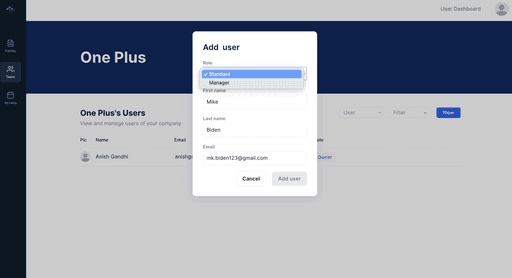
- Company-based access mechanism, built on company hierarchy.A parent company sees its children. A child sees only itself. Tax advisors and reviewers cut across the hierarchy with role-scoped permissions, enforced by Privacy Rules at the data type level.
- Document download with merge-PDF.V1 used Bubble's native page-to-PDF, with a merge step combining the rendered document and the attached source files into one deliverable. Mechanically fine for V1; replaced in V2.
- Comments with @mention for internal communication.Reviewers, owners, and advisors leave comments scoped to specific form sections. Threaded inside the form so context never has to leave the document.
- Critical-area identification with smart email throttling.Critical fields (signers, legal entities, retention policies, IT-environment metadata) trigger immediate notifications to the right roles. Non-critical edits roll up into a daily digest.

Multi-tenant SaaS DB architecture and relation-based UI.
The schema choice on a multi-tenant compliance product decides everything that follows. Tenant has Companies. Company has Users. User has Roles, scoped per Company. Company has Verfahrensdokumentation documents. Each document has Form instances. Each Form has Sections. Each Section has Fields. Each Field has a Type, a value, a chain of Audit-log rows.
The relation-based UI follows the schema directly. The forms list is a query over Form instances for the current tenant. The dashboard counters are aggregates over status fields. The audit log is a paginated read over Audit rows joined to Users and Forms. Privacy Rules at the data type level make the tenant boundary structural rather than reliant on UI filters.
This is the work that determines whether the product feels fast at fifty customers or whether it collapses at ten. Three weeks on the schema in V1 saved months of rewrite in V2.
- Tenant the isolation boundary
- Company with a parent-child hierarchy
- Document one Verfahrensdokumentation
- Form → Section → Field the CRUD surface
- Audit row previous and current value
The tenant boundary is a Privacy Rule, not a UI filter

AirDev Canvas + Workload Units optimisation.
The client chose AirDev Canvas as the Bubble.io framework before I joined. Canvas ships the auth flow, the user-account structure, the navigation, and a set of design conventions out of the box. For a product that needs to be production-shaped on a deadline, the time it saves on the boring layers is the time you spend on the multi-tenant data model that actually defines the product.
The Workload Units pass came later, as Bubble migrated its pricing from capacity-based plans to metered WU consumption. The same workflow patterns that were comfortable on capacity could become surprisingly expensive on WU. Lazy database reads, ungrounded searches, unbounded scheduled workflows all show up in the WU bill in a way they did not show up in the capacity bill. I audited the application’s hot paths, replaced client-side filters with server-side constraints, swapped “all rows” lists for paginated repeating groups, scoped scheduled workflows to actual change windows, and applied Bubble’s search index where it actually helped. The app was ready for the pricing migration before the migration arrived, with the cost trajectory under control rather than discovered after the bill jumped.


GoBD compliance, structurally. GDPR on top.
The reason this product exists is GoBD. The seven principles are not aspirational; they are the test the product has to pass on the day a Betriebspruefer arrives. The April 2024 GoBD revision was already in force when V1 shipped, so V1 implemented the current rules from day one rather than retrofitting them later.
Each principle shows up as a structural property of the system.
- Nachvollziehbarkeit
- the audit log: every change traceable to a user, a timestamp, and a previous-value / current-value pair.
- Vollständigkeit
- the schema: a document is incomplete until every required form is filled and every attachment uploaded, and the dashboard enforces that visibly.
- Unveränderbarkeit
- the change-tracking machinery: once a field is written the prior value cannot be silently overwritten, it is preserved and the new value is its own row.
- Zeitgerechtigkeit
- the workflow trigger order, with the timestamp being the actual moment the user committed, not a backdated edit.
- §§146 / 146a AO
- the export surface: a Z3-readable machine-readable export of the underlying data on demand, scoped to the auditor's request.
GDPR sits on top of all of this. Lawful basis per processing activity, declared in the data model so deletion or anonymisation can be applied per activity rather than per record. Data minimisation in the form design: every field justified against what GoBD actually requires, no nice-to-have personal data sneaking into a compliance form. Right-to-erasure that preserves the audit log integrity (the deletion writes a tombstone with the timestamp, the actor scrubbed but the value-change retained, so the GoBD Unveränderbarkeit posture survives the GDPR-mandated deletion). Processor agreement under Article 28, data-region pinning for EU-hosted Bubble infrastructure.
Under both regulations sit Privacy Rules at the data type level, scoped to tenant and role. The compliance posture lives in the database, not in a UI filter. The 10-year retention period mandated by §147 AO and HGB §257 is enforced at the schema level as well: a record cannot be deleted before its retention window closes, even by a tenant administrator.

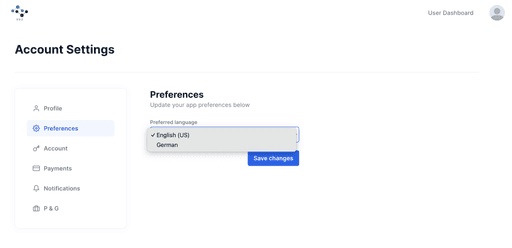
CRUD documentation forms and company-hierarchy access.
The CRUD layer is the surface customers spend the most time in. Six form types per Verfahrensdokumentation, each with its own field schema, its own validation, its own role-permission scope. Same machinery underneath: every form reads its definition from the database, every save writes through a workflow that respects the Privacy Rules.
Company-hierarchy access is where the multi-tenant model meets the customer’s organisational structure. A parent company sees the documents of its children. A child sees only its own. Tax advisors and external reviewers cut across the hierarchy with role-scoped permissions: an advisor might have read-mode access on every child of a parent but edit rights on none. The hierarchy is a data type. The access decisions are Privacy Rules joined to the hierarchy at read time. Adding a new child company is a data row, not a code change.

Quality of life: @mention comments and smart email throttling.
A compliance workflow lives or dies on the seams. The headline features (the schema, the forms, the access control) are necessary but not sufficient. What separates a compliance product reviewers actually use from one they tolerate is the set of quality-of-life features around the edges. V1 shipped two of them; the audit log and the in-app walkthroughs came later, in V2.
Comments with @mention scoped to form sections. The mention triggers a notification to the named user; the comment thread lives inside the form so the context never has to leave the document. The same workflow that writes the comment fires the notification, so collaborators are surfaced to each other inside the work, not in a separate Slack channel.
Critical-area identification with smart email throttling: not every change is worth a notification. Critical fields (signers, legal entities, retention policies, IT-environment metadata) trigger immediate emails to the right roles. Non-critical edits roll up into a daily digest. The decision happens at workflow time, scoped per field, so the user does not get a per-keystroke spam stream.

Phase Two · 2025 · V2 full product
V2: from MVP to white-label SaaS, plus the IKS module.
Internes Kontrollsystem, the companion artifact GoBD expects alongside the Verfahrensdokumentation. Where the Verfahrensdokumentation documents what the business does with its records, the IKS documents how the business controls and verifies those processes. A complete GoBD compliance posture needs both.
The V2 brief was to take the V1 MVP and turn it into a partner-distributable white-label SaaS, with the IKS module as the headline functional addition and the gold GoBD.ai customer-facing surface as the new visual identity. V1 shipped the Verfahrensdokumentation administration; V2 added the IKS module so the same product serves the full compliance picture. The product topology also expanded: V1 served end-client companies directly as tenants in one shared admin portal; V2 added a partner layer above that, so a process-consulting firm or a Steuerberater practice can resell the product under their own brand to their own clients, each on their own Bubble sub-app, each with their own multi-tenant pool of end-client companies underneath.
- White-labelling via Bubble.io sub-apps, for partners.Each partner agency gets their own sub-app with their own database, users, domain, and brand. The editor design, workflows, and schemas are pushed from the parent, so a feature ships once and lands everywhere.
- Partner licence model.Partners take a recurring licence to operate their own branded instance. Pricing is set at the licence level, not metered per end-client action, so partners can build a predictable margin.
- PDF Monkey for properly designed document generation.Replaced V1's page-to-PDF. Consistent typography, page breaks, headers, footers, and table layouts the native approach could not reach.
- n8n for merging the generated PDF with attached source files.Picks up the PDF Monkey output, pulls attachments from Bubble, runs the merge, posts one deliverable PDF back. Server-side, no long Bubble workflow.
- AI integration: plain answers to compliance language.A small-business owner knows what they do; they do not know how to phrase it in compliance-officer-speak. The user reviews and edits before saving.
- Webhook setup for inbound and outbound events.PDF Monkey, n8n, Stripe and the sub-apps all talk to the parent through webhooks. Every receiver validates the signature first and writes a status row for observability.
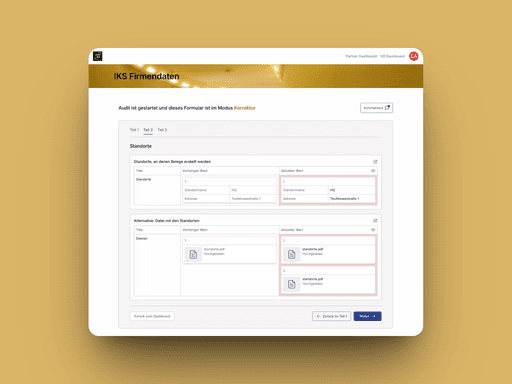
- Compliance form version comparisons, per row and field.In Korrektur Modus every field renders as a previous-value / current-value pair with the change highlighted. Repeating sections diff per row, not per form.
- The Aenderungs-log audit surface.Every sensitive-field edit lands in a paginated log with both values, the user and the timestamp. V1 built the schema for this; V2 built the surface that makes it useful.
- In-app YouTube walkthroughs alongside the forms.A new reviewer joining a customer team can learn the workflow without a separate training call. Scoped per form, so the relevant context is one click from the work.
- The IKS module, the second GoBD artifact.IKS Firmendaten, IKS IT Umgebung, IKS Eingangsbelege and the rest, on the same multi-tenant schema and the same role-based access.
- Role-based access, extended for multi-company hierarchy.An advisor can hold Audit rights on every child of a parent, an Anpassen scope limited to one child, and a Korrektur scope across two.

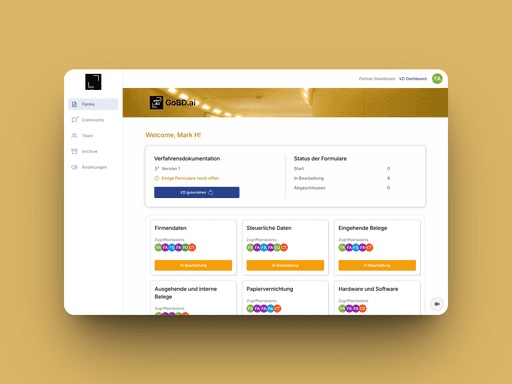
White-labelling via Bubble.io sub-apps, for the partner channel.
The partner channel was the headline V2 work. Those partners (process-consulting firms, Steuerberater practices, compliance agencies) needed to resell the platform under their own brand to their own clients. A Bubble.io sub-app is the right primitive for that: a separate app instance spawned from a parent app, with its own database, its own users, its own Privacy Rules, its own media uploads, and its own custom domain. Each partner gets one sub-app. The partner’s clients sign up and work inside that sub-app, on the partner’s domain, under the partner’s branding, never touching the parent.
The editor design, the workflows, and the data type schemas are pushed from parent to child on every release, so the product logic stays in one place while every partner’s instance gets its own client-facing surface. A new feature ships once at the parent and lands across every partner. A schema change at the parent propagates to every child. The partner-specific layer (logo, colours, copy, feature flags, billing posture) lives as data inside each sub-app’s own database, so a parent push does not overwrite the partner’s brand.
The complexity is rarely in the sub-app creation itself; it is in living with sub-apps over time.
- Parent-child sync discipline.What gets pushed, what stays in the child, what survives a push, what gets overwritten.
- Per-partner domain DNS.Each partner points their custom domain at the child via CNAME, with Bubble's domain configuration done in the parent.
- A data-driven branding layerso a parent push does not wipe each partner's customisation.
- Per-sub-app API keys.The API Connector's private keys are part of the pushed configuration with no per-sub-app override, so any sub-app that needs its own keys has them overwritten on every parent push and they have to be re-entered by hand.
The deep dive on this lives on the writing side of the site at How to use sub-apps in Bubble for white-label apps. The short version: sub-apps are the right answer for a partner-channel white-label on Bubble.io if you are willing to design for the parent-child sync model from day one.

The partner licence model.
V1 served end-client companies directly on a flat per-instance licence. V2 added the partner layer: a partner agency or a Steuerberater practice takes a recurring licence to operate their own branded instance of the platform (their own Bubble sub-app), and serves their own clients inside that instance.
The partner runs the day-to-day customer relationship under their own brand. The platform vendor licenses the product to the partner, ships the upgrades to every partner’s sub-app through the parent push mechanism, and handles the underlying infrastructure that all partners share. Partner pricing is set at the licence level (a recurring rate to operate the instance, not metered per end-client action), so partners can build a predictable margin into the rate they charge their own customers without watching a usage counter.
The engineering shape this asks for is mostly the partner-onboarding workflow (spin up the sub-app, configure the partner’s domain, seed the branding layer, set up the partner’s first admin user) plus the parent-side licence record that gates partner access and binds the recurring billing. The rest of the partner’s experience is the same product the parent ships, wearing the partner’s brand on the partner’s domain.
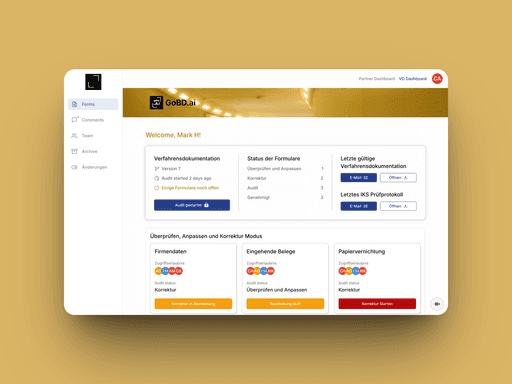

PDF Monkey + n8n + AI: the document pipeline.
V1 generated the downloadable Verfahrensdokumentation through Bubble.io’s native page-to-PDF conversion. It worked. It did not produce the kind of designed compliance document that customers wanted to hand to an auditor. V2 replaced the entire pipeline.
PDF Monkey took over document rendering. The Bubble.io app sends the structured form data; PDF Monkey returns a properly typeset PDF with consistent headers, footers, table layouts, page breaks, and typography. The template lives in PDF Monkey; the data lives in Bubble; the boundary between them is a single API call.
n8n took over document assembly. A complete Verfahrensdokumentation download is the rendered PDF Monkey document plus every supporting attachment the customer uploaded against the forms. n8n picks up the PDF Monkey output, pulls the attachments from Bubble through the API, merges the files, and posts the single deliverable PDF back into Bubble for download. The merge runs server-side; the user does not wait on a long Bubble workflow.
The AI integration is the surface that turned filling in a compliance form from a chore into a guided conversation. A small-business owner knows what they do; they do not know how to phrase it in compliance-officer-language. The AI integration accepts a plain-language answer to a simple question and writes the compliance-specific paragraph into the form. The user reviews and edits before saving; the AI is a first-draft assistant for the field’s natural-language paragraphs, not an autonomous filler of structured data.
- Bubble sends the structured form data
- PDF Monkey renders the typeset document
- n8n merges in every attachment
- Bubble one deliverable PDF, ready to download
The merge runs server-side. No long Bubble workflow, no waiting user.


Webhooks, row-field version comparisons, and the IKS audit workflow.
The webhook layer is what holds the V2 architecture together. PDF Monkey posts back when a render completes. n8n posts back when a merge completes. Stripe posts the usage events that drive the licence calculation. Each white-label sub-app exchanges events with the parent through signed webhooks. Every receiver workflow validates the signature first, dispatches by event type second, and writes a status row for observability third. The pattern is the same across providers; the validation is what makes the receivers safe.
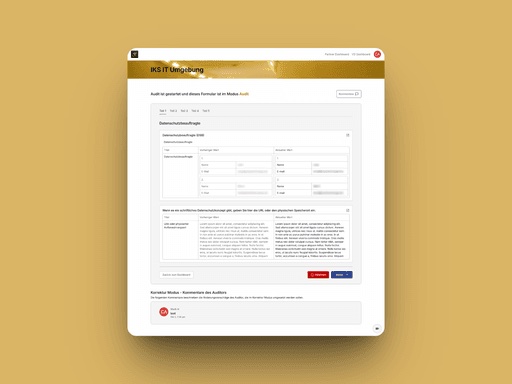
The row-field-level form version comparison is the visible surface of the change-tracking machinery. Korrektur Modus renders every field as a Vorheriger Wert / Aktueller Wert pair with red highlighting on the change. Repeating sections diff per row, not per form, so an auditor can accept or reject changes at the granularity they were made. The data model behind this is a change-set table joined to the form record, with the per-field history assembled at read time.
The IKS forms (IKS Firmendaten, IKS IT Umgebung, IKS Eingangsbelege, and the rest) plug into the same Korrektur / Audit / Anpassen workflow the Verfahrensdokumentation forms already used in V1’s schema. The audit mode lets a Steuerberater review each section, the Korrektur mode lets the owner propose changes, the diff surface shows both sides, and acceptance flows the change into the audit log on transition. The IKS module did not need a new workflow engine; it needed new form definitions and the IKS forms to plug into the existing one.

What changed
The product is live and serving German SMBs and their tax advisors through both the direct channel and partner agencies. V1 shipped the blue-branded multi-tenant admin platform with the schema, the role-based access, and the quality-of-life features that made the workflow usable. V2 added the gold-branded GoBD.ai client-facing surface with the IKS module, the Aenderungs-log audit log, in-app walkthroughs, partner-channel Bubble.io sub-apps so process-consulting firms and Steuerberater practices can resell the product under their own brand, a PDF Monkey and n8n document pipeline, an AI integration that writes compliance language from plain-language inputs, webhook orchestration across the toolchain, and row-field-level form version comparisons. The V3 milestone is currently in development in 2026 as the next chapter of the same engagement, with me continuing as the lead developer.
The pattern of the engagement is the part I would do again.
- Take the MVP scope seriously enoughthat the schema can carry the next milestone.
- Carry the same product through V1, V2 and V3as the same Bubble.io app rather than a rewrite.
- Let the trust compoundover a long-arc client relationship rather than chasing the next short engagement.