Article · Jun 8, 2023
How to use Stripe Payment Intents with Bubble?
Through the native API Connector plugin, you can easily create and manage payment objects. To set up Payment Intents in your Bubble application, follow thes
Payment gateway integration is an integral part of an application. Among the popular payment gateways, Stripe stands out as a preferred platform for Bubble.io. Offering a range of features and tools, it enables secure and straightforward payment processing. One of its significant features is the Stripe Payment Intents API, a powerful tool that allows you to manage payment flows in your Bubble applications.
So, what is Stripe Payment Intents API? In simple terms, a Stripe API allows you to handle the entire payment process, from capturing users’ payment information and handling errors and disputes. Stripe recommends creating one PaymentIntent for each order or customer session in your system. You can reference the PaymentIntent later to see the history of payment attempts for a particular session. It enables you to control payment authorization, create and capture payments, resolve failed payments, and more. Stripe Payment Intents creates a secure connection between your application and Stripe, allowing the handling of sensitive data without compromising user privacy and security.
The Stripe Payment Intents API offers a seamless and user-friendly payment experience, allowing you to incorporate dynamic authentication. Dynamic authentication enables customers to authenticate payments with their mobile devices, such as facial recognition and fingerprint recognition. This reduces the need for lengthy and complex passwords, thereby streamlining the payment process and providing a convenient and user-friendly experience.
The Stripe Payment Intents API allows granular control over payment authorization and capture. It empowers you to create unique workflows and rules that suit your business needs. For instance, you can specify the length of payment authorization before it expires or how many attempts can be made to capture funds before cancelling the payment. With this level of customization, you can avoid payment errors or fraud and tailor the payment process to your specific business requirements.
Stripe Payment Intents API provides the following endpoints to take different actions for each order or custom session:
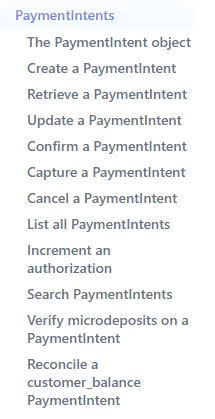
You can check endpoints in the documentation.
Integrating Stripe Payment Intents with Bubble applications is easy since Bubble offers seamless integration with Stripe. Through the native API Connector plugin, you can easily create and manage payment objects. To set up Payment Intents in your Bubble application, follow these steps:
-
Connect your Bubble application to Stripe by providing the Stripe API keys in API Connector settings. This allows Bubble to communicate with Stripe and access its features.
-
Create a new Payment Intent object in your Bubble application by sending a POST request to the Stripe API. You can set the amount, currency, payment method, and other parameters such as customer information and shipping address.
-
Use Stripe’s webhooks to receive updates and notifications about payment status. You can set up a webhook to get notified when a payment is captured, authorized, failed, or disputed.
-
Create custom workflows in Bubble’s workflow editor that interact with the Payment Intent object. For instance, create workflows that display payment confirmation messages when the payment is authorized or that send email notifications to the user when the payment is captured.
-
Use Bubble’s built-in data tools to store and analyze payment data such as transaction history, payment status, and customer information. This data can provide valuable insights into your payment processing performance, helping you identify areas that need improvement and make necessary adjustments.
If you are building a two-sided marketplace, Payment Intents is the foundation Stripe Connect builds on for escrow and split payouts between buyers and sellers. The marketplace-specific patterns (escrow release, dispute handling, two-sided payment flows) are at marketplace developer.
In conclusion, Stripe Payment Intents API is a powerful tool that can help you streamline payment processing and enhance the user experience in your Bubble applications. With its ability to handle complex payment workflows, dynamic authentication, and customizable rules, Payment Intents can help you reduce errors and fraud, simplify payment processing, and improve customer satisfaction and conversion rates.
By integrating with Bubble’s native API Connector and data tools, you can create robust and scalable payment solutions that meet your business needs and exceed your customers’ expectations. As a Bubble.io Developer, leveraging Stripe Payment Intents API can help you stay ahead of the competition and provide a seamless payment experience to your customers.
Frequently asked questions
What is the Stripe Payment Intents API?
Payment Intents is Stripe's recommended low-level payments API for tracking the entire lifecycle of a payment from the moment it is created to capture, including any 3D Secure authentication steps and retry behaviour. Each PaymentIntent represents one customer's attempt (or attempts) to pay for one order or session. You create the intent with an amount and currency, the customer supplies a payment method, Stripe either authorizes the payment or surfaces an authentication challenge, and on success you can capture the funds. The PaymentIntent's status field exposes the current state (requires_payment_method, requires_confirmation, requires_action, processing, succeeded, canceled), which your application reads to decide what to do next.
When should I use Stripe Payment Intents instead of Stripe Checkout?
Use Stripe Checkout when you want a hosted, prebuilt payment page that handles every payment-method UI, every regional variation, and 3D Secure for you, and you are willing to redirect the user off your domain. Use Payment Intents when you need a custom payment UI inside your Bubble app, when the payment flow has multiple steps or conditional logic, when you need to capture and authorize separately, or when you are building subscriptions with non-trivial proration. Stripe's own documentation recommends Checkout for most cases. Payment Intents wins when you have flow-control needs that Checkout's hosted page cannot accommodate.
How do I integrate Payment Intents with Bubble.io?
Five steps. (1) In Bubble's API Connector, configure a Stripe API call with your secret key as a Bearer token in the Authorization header and set Content-Type to application/x-www-form-urlencoded. (2) Create a Payment Intent by POSTing to api.stripe.com/v1/payment_intents with amount, currency, and any optional customer/metadata fields as querystring parameters. (3) In Stripe Dashboard, register a webhook pointing at a Bubble backend workflow to receive payment_intent.succeeded, payment_intent.payment_failed, and payment_intent.requires_action events. (4) Build Bubble workflows that confirm the intent on the front-end (using stripe.js or a dedicated plugin if you need card collection inside Bubble) and react to webhook events. (5) Store the PaymentIntent ID, status, and amount in Bubble's database for lookup and reporting.
How does dynamic authentication work with Stripe Payment Intents?
Payment Intents automatically applies 3D Secure when the issuing bank requires it. When you confirm a PaymentIntent, Stripe checks the card and the regional regulatory rules (PSD2 in Europe, similar regimes elsewhere) and either approves immediately or returns a status of requires_action. Your front-end then handles the authentication challenge using stripe.js (typically a redirect or modal where the user authenticates via the bank's app, fingerprint, or face recognition). After the user completes the challenge, Stripe updates the PaymentIntent status to succeeded and fires the payment_intent.succeeded webhook. The whole authentication step is handled by Stripe and the issuing bank; your code only needs to react to the status changes.
How do I handle Payment Intent webhooks in Bubble?
Create a backend workflow in Bubble named something like stripe-payment-intent-webhook and click "Detect data" so Bubble can learn the webhook payload shape from a real Stripe event. Register that workflow's URL in Stripe Dashboard at Developers, Webhooks, Add endpoint, and select payment_intent.succeeded, payment_intent.payment_failed, and payment_intent.requires_action events. In the backend workflow, read the data.object.id from the payload (this is the PaymentIntent ID), do a Search in Bubble for the order/transaction record matching that ID, and update the record's status field accordingly. Treat the webhook as the source of truth; do not rely on front-end confirmation alone.
Should I use Stripe's plugin or the API Connector for Payment Intents?
The API Connector is the more flexible path because Payment Intents has parameters and edge cases that Bubble's free Stripe plugin does not expose, especially around capture method (automatic vs manual), payment-method types beyond cards, and metadata. The plugin is faster to set up for simple charge flows. For Payment Intents specifically, most production integrations end up on the API Connector because the lifecycle complexity needs the granular control. The API Connector also gives you direct access to the latest Stripe API features without waiting for the plugin to catch up.