Article · Oct 20, 2025
How to Implement TOTP(time-based one-time passwords) based 2FA in Bubble.io Without Using Any APIs?
Learn how to add Google Authenticator–style 2FA in Bubble.io using the Crazy Two Factor plugin - no APIs, no plugins, just secure TOTP authentication.
This article is Powered by Zeroic and Sponsored by FormulaBot.
Limitations of Bubble.io’s native 2FA:
Bubble.io’s built-in two-factor authentication (2FA) primarily revolves around sending verification codes via email or SMS. While this works for basic identity verification, it doesn’t cover the TOTP (Time-Based One-Time Password) standard - the system used by popular authentication apps like Google Authenticator, Authy, or Microsoft Authenticator.
TOTP works differently from email or SMS verification. Instead of sending a code over the internet or through a messaging service, it relies on a shared secret key that’s stored both on the server (Bubble app) and the user’s device (in the authenticator app). This key generates a new 6-digit code every 30 seconds entirely offline, meaning no communication between your app and the authenticator is needed during verification.
Here’s the challenge:
Bubble’s native user authentication system doesn’t provide:
-
A way to generate and share the secret key securely with the user.
-
Built-in tools for generating or verifying TOTP codes.
-
Access to low-level cryptographic functions (like HMAC-SHA1) is needed to calculate time-based tokens.
Because of these missing components, developers can’t directly implement app-based verification like TOTP purely through Bubble’s native features.
This limitation makes it difficult to offer the same security and convenience that users expect from standard authenticator-based 2FA systems - where verification doesn’t depend on email delivery, SMS reliability, or network access.
Advantages of using the Plugin over the API
Implementing TOTP (Time-Based One-Time Password) authentication manually inside Bubble can be quite complex. You’d need to handle several technical layers yourself - like generating the secret key, creating a QR code for users to scan with Google Authenticator, calculating time-based codes using cryptographic algorithms (HMAC-SHA1), and then verifying those codes securely when the user logs in.
While it’s possible to achieve some of this using custom JavaScript or backend workflows, the process is time-consuming, error-prone, and security-sensitive. That’s where a dedicated plugin comes in handy.
A good plugin encapsulates all these technical details behind simple Bubble actions - so you can set up TOTP-based 2FA with just a few workflows instead of writing and testing custom code.
Another big advantage is that you don’t need to register your app with third-party authentication providers like Auth0 or Stytch. These platforms require API keys, account setup, and extra configuration steps - and in many cases, their APIs come with usage limits or ongoing subscription costs.
By using a Bubble-native plugin, your entire 2FA system remains self-contained inside your Bubble app. This means:
-
No dependency on external APIs or services.
-
Faster setup - everything happens inside Bubble.
-
Lower long-term maintenance, since you’re not managing third-party credentials or webhooks.
So, as a plugin has a one-time fee, it often pays for itself quickly in saved development hours, reduced complexity, and a cleaner, more maintainable authentication setup.
Here, I will provide a step-by-step guide to implement TOTP(time-based one-time passwords) based two-factor authentication (2FA) that will be compatible with popular authenticator apps such as Google Authenticator, Authy Authenticator, and Microsoft Authenticator.
Step 1: Install Crazy Two Factor - Authentication Plugin in the bubble.io app
You can install the Crazy Two-Factor Authentication plugin from the Bubble.io plugin store.
Step 2: Setup TOTP based 2FA Enabler for User in bubble.io app
Here, I have set this up on the user’s profile page, where the user can enable 2fa with switch toggle.

Once the switch is Yes, There is an action named ‘Two Factor’ from plugin, Use it to enable 2fa. Enabling 2fa won’t require secret and verification token as you can see in the screenshot below. You can write any text as an app name. This name will be shown in your authenticator app.
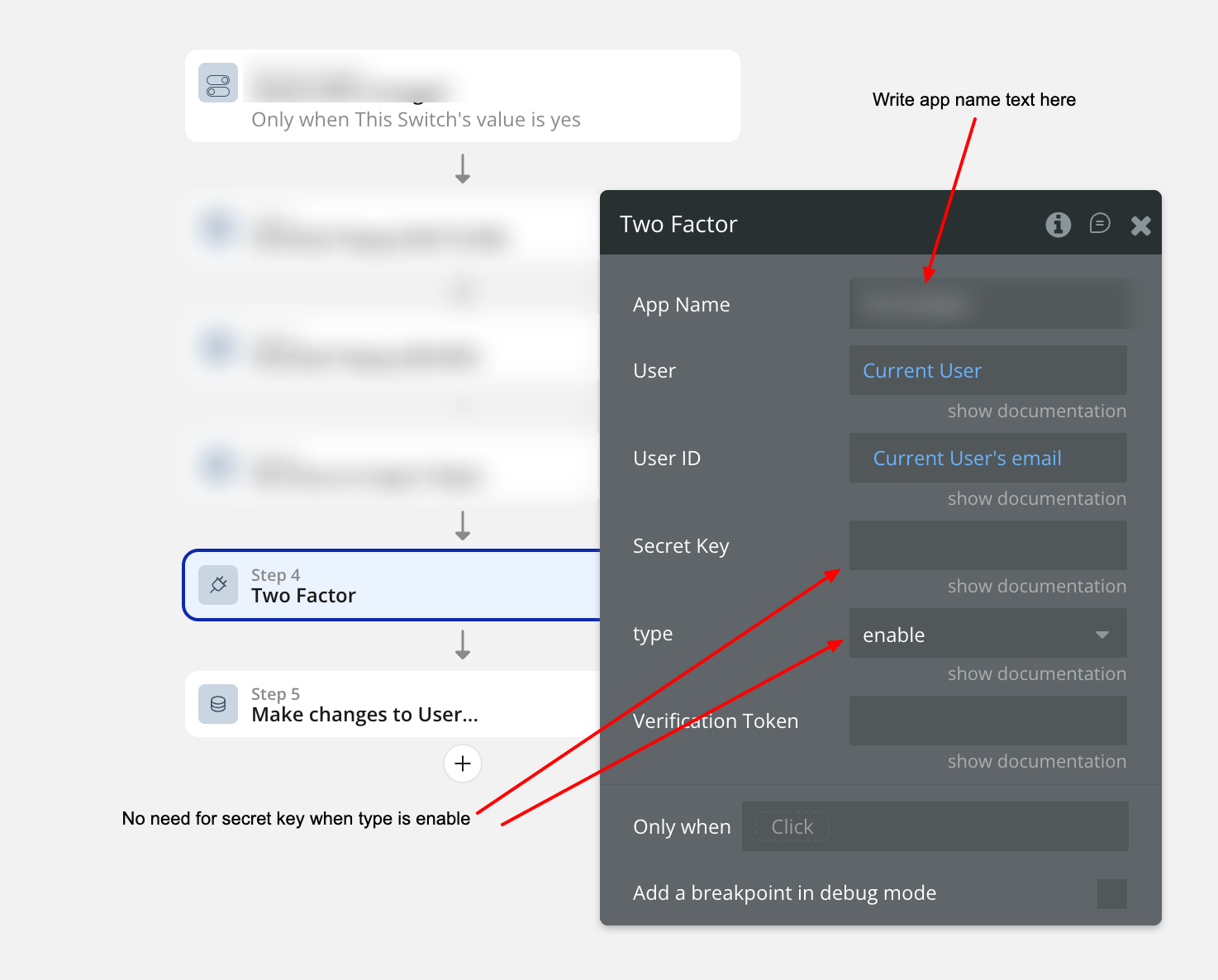
Now create 4 new field’s in User table named secret, is-2fa-enabled, is-2fa-verified and is-2fa-qr-code. All this field will be used in next step.
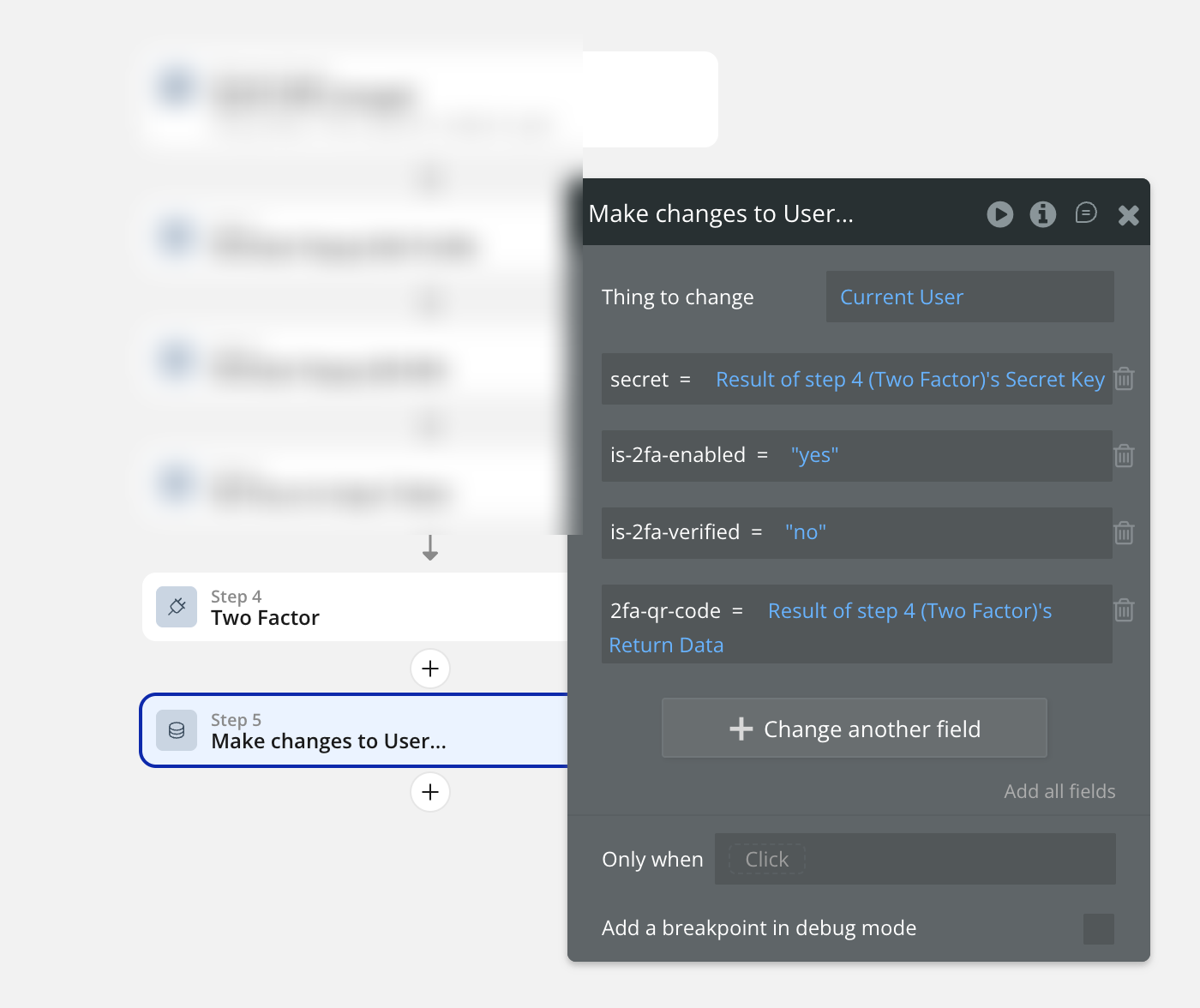
So bascially this ‘Two Factor’ action is generating QR code and secret which will be used to enable TOTP based 2fa for user. is-2fa-verified is ‘no’ because user just have enabled it but verification is still pending.
Step 3: Setup TOTP based 2FA Verifier for User in bubble.io app
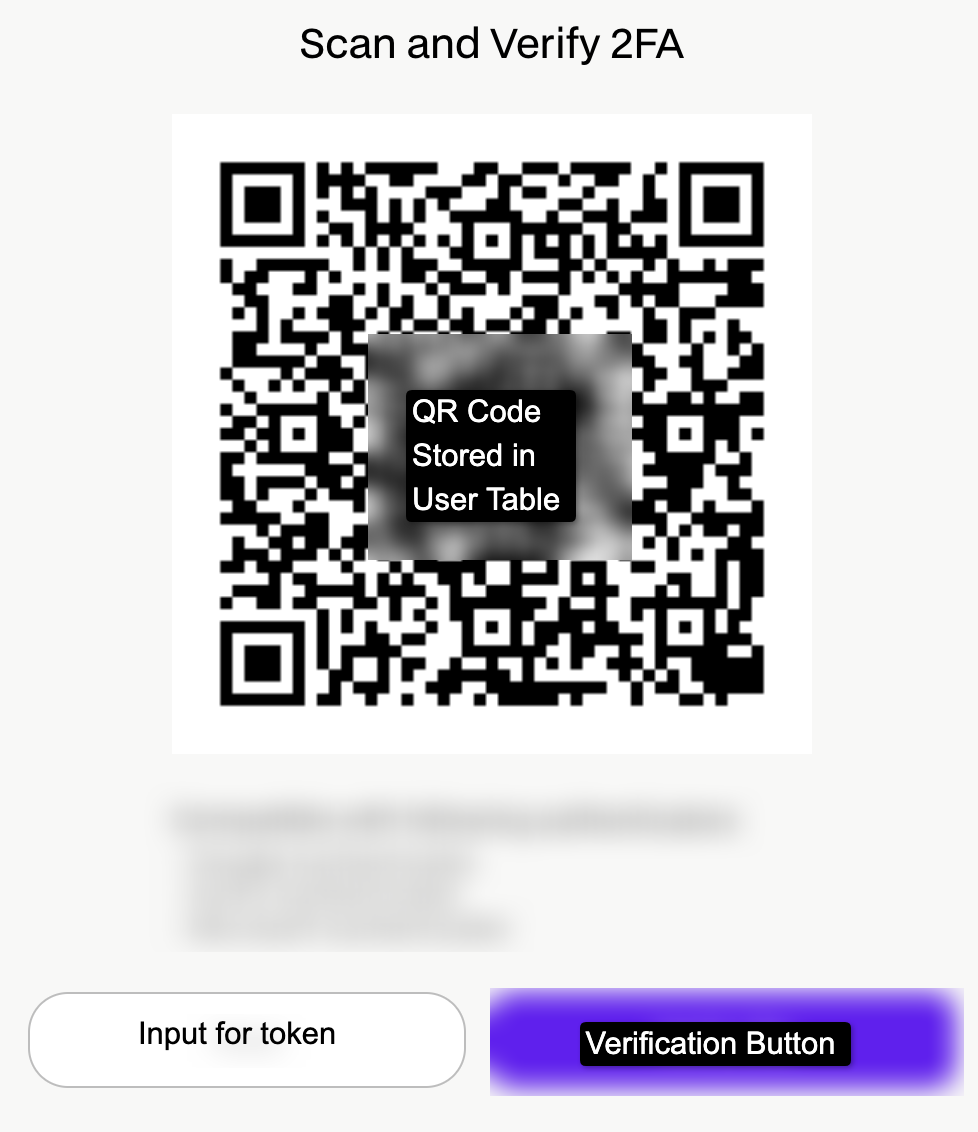
Now Create a Group where this 2fa-qr-code will be shown and User will be asked to scan the QR code in authenticator app such as Google Authenticator and Write 6 digit token number in input box to verify as shown in the image below. This group will be shown immediately once the is-2fa-enabled is ‘Yes’.
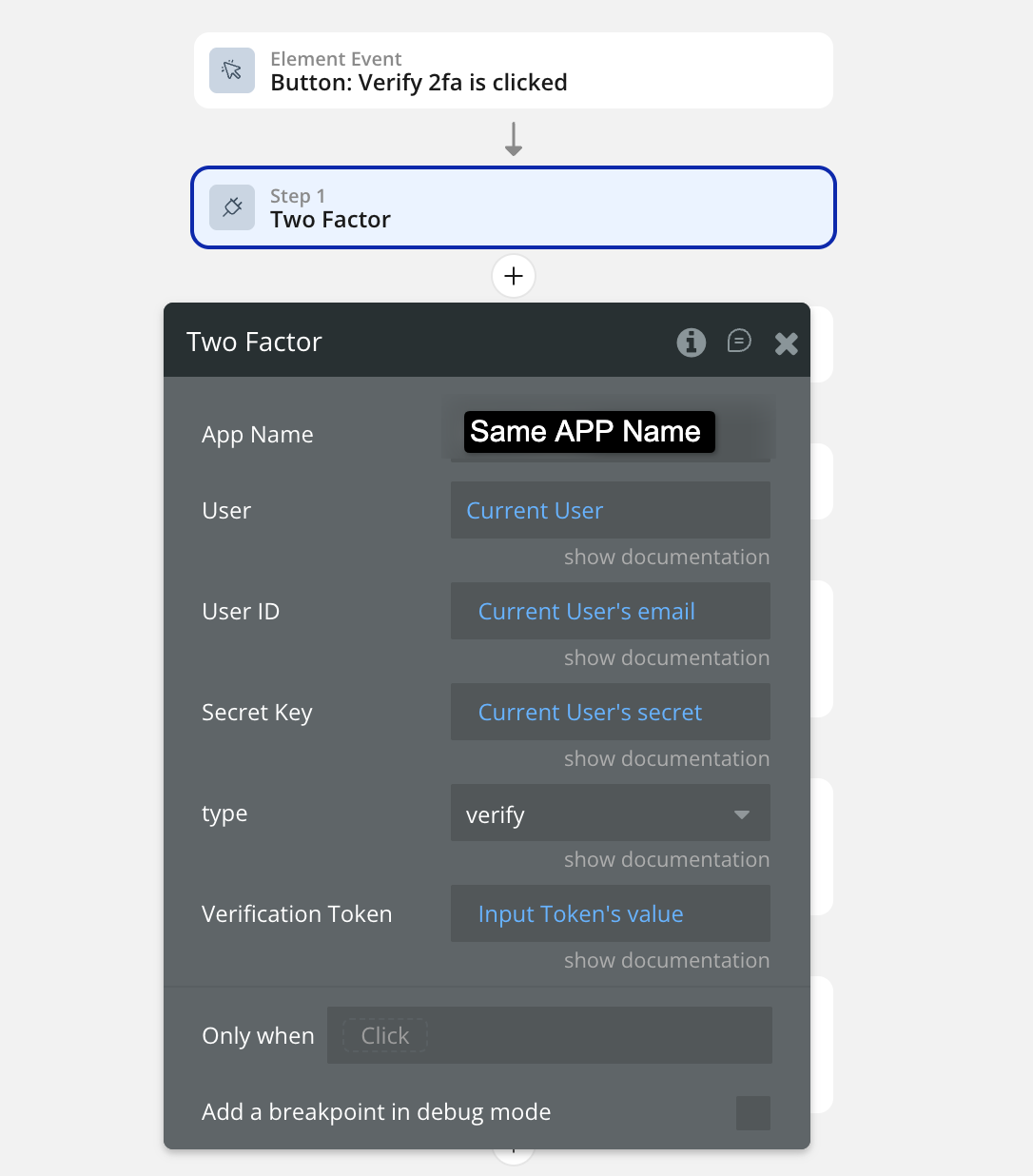
Once the 6 digit token is provided and verification button is clicked, Run ‘Two factor’ action again. This time, it will be to verify and not to enable. Here is the setup image below
Now result of this action is either error or return data. If the result’s error detail is not empty → Show error to user below QR code or wherever you want.
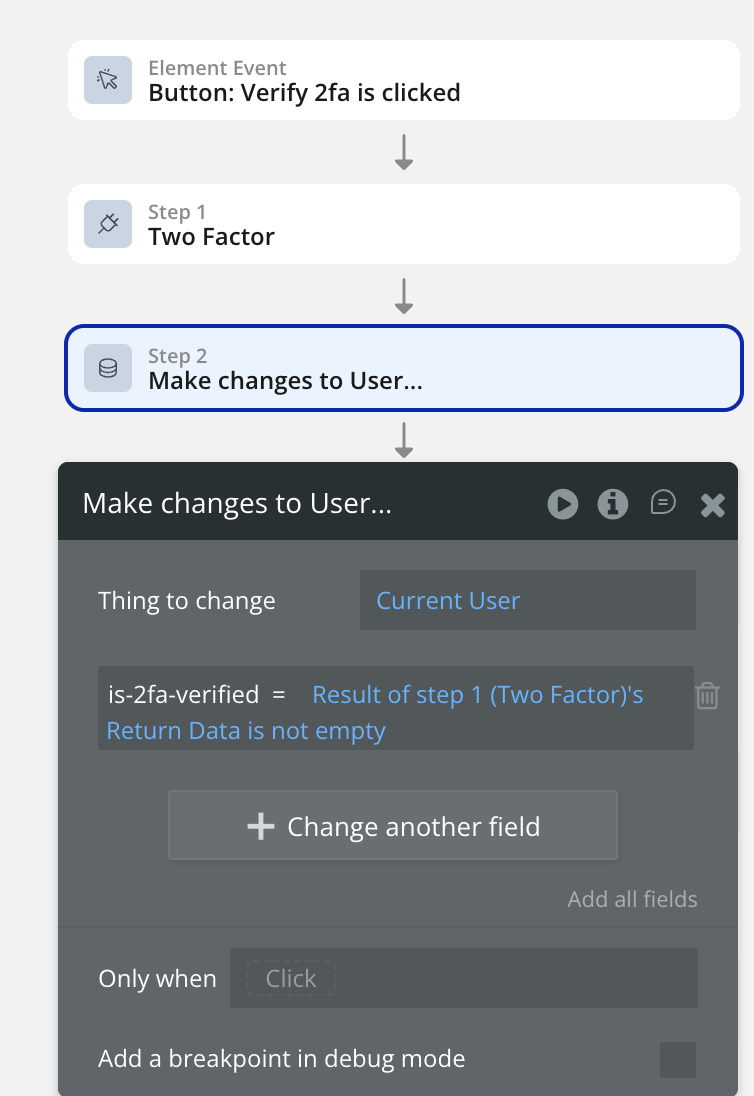
If the result’s Return data is not empty→ Make is-2fa-verified ‘Yes’. Check the image below
Step 4: Setup Privacy rules for User table
Now, all the fields of user table must be protected by privacy rules. So logged out user’s details won’t be visible in network calls or concole app file. But I will make user table details find in searches enabled. Basically When will make ‘Do a search for user’ call, it will give me result but data will be empty because I can find the user in search but data is privacy protected.

Step 5: Setup login mechanism for 2fa-verified=Yes User
Once the user writes email and password on login page, check whether user has 2fa-enabled or not. I am checking it using custom event and returning data as yes or no.
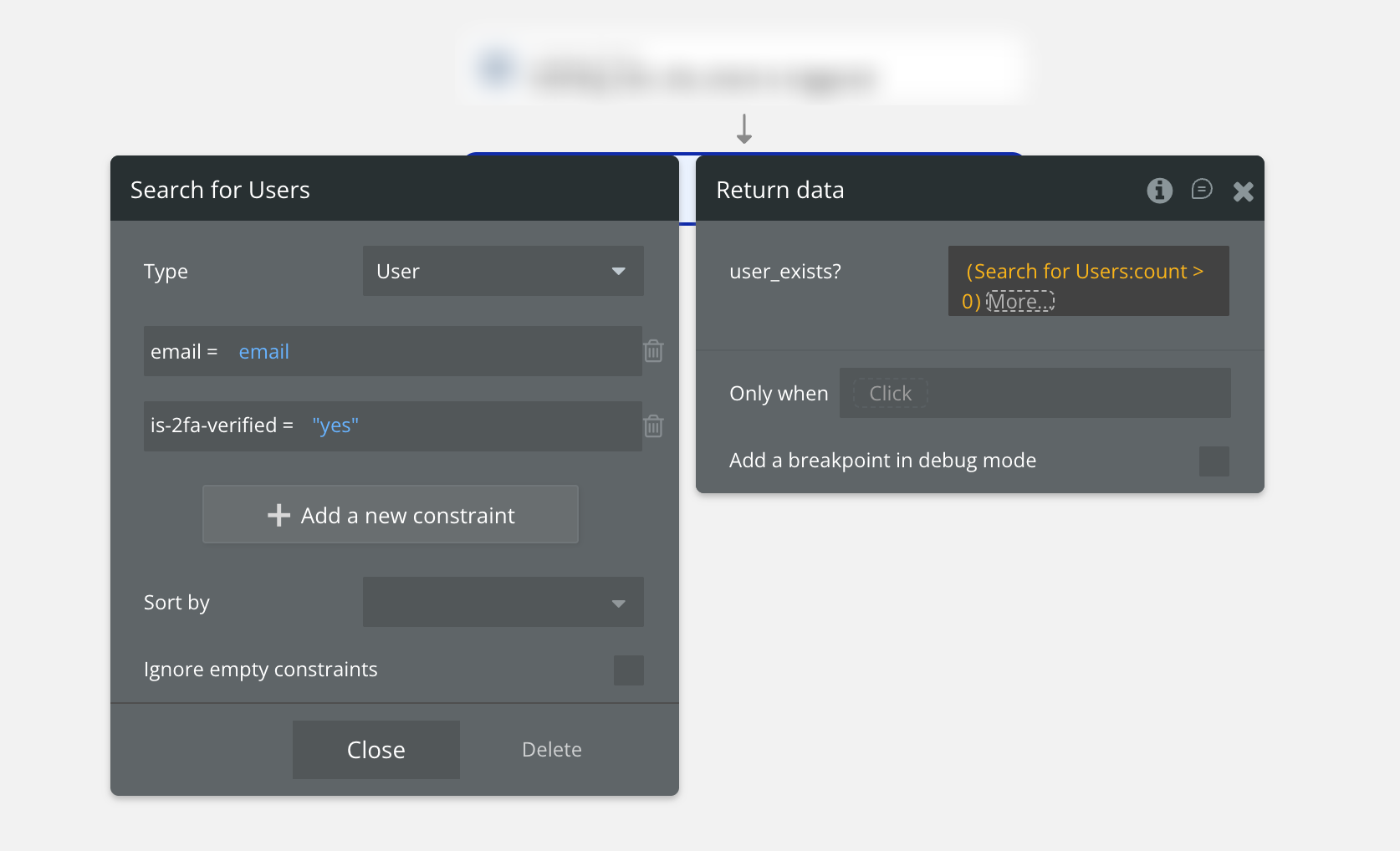
If the search result is empty, the return data will be no and If the search reult is not empty, the return data will be Yes.
If the return data is yes, then on click of login, don’t ‘Log the User In’ but show verify group first ask for 6 digit verification token.
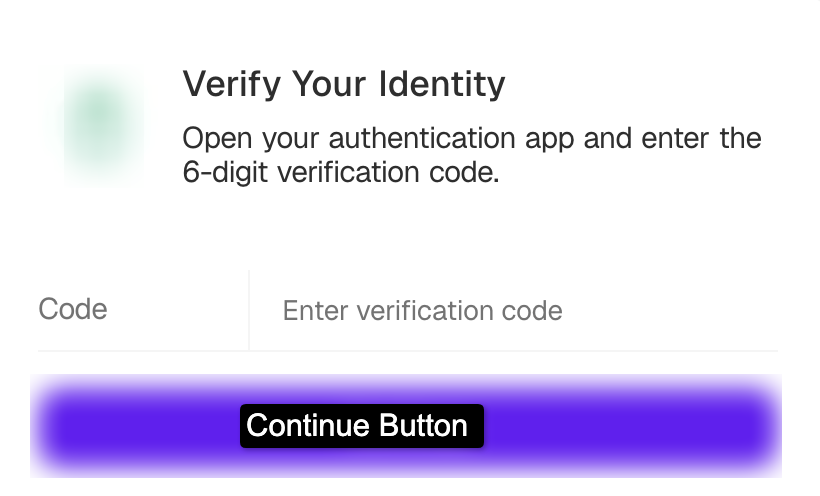
Once the input is not empty, Allow user to click continue button.
Log the user in and verify 6 digit verification code using ‘Two Factor’ action.
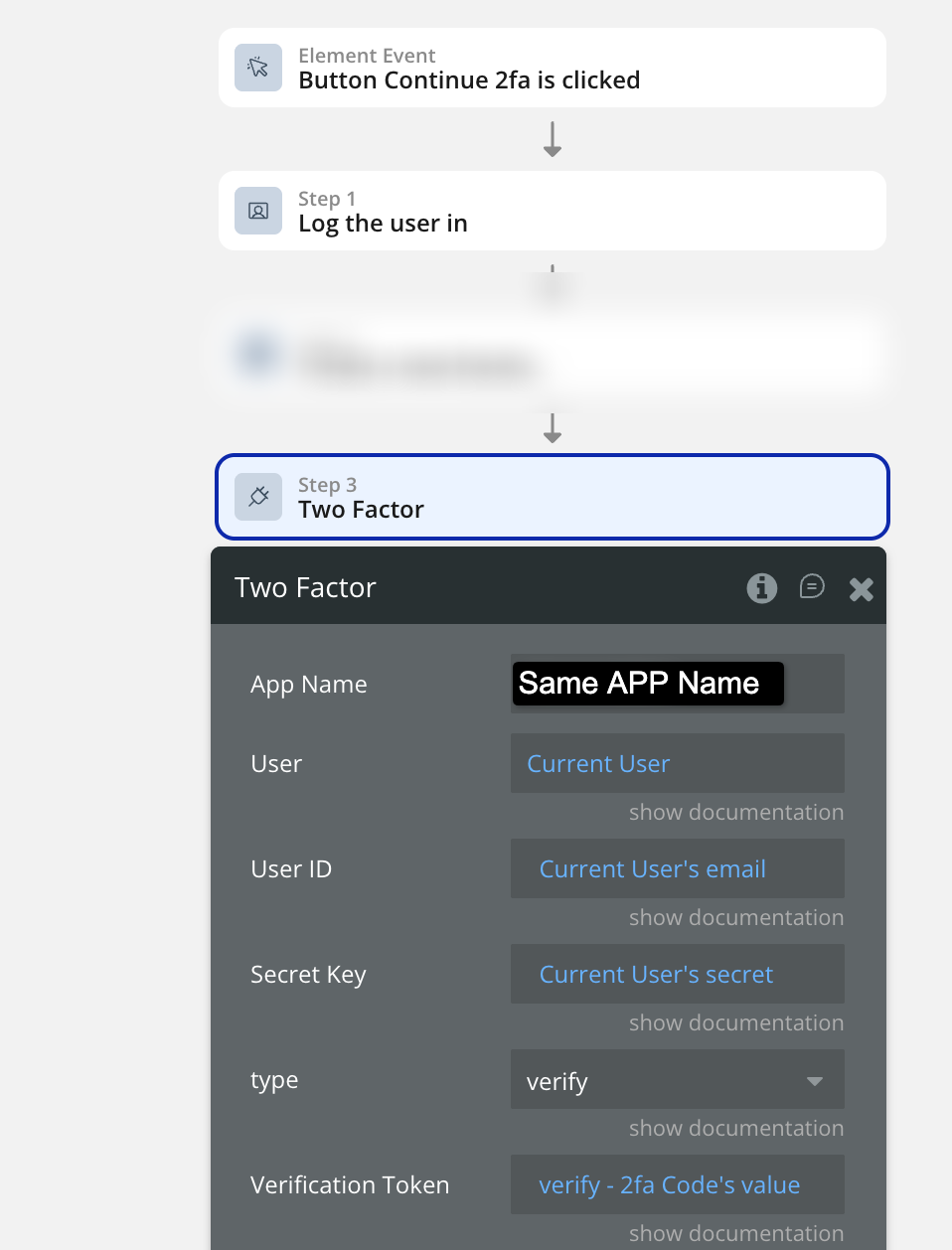
If the result of the ‘Two Factor’ action has an error detail not empty → Log the user out immediately.
If the result of the ‘Two Factor’ action has result data not empty → Keep user logged in.
This approach not only simplifies the setup process but also maintains the entire authentication system within the Bubble environment, reducing dependencies on third-party services and minimizing long-term maintenance. Ultimately, this method provides a more secure, efficient, and user-friendly authentication experience.
Key Takeaways: Implementing TOTP-Based 2FA in Bubble.io
-
Bubble.io’s native 2FA supports only email and SMS verification - not TOTP-based authenticator apps.
-
TOTP (Time-Based One-Time Password) works completely offline and generates new 6-digit codes every 30 seconds using apps like Google Authenticator, Authy, or Microsoft Authenticator.
-
Bubble lacks native cryptographic functions like HMAC-SHA1, which are required to generate and verify time-based one-time passwords.
-
The Crazy Two Factor – Authentication Plugin provides a simple and secure solution to enable TOTP 2FA inside Bubble without using any external APIs.
-
The plugin handles all critical steps - secret key generation, QR code creation, and token verification - directly within Bubble workflows.
-
Advantages of using the plugin:
-
No dependency on external APIs like Auth0 or Stytch
-
Faster and simpler setup
-
Lower maintenance and better control over security
-
-
Developers can easily add workflows to enable, verify, and enforce 2FA for users with just a few actions.
-
Applying strong privacy rules in the User data type ensures user secrets remain secure.
-
This method keeps the entire authentication system Bubble-native, providing a robust, user-friendly, and scalable security flow.
Formula Bot has sponsored this article - Formula Bot is your AI-powered data analyst that instantly transforms data into charts, insights, reports, and more. Here is the link to check it out.
This article is powered by the dev team behind FormulaBot - Zeroic, a low-code and AI development studio. Here is the link to check them out.
Frequently asked questions
What is TOTP-based 2FA?
TOTP (Time-Based One-Time Password) is a form of two-factor authentication where a unique 6-digit code is generated every 30 seconds by an authenticator app like Google Authenticator, Authy, or Microsoft Authenticator. The code is derived from a shared secret stored on both the server and the user's device, plus the current time, run through an HMAC-SHA1 hash. It is more secure than SMS or email-based 2FA because it works entirely offline and cannot be intercepted in transit. Standardized as RFC 6238, TOTP is the standard authentication primitive every modern SaaS uses for app-based 2FA.
Does Bubble.io natively support TOTP-based 2FA?
No. Bubble.io's native authentication system only supports email or SMS verification codes. It does not include built-in support for TOTP, no way to generate or share a secret key with the user's authenticator app, and no access to cryptographic primitives like HMAC-SHA1 needed to compute time-based tokens. Implementing TOTP from scratch in Bubble would require custom JavaScript or backend workflows replicating the cryptographic spec, which is time-consuming and error-prone. A Bubble-native plugin is the practical path.
Why not just use Bubble's built-in 2FA feature?
Bubble's native email and SMS 2FA is fine for low-security verification flows but lacks the flexibility production apps need. Email codes can be intercepted (account takeover via email compromise), SMS codes can be SIM-swapped (a documented attack vector), and both depend on real-time delivery that fails when the user's network flakes. TOTP-based 2FA generates codes offline on the user's device, has no delivery dependency, and is the standard most enterprise compliance frameworks (SOC 2, HIPAA, PCI) explicitly prefer over SMS. For any app handling sensitive data, TOTP is the right choice.
Can I build TOTP-based 2FA in Bubble without using any external APIs?
Yes, with the Crazy Two Factor Authentication plugin. The plugin handles every layer TOTP requires (secret-key generation, QR-code creation for the authenticator app to scan, time-based token verification using the standard HMAC-SHA1 algorithm) directly inside Bubble workflow actions. You do not need to integrate Auth0, Stytch, Twilio Authy API, or any other third-party service. The whole authentication flow stays inside your Bubble app, which means no external API keys to manage, no third-party latency, and no recurring usage fees beyond the plugin's one-time license.
Is the plugin better than using an external 2FA API for Bubble?
For most Bubble developers, yes. The plugin simplifies setup (a few workflow actions instead of multi-day API integration), avoids third-party dependencies, and keeps your entire authentication system within the Bubble ecosystem. APIs like Auth0 and Stytch add configuration overhead, require account registration and ongoing credential management, and most charge usage-based fees that scale with your user base. The plugin's one-time license cost typically pays for itself within the first project. APIs win only if you need cross-platform 2FA (the same TOTP secret used in a mobile app and a Bubble app simultaneously), which is rare.
Is the Crazy Two Factor Authentication plugin secure?
Yes. The plugin uses standard TOTP key generation and HMAC-SHA1 verification per RFC 6238, which is the same algorithm Google Authenticator, Authy, and Microsoft Authenticator implement. The cryptography is sound. However, security at the app level still requires you to apply strict privacy rules to the User data type so the stored secret and is-2fa-verified fields are not exposed via the Bubble Data API or visible in the developer console. Without privacy rules, a logged-in user could query other users' secrets via search. Privacy rules are non-negotiable.
Can users disable 2FA once they have enabled it?
Yes. Add a workflow that resets the user's is-2fa-enabled, is-2fa-verified, and secret fields to blank values when the user toggles 2FA off. For security, consider requiring the user to enter a current 6-digit token before disabling (using the same "Two Factor" verify action) so an attacker who has gained access to a logged-in session cannot simply turn off 2FA without the user's authenticator. Adding a re-authentication step before the disable is a small UX cost for a meaningful security gain.
Does this 2FA setup work with all authenticator apps?
The plugin is built on a JavaScript library that implements the standard TOTP algorithm (RFC 6238), so it is compatible with every authenticator app that follows the spec. The plugin creator specifically tests against Google Authenticator, Authy, and Microsoft Authenticator, which are the three most-used apps. Less-common apps like 1Password's built-in TOTP, Bitwarden's TOTP, or Yubico Authenticator also work because they all implement the same RFC. The QR code the plugin generates uses the standard otpauth:// URI scheme that every TOTP app accepts.