Article · Oct 21, 2024
Bubble.io API Security Best Practices
Learn how to secure API calls and manage tokens in Bubble.io with effective steps and best practices to protect sensitive information
What are the risks of not making secure api calls with bubble.io?
-
Exposing sensitive information, such as passwords and tokens, because of unencrypted data transfers and visible API keys in logs.
-
Unauthorized access and token theft.
-
Risk service disruptions, account takeovers, and potential compliance issues.
-
It opens the door to injection attacks and data leaks.
In the previous article, I have shown how to set API calls and OAuth in bubble.io using the bubble api connector.
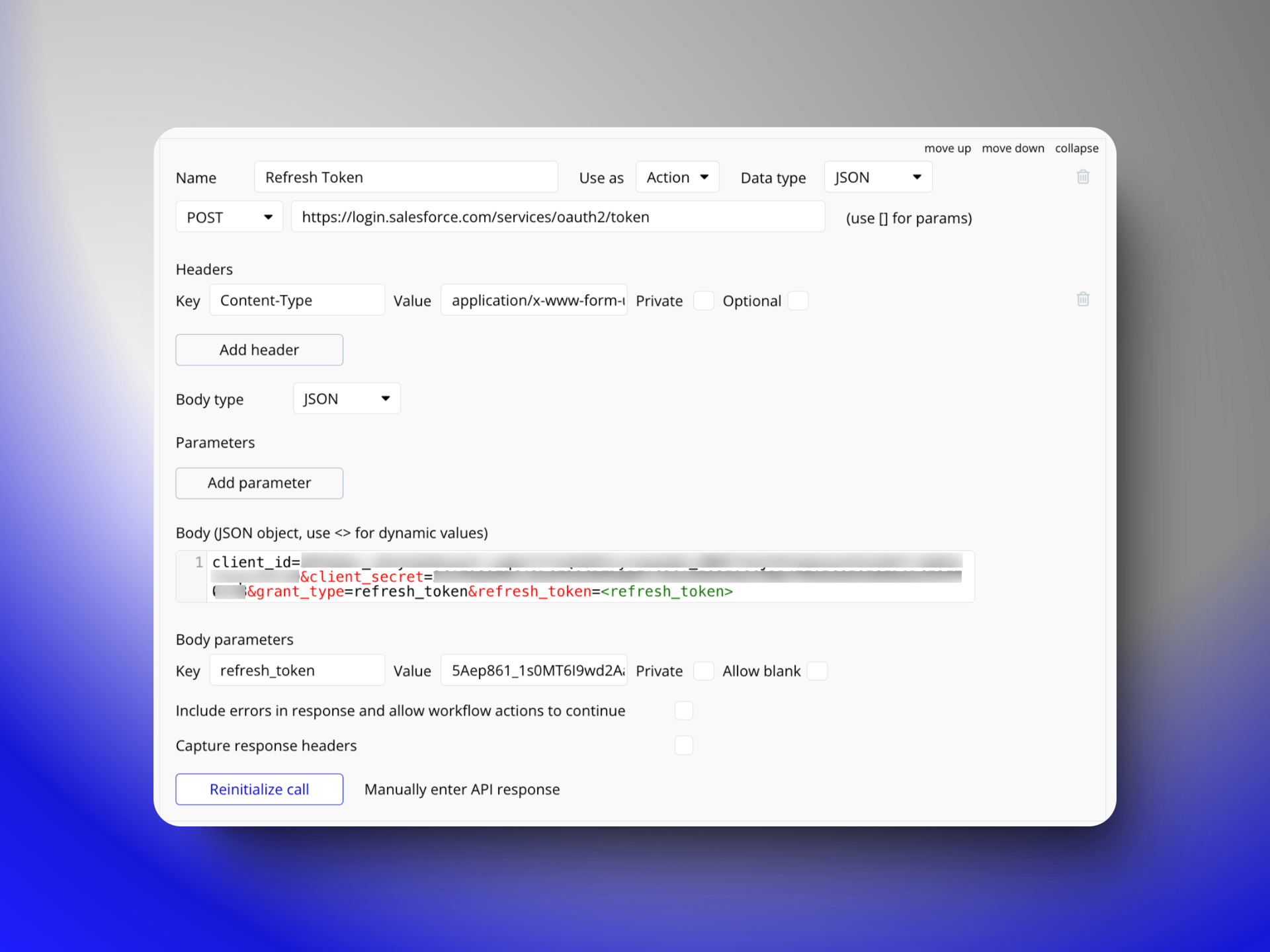
A successful API call might look like in the images shown below:
OR
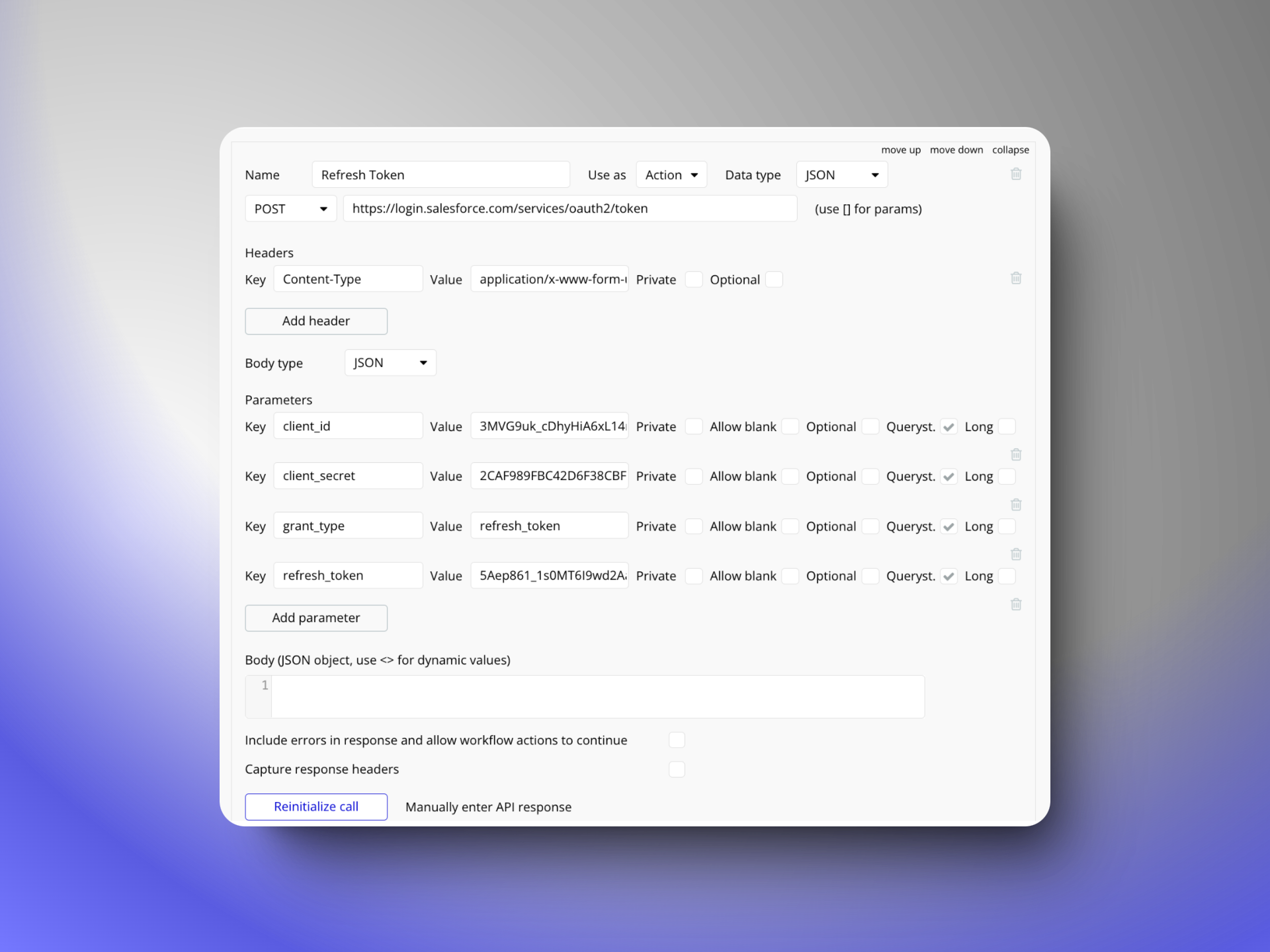
These API calls are not secure. Let me explain how.
- This API call, endpoint URL, and all its tokens (Client ID, Client Secret, Authentication token, refresh token, etc.) are visible on the developer console on each page load of the bubble.io application. It doesn’t matter if I am using this API call or not. It will be visible to logged-out users (Unauthorised users) as well on any page load.
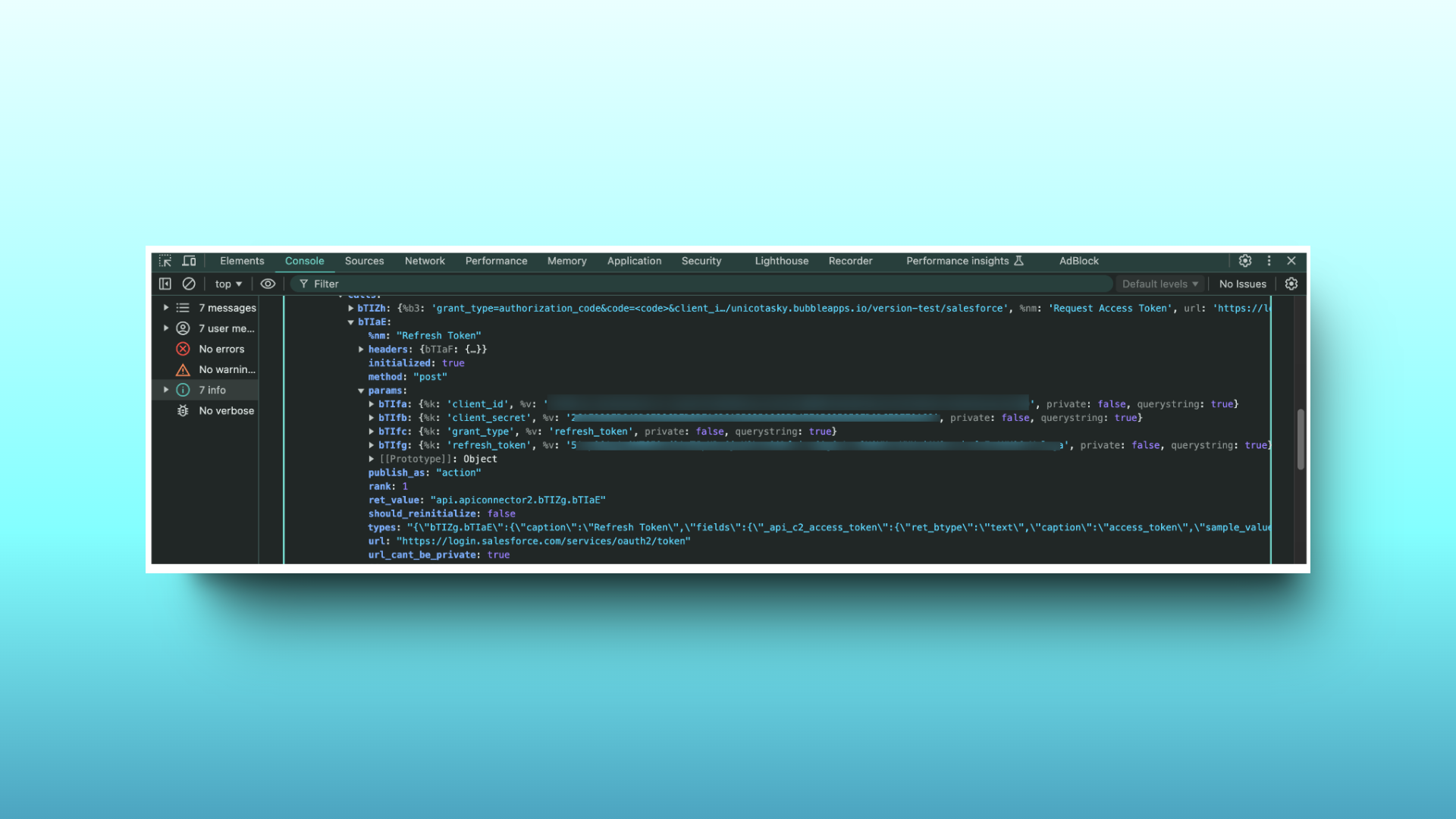
Best Practices for implementing secure API calls
Here are some of the best practices for implementing secure API calls and token management:
Step 1: Conceal API URL Endpoint
Now you must be wondering why should I hide my API URL Endpoint. Here is why:
- Exposing the endpoint could let malicious users access the API directly, understand my application’s structure, and possibly exploit vulnerabilities. It also helps protect the privacy of my business logic and interactions with third-party services, maintaining both security and a competitive edge. Keeping the endpoint hidden adds an important layer of security to my application.
After understanding why, let’s dive into how.
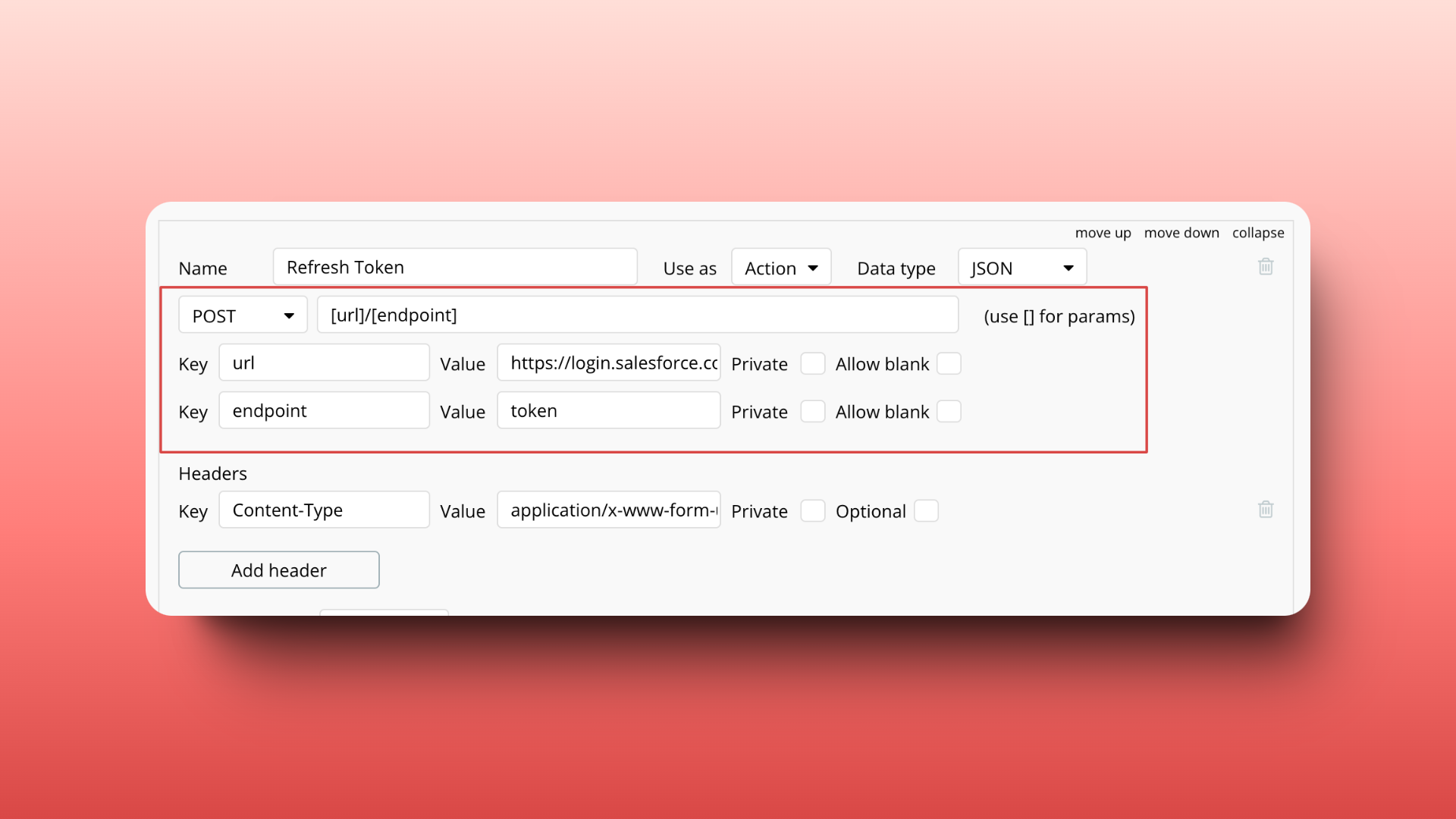
As you can see in the screenshot attached below, I have divided the endpoint URL: https://login.salesforce.com/services/oauth2/token into 2 parts and put them in square bracket [url]/[endpoint]
Then I have defined url=https://login.salesforce.com/services/oauth2 and endpoint=token
Step 2: Safeguard Static Parameters
When making an API call, certain parameters remain constant, regardless of whether the call is a Data call or an Action call. These are known as static parameters. It is crucial to ensure that all these static parameters are kept private. By doing so, you protect sensitive information from being exposed or accessed by unauthorized users. This will prevent them from being visible on the client side through the developer console. Checkout the screenshot below:
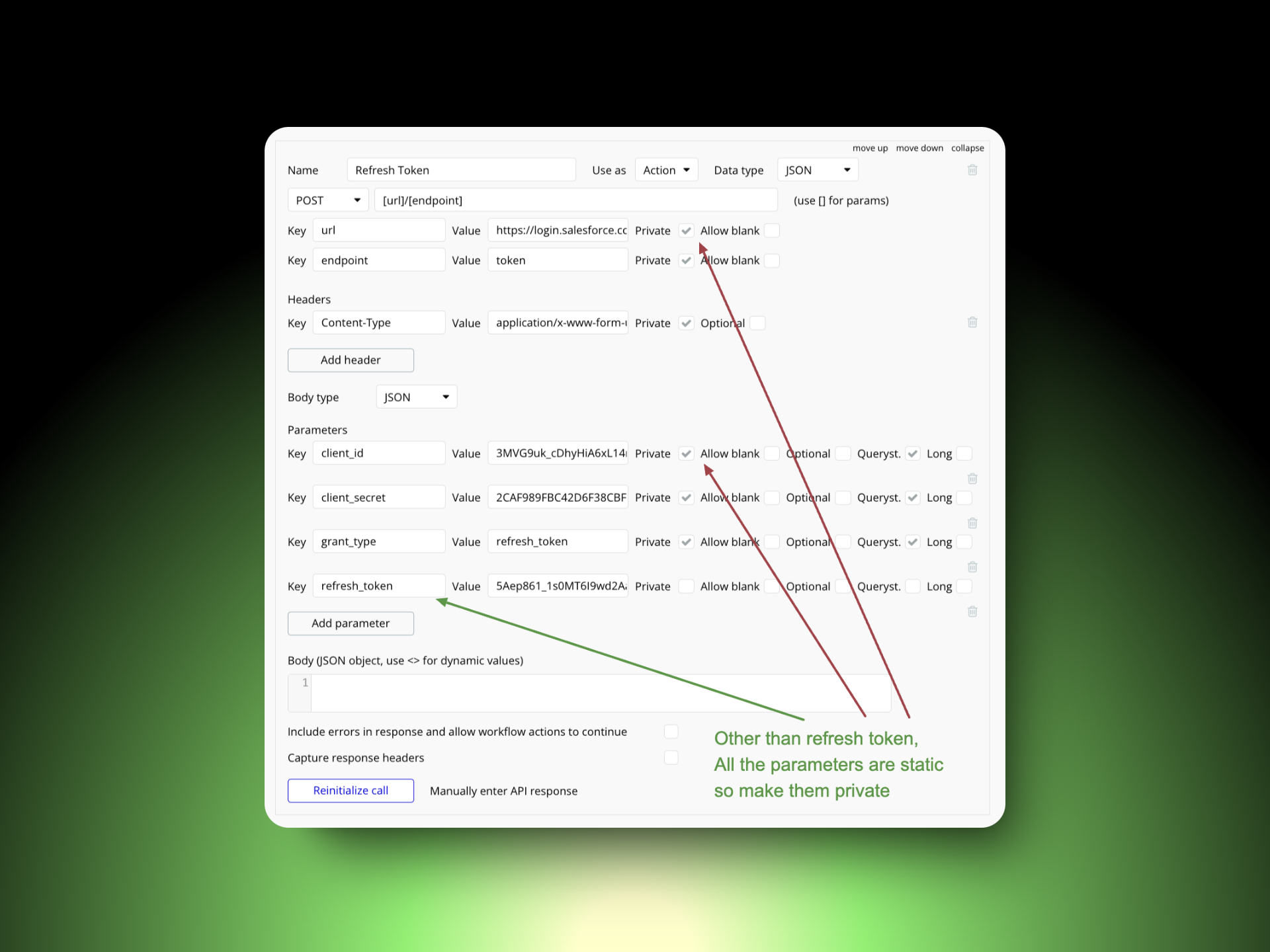
On the Bubble.io app page load, the browser downloads all api calls on the user’s device, and if you don’t keep the static parameters like client_id, and client_secret private; anyone can access these parameter values on their device using the console.
Step 3: Manage Dynamic Parameters Securely
What are the dynamic parameters in API calls?
- When making an API call, some parameters may change based on specific inputs or conditions at the time of the call. These are called dynamic parameters. Unlike static parameters, which stay the same whether it’s a Data call or an Action call, dynamic parameters are flexible. They can be updated with values that are generated or provided during each API request. This flexibility allows the API call to adapt to different situations or user inputs as needed.
Let’s understand how to make them secure.
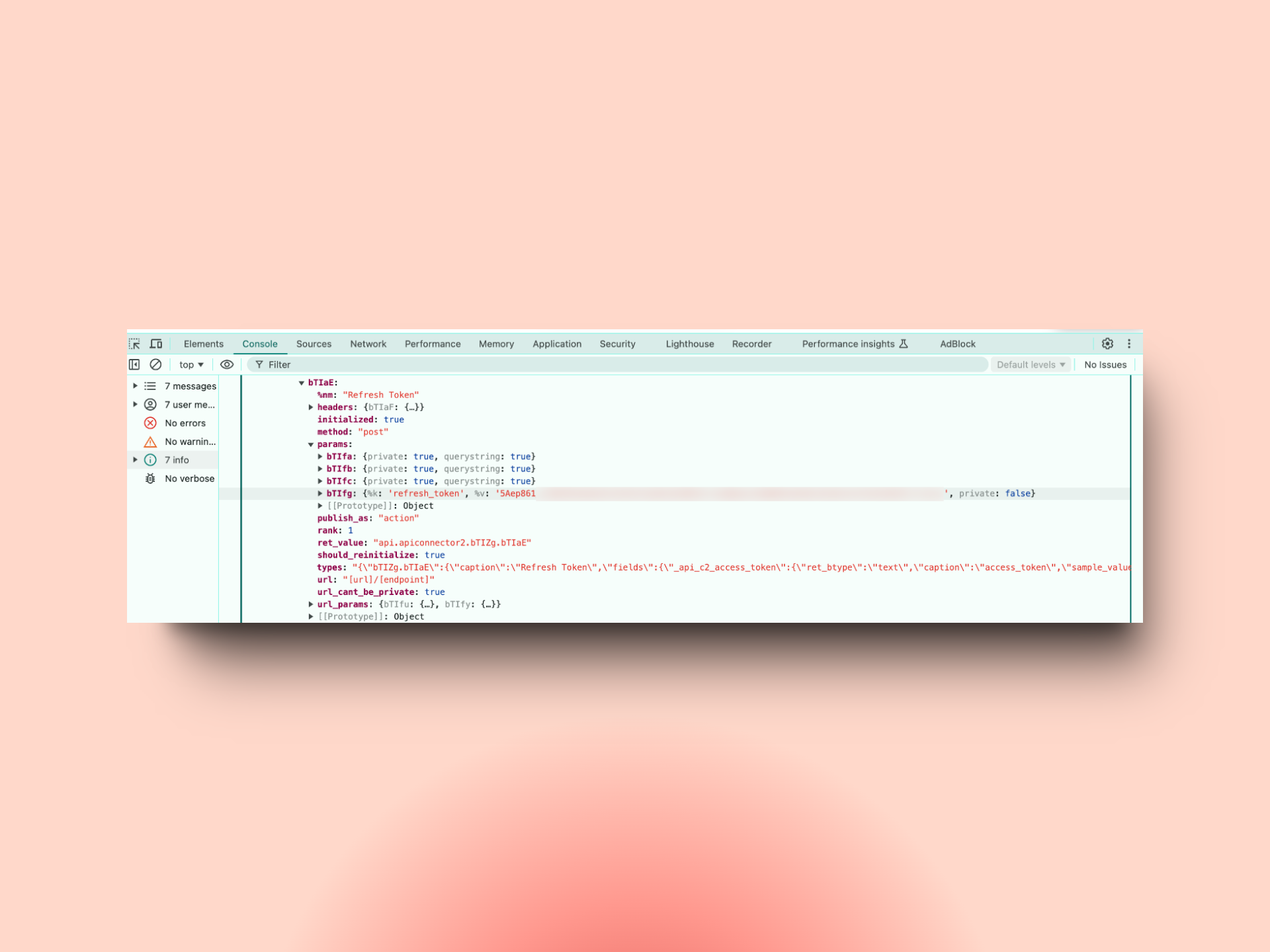
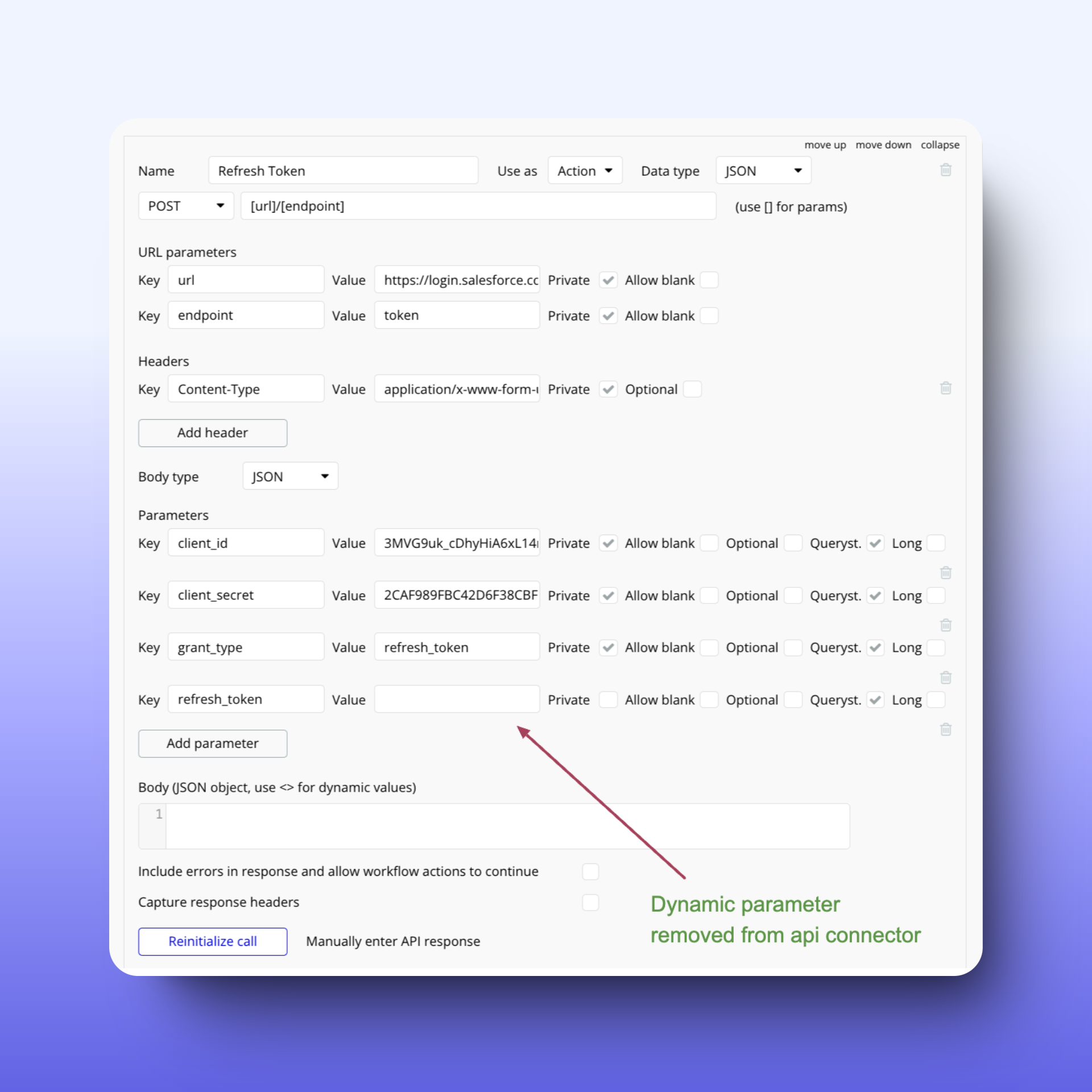
Once I initialize the API call, I will remove all the parameters from the API connector that are not private. On the Above image of step 2, you can see that refresh_token is not private and because of that, it will still be visible on the developer console on every page load. Check out the below image:
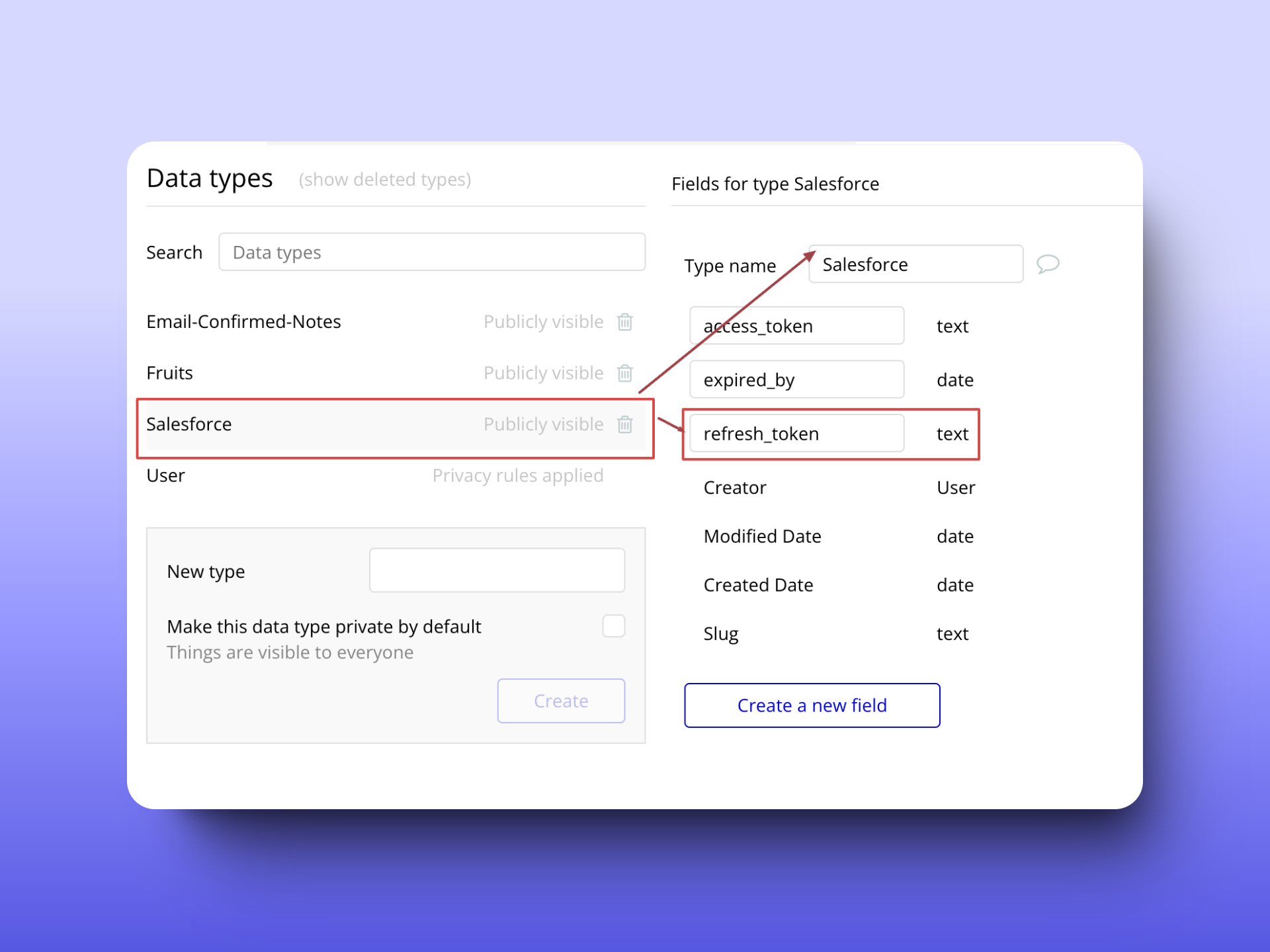
This is still risky so remove it from here and because it is a dynamic parameter that varies from user to user, I will store all the dynamic parameters in the database. Check the screenshot below:
Step 4: Implement Privacy Rules for Dynamic Data
As shown in the screenshot above of step 3, the refresh token is a dynamic parameter that I did not make private. It is stored in the database as a field in a certain data type.
Without privacy rules, data is basically open to anyone using the app. Any user can possibly access the database data for that specific type. This includes data from things like repeating groups, text elements, and API requests. Any workflows that create, change, or show data that can lead to unauthorized changes or exposure of data.
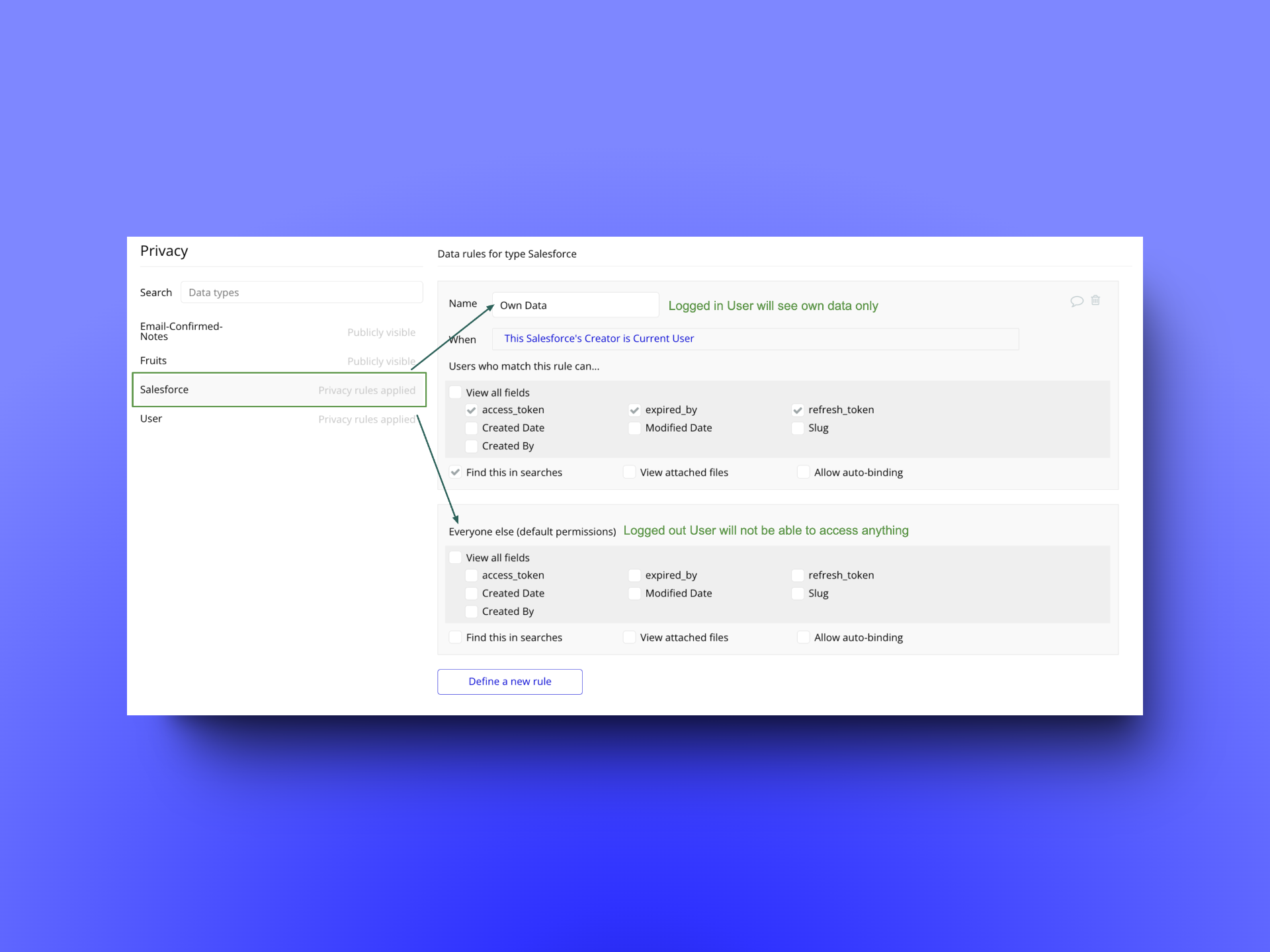
So here I have defined privacy rules that will accomplish the following:
-
Do not show the refresh token, access token, and access token expiry date to any users who are logged out.
-
When a user is logged in, the application will allow access only to their own refresh token, access token, and access token expiry date. Users will not be able to see anyone else’s refresh token, access token, or access token expiry date.
Checkout the image below to check the privacy rules setup:
Step 5: Replace Initialised API Call Response with placeholders
Let’s understand how bubble.io works:
-
When I set up an API call in Bubble.io, the API Connector plugin automatically makes a test call to understand how the API response is structured. This process creates a response schema - a template that represents the format and structure of the data the API returns. This schema helps Bubble understand what kind of data to expect when the API call is made in real-time.
-
After the initial test call, the response schema is stored in my app’s configuration, specifically in a file called app.json. This file is part of my app’s settings and can be accessed by others if it’s not secured properly. Therefore, if the test API call includes sensitive information - like access tokens, API keys, user data, or app IDs - this information will be saved as part of the schema.
Issue: If I don’t clean up these sensitive details before deploying my app, they might become visible to anyone who can access the app.json file or inspect the API response structure.
Solution:
-
As you can see in the image shown below, my initialized api call contains actual sensitive information that will be visible on the developer console and if it is leaked, my account, my credits, my data, etc can be misused.
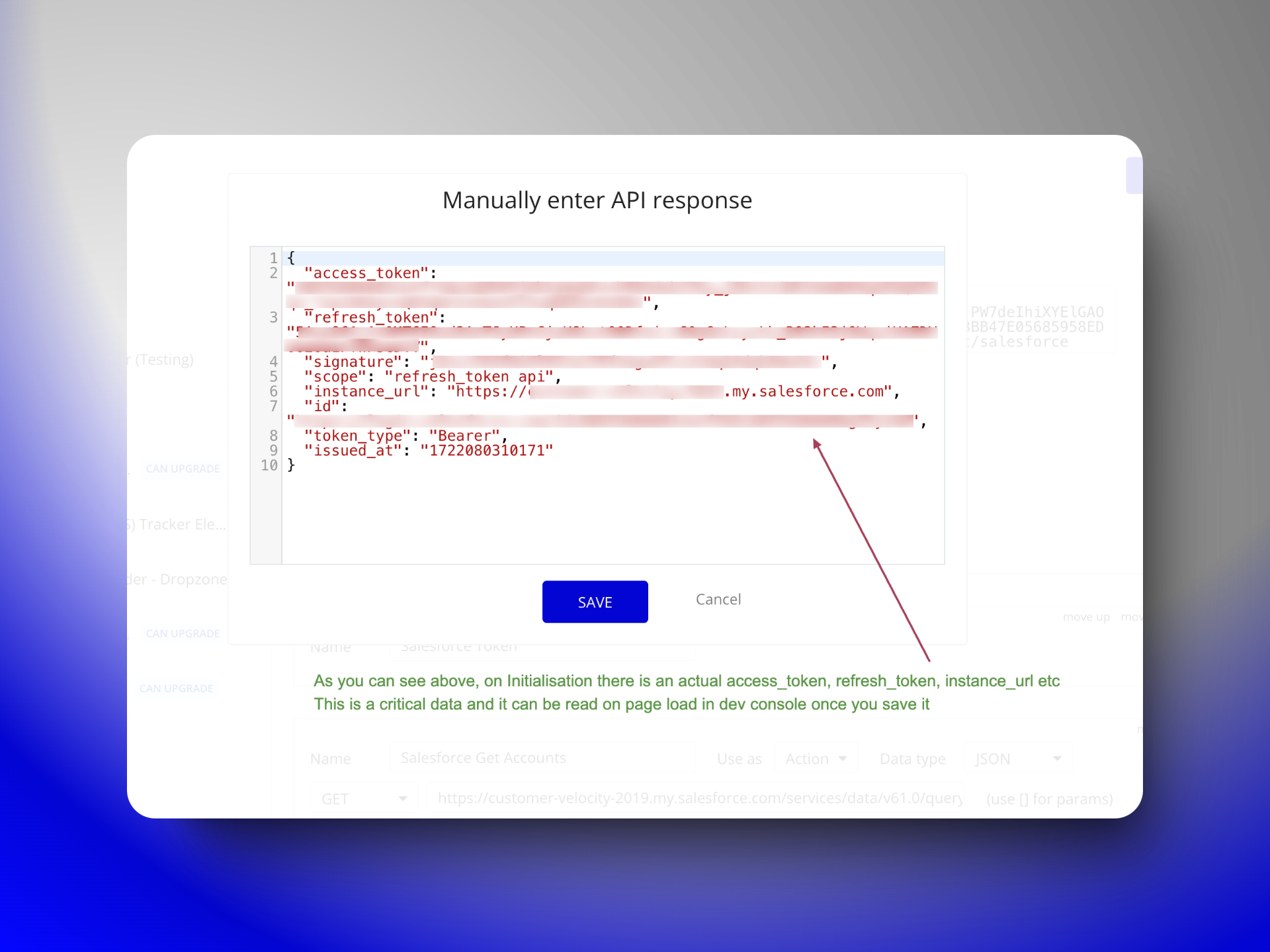
-
Now, when you save it, you will know the exact type (like text, number, yes/no, file, image) of the data each field contains. check the image below for more clarity.
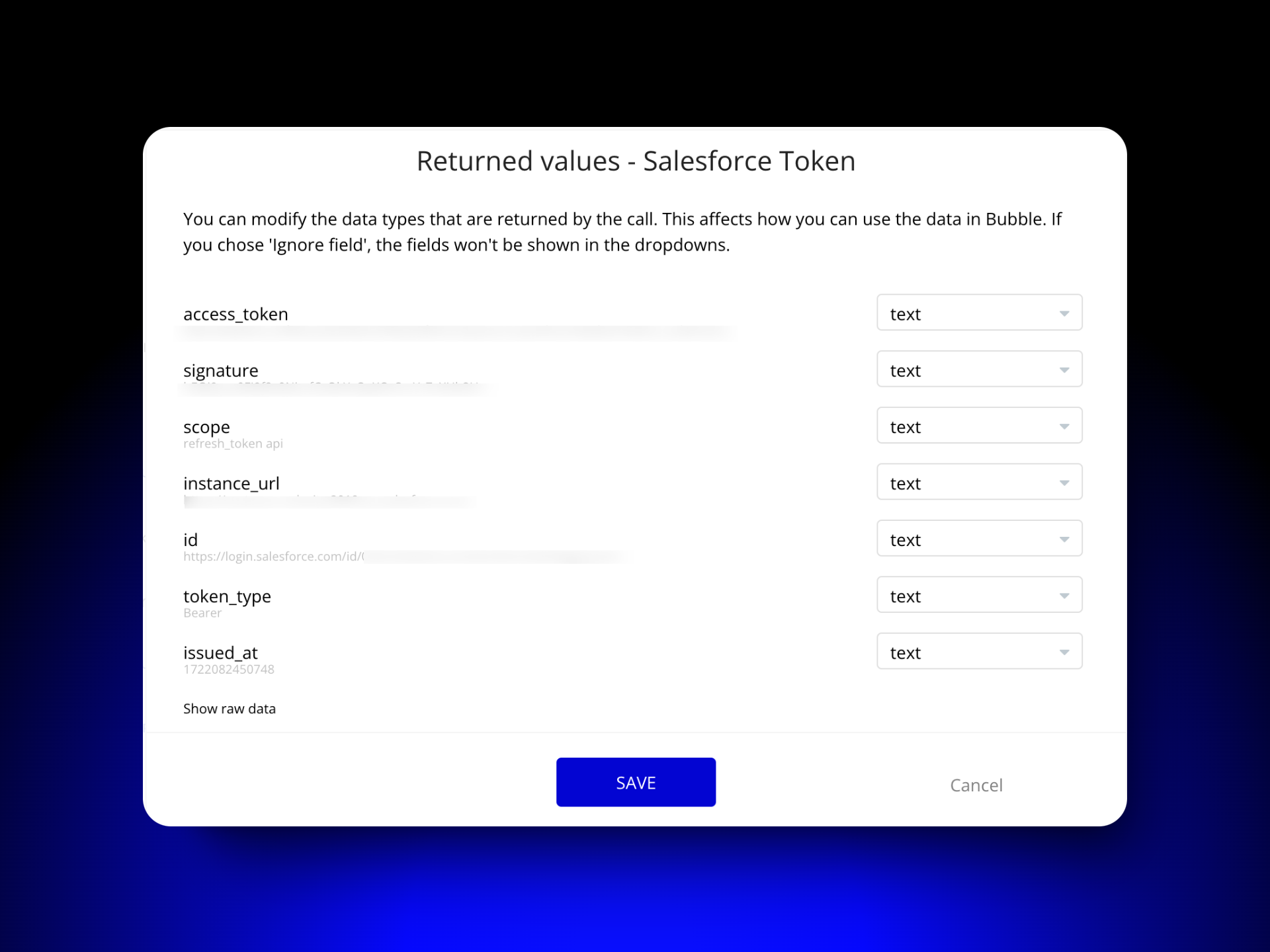
-
The reason for the bubble.io to save it is just to understand data structure whenever an API call is made that means, in manual response if there is ‘access_token’ and the type of field is text then I don’t need actual access_token but some arbitrary text which will let api response to identify as text.
-
So I will replace the existing original data with a placeholder for the same type of data
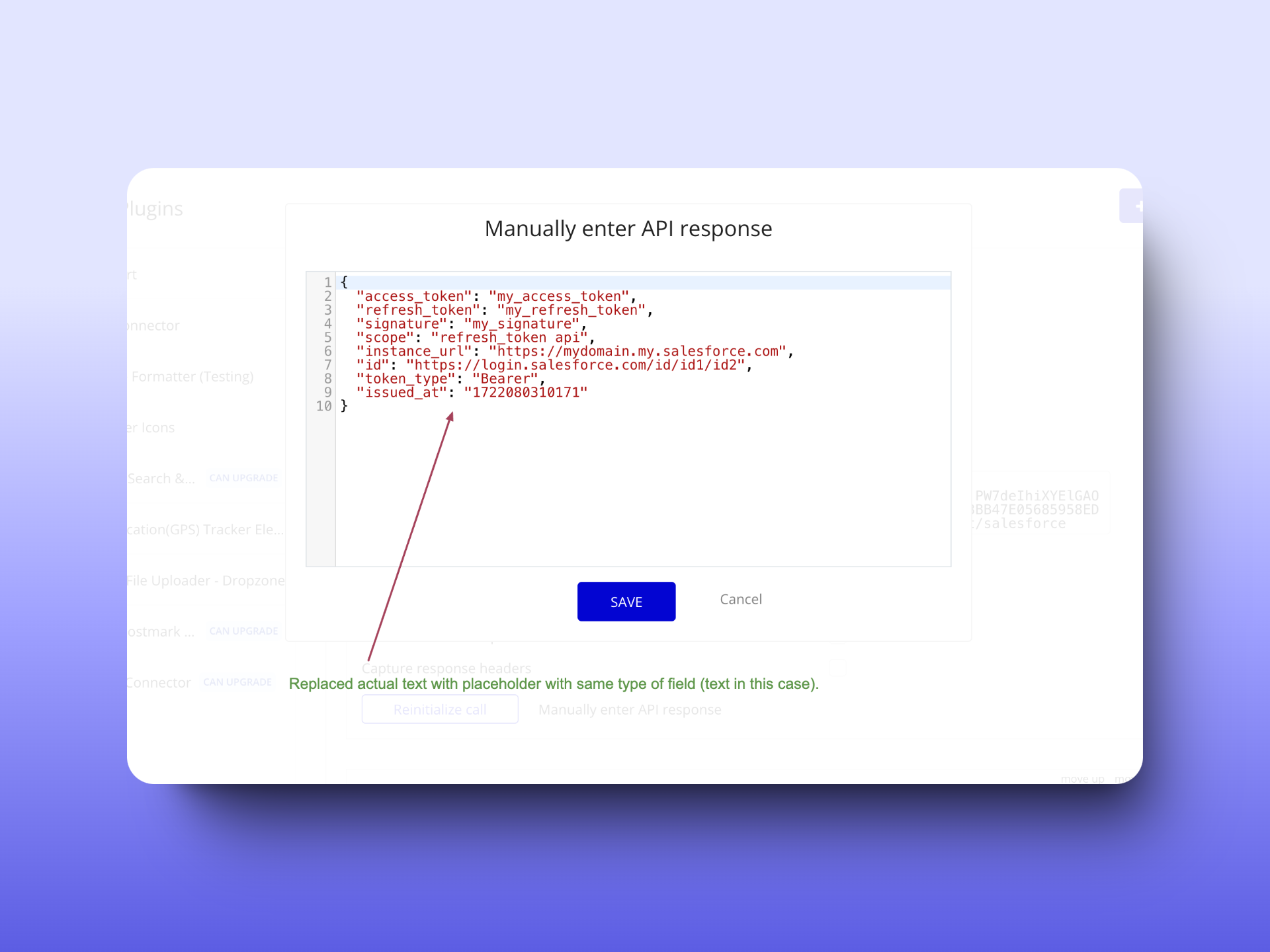
Following these steps, your app’s response schema will contain placeholders instead of sensitive data. When you deploy your application, any potential exposure of sensitive information will be avoided. This practice enhances the security of your app, especially when dealing with data like access tokens, API keys, and user information.
Step 6: Limit Developers’ Access to Dynamic Tokens
Now, developers working with applications and having access to the Bubble.io app editor can also access the data. However, not every developer needs to see this information. Bubble.io offers a way to restrict developer access to data as well.
Go to Setting → Collaboration and restrict the data access for developers who don’t need it.
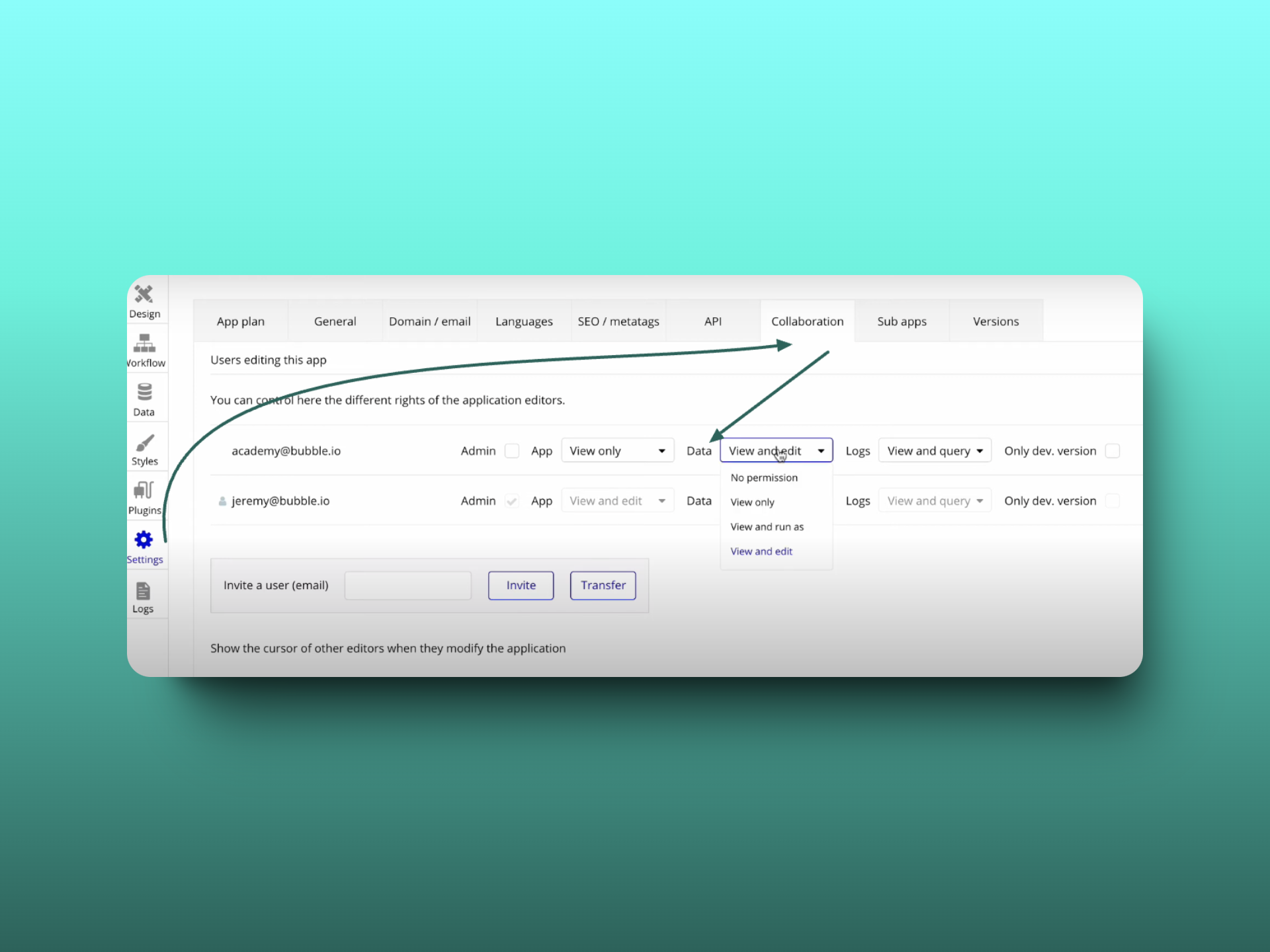
For Data, there will be 4 options explained below:
-
No permission - (cannot see or edit any database data in Development or Live)
-
View only - (can view data but cannot change it in the database editor)
-
View and run as - (can view data and use the run as feature)
-
View and edit - (can view and freely edit data)
How did I secure API Calls & tokens till now?
-
With Step 1, I ensure that no user can identify the API calls the app is making, regardless of their login status.
-
With Step 2, static parameters like the client ID and client secret are completely inaccessible in the developer console for all users, whether logged in or out.
-
With Step 3, dynamic parameters are hidden for all users (authorized/unauthorized) in the developer console of the browser on page load.
-
With Step 4, dynamic parameters are hidden from logged-out users, and logged-in users are restricted from accessing tokens of other users.
-
With Step 5, Anyone (authorized/unauthorized) won’t be able to find actual data in bubble.io’s saved API response because I have replaced it with placeholders.
-
With Step 6, developers who don’t need to view or edit data are denied access.
This is how I recommend securing API calls and tokens from any user, logged-out users, logged-in users, and unauthorized developers.
Special Cases & Your API Practices
Frequently asked questions
Why are API calls visible in the browser developer console in a Bubble.io app?
Because Bubble.io ships every API Connector definition to the client by default, and the client uses that definition to know which calls to make and what shapes to expect. That means the endpoint URL, header values, and any non-private parameters are downloaded as part of the page bundle and visible in the Network tab on any page load, regardless of whether the user is logged in or whether the API call is actually invoked. This is by design (API Connector calls run from the client unless you specifically route them through a backend workflow), but it means you must mark sensitive values as private to keep them on the server.
What is the difference between static and dynamic API parameters in Bubble.io?
Static parameters have the same value across every API call, regardless of which user is making the request. Examples are client_id, client_secret, grant_type, and the base URL of the API. Dynamic parameters change per call or per user, like a user-specific refresh_token, an order ID, or a search query. The security treatment is different: mark static parameters as private in the API Connector so they stay on the server, but for dynamic parameters that vary per user, store them in your Bubble database with privacy rules and remove them from the API Connector entirely.
Why mark API parameters as private in the Bubble API Connector?
Marking a parameter as private removes it from the client-side bundle and routes the API call through Bubble's server, so the parameter value is never visible in the browser. Without the private flag, the value is plain-text in the page source and anyone who opens DevTools can read it. For static secrets (client_secret, API keys, service-account tokens), this is non-negotiable. The private flag is one checkbox per parameter in the API Connector, and it is the single highest-leverage security hardening you can apply to a Bubble app.
How do privacy rules protect API tokens stored in the Bubble database?
Privacy rules are conditions on each data type that tell Bubble's server when to send a row to a client, when to allow modification, and when to expose individual fields. For an OAuth-token table, the right rules are: no access for logged-out users, and for logged-in users access only to rows where Created By is the current user. Without these rules, any authenticated user can query the database for other users' tokens via the Data API or by inspecting page-load network calls. Privacy rules are server-side; they cannot be bypassed by the client.
What is the risk of leaving real values in the initialized API response in Bubble?
When you initialize an API call in the Bubble API Connector, the test response is saved to your app's app.json file as the schema for that call. If the test response contained a real access_token, real customer email, or real account ID, those values become part of your app's source artifact and can leak via the editor, source-export, or any tool that reads app.json. Bubble only uses the schema to learn data types (text, number, yes/no), so the values themselves are not needed. Replace every real value in the initialized response with a placeholder of the same type before saving; "my_access_token" instead of the real one, "user@example.com" instead of the real email.
How do I restrict developer access to API tokens in a Bubble.io app?
Go to Settings, Collaboration in your Bubble app, and use the Data permission dropdown for each invited developer or stakeholder. The four levels are: No permission (cannot see or edit database data in Development or Live), View only (can view but not edit), View and run as (can view and use the run-as feature), and View and edit (full access). For developers who do not need to inspect tokens or production data, set No permission or View only. This applies the principle of least privilege at the team level and pairs with privacy rules to limit exposure.