Article · May 1, 2026
Phased migrations with per-phase verification gates
Big-bang refactors of 6+ files break things you cannot predict. Phased migration with explicit gates catches regressions before they compound.
Most refactors that go wrong go wrong because somebody decided to do it all at once. Six files of form code converted from useState to React Hook Form in one commit. Twenty edge functions ported from the v1 SDK to v2 in one branch. A backend rewrite from REST to GraphQL shipped on a Tuesday. Each of those is a real story I have either been pulled into to fix or watched a team try to recover from over the course of a week.
Phased migration is the alternative. One file per phase, each phase shipped and verified before the next dispatches. Slower in calendar time. Faster in total time, because the regression week never happens.
When to phase and when to big-bang
Two conditions genuinely argue for big-bang: the change is purely mechanical (a function rename across the codebase, no semantic change) and your test coverage is comprehensive enough that a regression triggers a red CI within minutes.
Most refactors fail at least one of those. The form-layer migration I described in migrating useState forms to React Hook Form and Zod touches six files. Even with strong tests, the per-file edge cases accumulate into surprises: default values, server-error handling, custom select components. Phased is the safer default.
The overhead is real. Each phase costs time for prompt drafting, gate verification, commit, and push. For a six-file migration, that overhead might add a day. The benefit is a week of regression fixes that never happen. The math is not close.
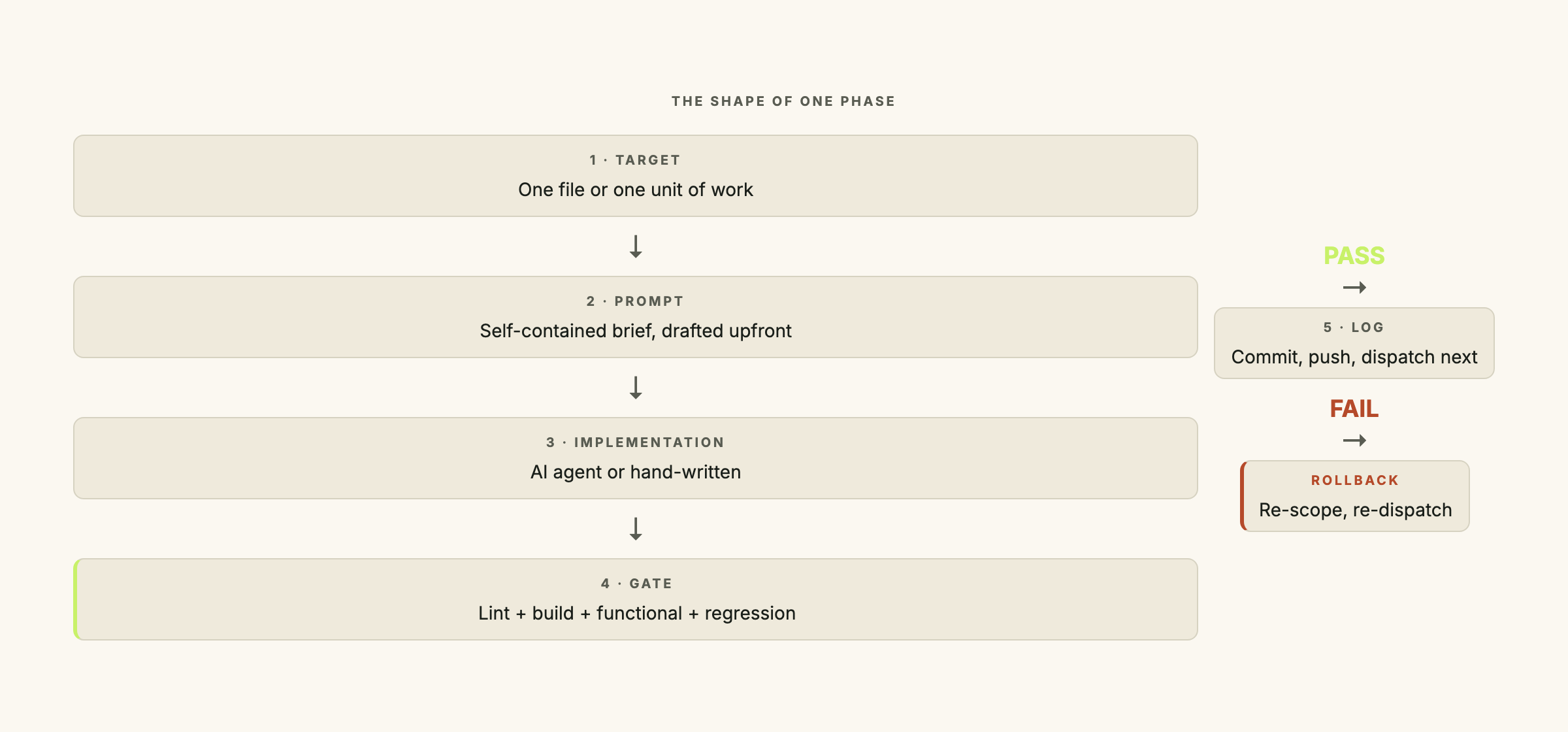
The shape of a phase
Five pieces, in this order:
- A target. One file, or one well-bounded unit of work (e.g., “convert
EditProfileForm.tsxfrom useState to RHF, including the matching test file”). - A prompt. The full instruction sent to Claude Code, Cursor, or Lovable. Names the file, the desired output, and the invariants.
- The implementation. The actual code change.
- A gate. The verification step that decides whether the next phase dispatches.
- A log entry. A few lines capturing what was done, what was verified, and any surprises.
Step 5 must complete before step 1 of the next phase starts. The log is what keeps the migration auditable across days.
The gate criteria
The gate earns its place. The layers I run on every phase:
Layer 1: automated. Lint, typecheck, build, unit tests. Runs in 30 seconds to two minutes. Failing this is a hard stop; don’t proceed to layer 2.
Layer 2: functional walkthrough. A 12 to 15 step manual test of the changed surface. For a form migration: open the form, type a valid name and email, save, verify the toast appears; leave the name blank, blur, verify the error; resubmit with a server-side conflict, verify the error renders under the email field. The walkthrough takes five to ten minutes per phase. It catches the bugs that automated tests miss because nobody wrote a test for the case.
Layer 3: regression check. Walk three or four other parts of the app that the change should not have touched. For a form migration: an unrelated dashboard, an unrelated workflow, a settings page. This is the “did we break anything we weren’t trying to touch” check. It takes five minutes and has caught ripple effects that layer 2 would have missed entirely.
If all layers pass, commit, push, log, dispatch the next phase. Any layer fails: fix and re-run. Do not move on.
Draft all prompts upfront
The temptation is to write each phase’s prompt right before dispatch. The problem is that the gate often takes longer than the implementation, so you sit idle waiting for Claude Code to finish, then write the next prompt cold.
What works instead:
- Spend the first hour of the migration drafting all per-phase prompts in one sitting. Each is a self-contained brief.
- Save them to
migration-prompts/phase-1-name.md,migration-prompts/phase-2-name.md, etc. - Dispatch phase 1, run the gate, log, dispatch phase 2 immediately.
No prompt-writing in the dispatch loop. By phase 4, you are not thinking about the prompts at all.
On a recent six-form migration, the upfront drafting took 90 minutes. Each phase took 25 to 40 minutes (roughly 15 minutes of implementation, 10 minutes of gate, 5 to 15 minutes of small fixes). Total: four working days. The big-bang attempt would have been one day of writing followed by three to five days of fixing.
The verification log pattern
A single markdown file at the root of the migration captures the state across days. Mine looks like this:
# Migration verification log: useState → React Hook Form

## Phase 1: Form A
- Prompt: migration-prompts/phase-1-form-a.md
- Implementation: Claude Code, 12 min
- Gate:
  - Lint/typecheck/build: pass
  - Functional (12 steps): pass
  - Regression (3 surfaces): pass
- Surprises: none
- Commit: abc1234

## Phase 2: Form B
- Prompt: migration-prompts/phase-2-form-b.md
- Implementation: Lovable, 8 min
- Gate:
  - Lint/typecheck/build: pass
  - Functional (15 steps): FAIL on step 9 (server error not displaying under field)
  - Fix: setError('email', { message }) was setting on 'emailAddress' (typo)
  - Re-run: pass
- Surprises: Lovable misread the field name; verified the corrected version
- Commit: def5678
The log does two things. It is the audit trail when someone six weeks later asks why a form was structured this particular way. And it is the cross-session resume point when the migration spans multiple days.
When a phase fails the gate
Two responses, one is right.
Wrong response: ship anyway, fix forward. The gate failed. Shipping past it compresses one bug into a slower, harder-to-find bug downstream. Do it once and the gate is no longer trustworthy.
Right response: roll back and fix. If the gate fails on layer 1, the fix is usually small (a typo, a missing import). If it fails on layer 2, a targeted re-prompt or a manual patch usually resolves it. If it fails on layer 3 (something rippled where you didn’t expect), roll back the phase entirely, re-scope the prompt, and re-dispatch.
If you find yourself talking yourself into shipping a failed gate, your timeline is wrong, not the gate.
A worked example
A six-page admin dashboard migrating its form layer from useState to RHF + Zod + shadcn <Form>. The pages: Tasks, Clients, Users, Projects, TimeTracking, Settings. Each form had its own validation rules and its own server-error handling.
The phase plan:
- Phase 0: install the shadcn Form component (no behavioral change, just dependency)
- Phase 1: Auth/Login (smallest form, validates the pattern end to end)
- Phase 2: Tasks (medium complexity, two fields plus a select)
- Phase 3: Clients (four fields, server-error on duplicate name)
- Phase 4: Users (five fields, role select, server-error on duplicate email)
- Phase 5: Projects (six fields, date picker, conditional fields)
- Phase 6: TimeTracking (seven fields, the form that drove the migration in the first place)
- Phase 7: Settings (mostly password change, server-error mapping)
Eight phases, 25 to 40 minutes each once the prompts were drafted. Four working days total. Zero regressions in production.
I have watched two other teams attempt the same migration as a big-bang. Both took four days too: one day of writing, three days of fixing regressions while users were hitting the bugs.
Why fast code generation makes the gates more important
The temptation with Claude Code or Lovable is to skip the gates because the implementation is fast. The AI produced six files of converted code in 20 minutes. The gate would take another 90 minutes. The math looks like “skip the gates.”
Skip-the-gates is the bug.
Plausible-looking code: code that compiles, passes linting, and reads correctly on review but contains subtle behavioral differences from the original, often in edge-case handling (empty states, server errors, field-name mismatches). Fast generation makes it more common, not less, because the model optimizes for the common path.
Fast generation makes the gate cost feel proportionally higher. The cost of a missed bug in production is unchanged. The gate is how you verify that plausible-looking code is actually correct.
If you are running a refactor over five or more files and want a second opinion on the phase plan or the gate criteria, let’s talk. The phase-planning session runs about two hours and produces a written plan ready to dispatch.
Frequently asked questions
When should I do a big-bang refactor instead of a phased migration?
Two conditions genuinely argue for big-bang: the change is purely mechanical (rename a function, no semantic change) and test coverage is strong enough to catch regressions automatically. If the change touches six or more files, alters runtime behavior in any way, or lives in a codebase without solid tests, phased is the safer default. Most real-world refactors fail at least one condition.
What goes in a verification gate?
Two layers minimum, three if you can. An automated layer (lint, typecheck, build, unit tests) that always runs first. A functional layer (a 12 to 15 step manual walkthrough of the changed surface) that runs once per phase. And a regression layer checking that unrelated surfaces still work. The gate fails if any layer fails. The next phase does not dispatch until the gate is green.
How do I write the per-phase prompts without leaking context?
Treat each prompt as if the reader has never seen the project. Include the specific file path, the desired before-and-after shape, the invariants that must hold (no new dependencies, reuse the shared schema, match the existing API contract), and a short "do not change" list. The prompt should be fully self-contained. If you find yourself referencing "the pattern we established in phase 2," fold that pattern into the phase-3 prompt explicitly.
Should each phase be its own commit?
Yes. One commit per phase keeps the history readable, makes the verification log mirror the commit log, and lets you roll back exactly one phase if the gate fails after merge. Squash-merging defeats the purpose. If your team policy is "squash everything," consider one PR per phase instead of one PR with multiple commits.
Can phased migrations work without Claude Code or other AI tools?
Yes. The discipline predates them. Martin Fowler's Strangler Fig pattern (2004) is the architectural ancestor: replace a legacy system one route at a time, each replacement shipped behind its own gate. Claude Code and Cursor shorten the per-phase implementation time but do not change the discipline. If anything, fast code generation makes phased migration more important, not less, because the gates are the only thing verifying that the generated code is actually correct.