Article · Apr 10, 2026
User enumeration via password reset: the bug in default forgot-password flows
Most forgot-password endpoints leak whether an email exists. Fix: return the same response always, regardless of account status.
The penetration tester sent me two screenshots. The first showed a curl command against the password-reset endpoint with a known-valid email. The response was { "status": "sent" }. The second showed the same curl against definitely-not-a-real-email@example.com. The response was { "error": "user not found" } with a 400 status. The full report said the same thing for the signup endpoint, the magic-link endpoint, and the OTP-request endpoint. Four endpoints, same bug.
The fix took an afternoon. The bug had been in production for fifteen months.
What user enumeration actually is
User enumeration: a vulnerability where your system answers “is
foo@example.comregistered here?” without requiring proof that the asker owns that address. The leak channel can be a status code, a response body, a timing difference, or a redirect path.
Once that answer is leakable, attackers can ask the question programmatically with a wordlist of common emails or a dump from a prior breach. The output is a high-confidence list of valid accounts on your service. That list feeds the next attack: targeted credential stuffing, targeted phishing, account-takeover attempts using stolen passwords from a different breach.
The cost scales with your user base. For an internal B2B tool with twenty employees, it shows up as a finding on a pen-test report and a customer asks why. For a consumer app with a million users, the enumerated list becomes the working set for every phishing campaign aimed at your users for the next year.
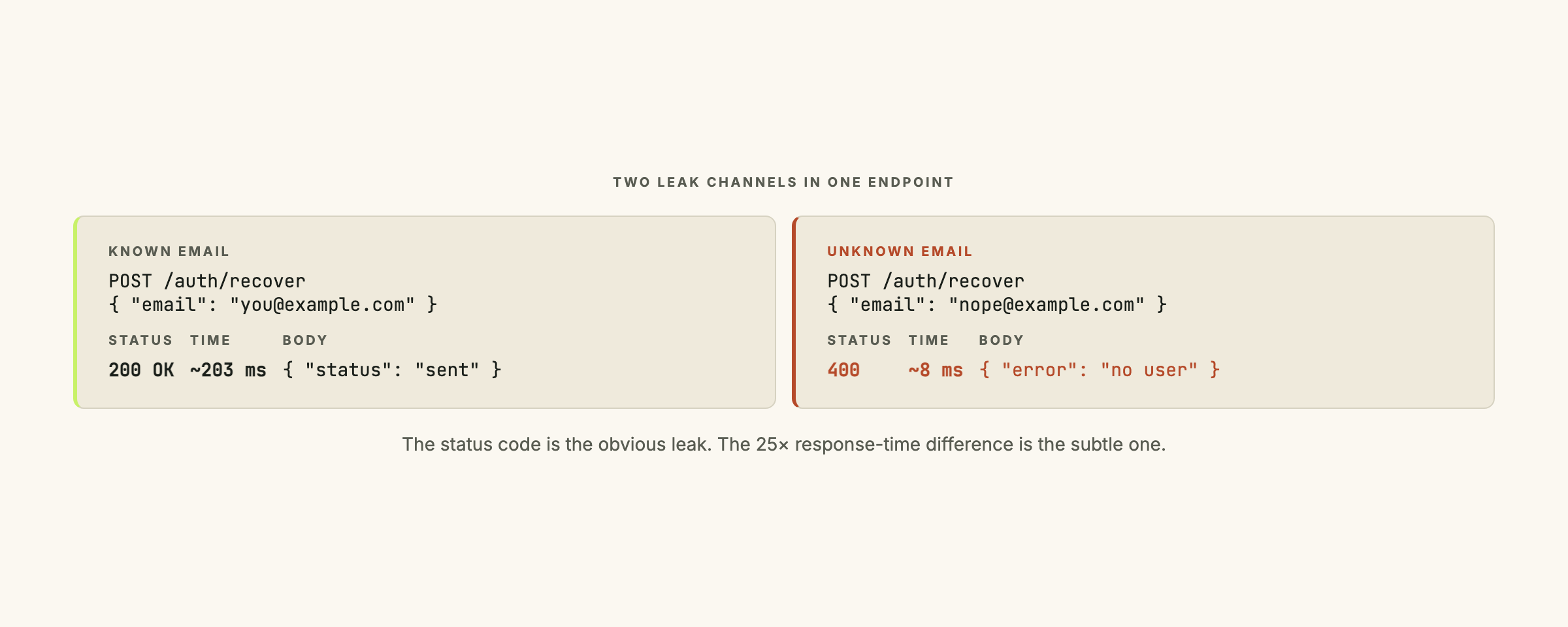
The two leak channels: status codes and response timing
HTTP status differential is the obvious one. The endpoint returns 200 for a known email and 400 for an unknown one, with different bodies. An attacker scripts the endpoint and filters on the status code.
POST /auth/v1/recover  { email: "known@example.com" }
→ 200 OK  { "status": "sent" }

POST /auth/v1/recover  { email: "unknown@example.com" }
→ 400 BAD REQUEST  { "error": "user not found" }
Response-time differential is the subtle one. Both calls return identical status codes and bodies, but one takes 200ms (real work: database lookup, email queue, audit log write) and the other takes 8ms (an early exit on “user not found”). An attacker scripts the endpoint and measures elapsed time instead.
POST /auth/v1/recover  { email: "known@example.com" }
→ 200 OK  (203ms)

POST /auth/v1/recover  { email: "unknown@example.com" }
→ 200 OK  (8ms)
Network jitter adds noise to timing attacks, but at a hundred samples per email the signal beats the noise reliably.
Where this hides in Supabase Auth
The Supabase JS SDK’s auth.resetPasswordForEmail does the right thing out of the box: it returns a generic success response regardless of whether the email exists. The leak appears when you wrap that call in your own edge function and add lookup logic before it.
A common shape that reintroduces the bug:
// Edge function: vulnerable
const { email } = await req.json();

const { data: user } = await supabase
  .from('users')
  .select('id')
  .eq('email', email)
  .maybeSingle();

if (!user) {
  return new Response(
    JSON.stringify({ error: 'user not found' }),
    { status: 400 }
  );
}

await supabase.auth.resetPasswordForEmail(email);
return new Response(JSON.stringify({ status: 'sent' }), { status: 200 });
This looks defensive: check the user exists before triggering the reset. What it actually does is make the endpoint a perfect enumeration oracle. The 400/200 split is the leak.
The fix
// Edge function: fixed
const { email } = await req.json();
await supabase.auth.resetPasswordForEmail(email).catch(() => {});
return new Response(JSON.stringify({ status: 'sent' }), { status: 200 });
The “does this user exist” check is gone. The SDK handles the lookup internally and silently does nothing if the email is not registered. Your edge function never needs to know either way.
The .catch(() => {}) swallows any error from the SDK call, so even an SDK-level failure (a network blip, a rate-limit response from the email provider) cannot leak through. The user receives “we sent the email” whether anything actually got sent or not.
Real users who entered a valid email get the reset link in their inbox. Real users who entered an invalid email (typo, wrong account, forgot which address they used) get the same confirmation page and learn from the absence of email. Attackers get nothing useful from the endpoint.
Closing the timing channel
Status codes are the easy half. If your reset flow does meaningful work for valid users (sending the email, writing audit rows, updating session state), that work takes time. The “no such user” path exits at the SDK level, which is faster. The timing channel is still open.
Pad the fast path. Add a sleep to make the timings match:
const start = Date.now();
await supabase.auth.resetPasswordForEmail(email).catch(() => {});
const elapsed = Date.now() - start;
const minResponseMs = 200;
if (elapsed < minResponseMs) {
  await new Promise((r) => setTimeout(r, minResponseMs - elapsed));
}
return new Response(JSON.stringify({ status: 'sent' }), { status: 200 });
This works, but introduces a latency floor on every reset request. If your slow path is 200ms today and 800ms next month (the email provider got slower), the padding is wrong and the timing channel reopens.
Do the slow work either way. Whatever side effect your “valid user” path produces (audit log row, rate-limit counter increment, telemetry event), produce the same side effect on the “no such user” path. The work itself is the leveler. The timing match is structural, not a number you have to keep updating.
Other endpoints with the same shape
The password-reset flow is the famous example. The pattern hides in every endpoint that takes a user identifier as input:
- Signup. An endpoint that returns “email already in use” is the same leak with the polarity reversed. Treat duplicate-email as a successful signup that silently does nothing (or queues a notification to the actual owner).
- Login. “Wrong password” and “user not found” need identical responses. The classic mitigation in the OWASP authentication cheat sheet is “Login failed. Username or password incorrect.” with a 401 in both cases.
- Magic-link request. Same as password reset. Return “if an account exists, we sent the link” regardless.
- OTP / verification-code request. The “no such phone number” case should return the same response as the “code sent” case.
- Username availability checks. A typeahead calling
/check?username=Xand returning{ available: true/false }is enumeration-as-a-service. Rate-limit it aggressively. The channel is fundamentally open here because the UX requires a real answer; that is an accepted tradeoff, not a fix.
If you are inheriting a Supabase-based product, this is the third audit in the four-part security pass I run on every project, alongside the two-layer identity model, the PostgREST upsert fragility, and the origin-validation patch on edge functions. All four are silent. All four are common. All four take an afternoon to fix once you have the inventory.
How to test for the bug
Pick a known-good email (your own test account) and a definitely-invalid one. Run both through every endpoint that takes an email or username:
# Known good
time curl -X POST https://your-app.com/auth/v1/recover \
  -H 'Content-Type: application/json' \
  -d '{"email": "you@example.com"}'

# Definitely invalid
time curl -X POST https://your-app.com/auth/v1/recover \
  -H 'Content-Type: application/json' \
  -d '{"email": "nonexistent-2026-test@example.com"}'
Compare four things across the two responses:
- HTTP status code (should be identical)
- Response body (should be identical, byte for byte)
- Response headers (Set-Cookie, Cache-Control, etc.)
timeoutput (should be within ~50ms; if not, the timing channel is leaking)
Repeat for signup, login, magic-link request, OTP request.
If you are running a customer-facing product and want this audited, let’s talk. The user-enumeration audit runs about two hours per app and produces a list of one-line fixes you can ship the same afternoon.
Frequently asked questions
What is user enumeration in security terms?
User enumeration is the class of vulnerability where an attacker can determine whether a given identifier (typically an email address) is registered in your system without needing a valid password. The leak channel can be a response status code, a response body, a response time, or even a redirect path. Once the attacker has a list of valid emails for your service, they can run targeted phishing, credential-stuffing attacks, or social- engineering campaigns against those specific accounts.
Does Supabase Auth prevent this by default?
Supabase Auth does the right thing for the password-reset flow at the SDK level (it returns a generic success response regardless of whether the email exists). But if you wrap the SDK call in your own edge function and add custom logic (e.g. "look up the user first and return a 400 if not found"), you reintroduce the leak. The bug class is in your code, not the SDK. Check every endpoint that takes an email or username as input, not just password reset.
Should I add a constant-time delay to the response?
Yes, where the work is conditional on whether the user exists. If your "user found" path takes 200ms (database lookup, email queue, audit log write) and your "user not found" path takes 8ms (a fast reject), the timing difference is visible at scale. The two patches are: (a) pad the fast path with a sleep to match the slow path, or (b) do the slow work regardless of whether the user exists (call the email service with a no-op, write the audit log either way). Option (b) is harder to get wrong over time.
What about rate limiting as an alternative?
Rate limiting reduces the speed of enumeration; it does not close the channel. An attacker who can make 100 requests per minute against your reset endpoint can still enumerate thousands of emails per day. Rate limiting is necessary defense in depth. The endpoint still needs to return identical responses; rate limiting just buys you time to detect the attack pattern in your logs.
How do I test for the bug in my own app?
Pick a known-good email (your own test account) and a definitely-invalid one (something like nonexistent-2026-test@example.com). Submit both through your password-reset endpoint. Compare the response status, response body, response headers, and response timing. If any of the four differ, you have a leak. Run the same test against signup, login, magic-link request, and any OTP request endpoint. The same bug class hides in all of them.