Article · Mar 6, 2026
Two-layer identity models in Supabase: when auth and authorization disagree
auth.users gives you identity for free. Roles need a second table, a trigger, and an atomic migration. Here's where the gap breaks production.
When I take over a Supabase project, the first thing I check is how the identity model is wired. Not the auth provider, not the OAuth setup. The bit that connects auth.users (the identity layer) to whatever table holds roles or permissions (the authorization layer). Half the time it is wrong, and the people running the app do not know yet because the bug only shows up when somebody signs up for the first time after a botched deploy.
What “two-layer identity” actually means
Supabase Auth gives you a single table called auth.users. It is created the moment you enable any provider (email, magic link, OAuth). Every signed-up user gets one row in it, with their hashed password or OAuth identifier, email, and a few timestamps.
What auth.users does not know is whether the user is an admin, a freelancer, a paid customer, or a viewer. That is the authorization layer, and you build it yourself in the public schema. A typical shape:
create table public.user_roles (
  user_id uuid primary key references auth.users(id) on delete cascade,
  role text not null check (role in ('admin', 'member', 'viewer')),
  created_at timestamptz default now()
);
Row-Level Security (RLS): Postgres’s built-in mechanism for controlling which rows a given session can read or write. Every table has its own policies, and each policy evaluates against the current session’s identity. On a Supabase project, that identity comes from the JWT Supabase issues at sign-in.
Every RLS policy in your app checks user_roles to figure out what the current session is allowed to do. The two tables are joined on user_id.
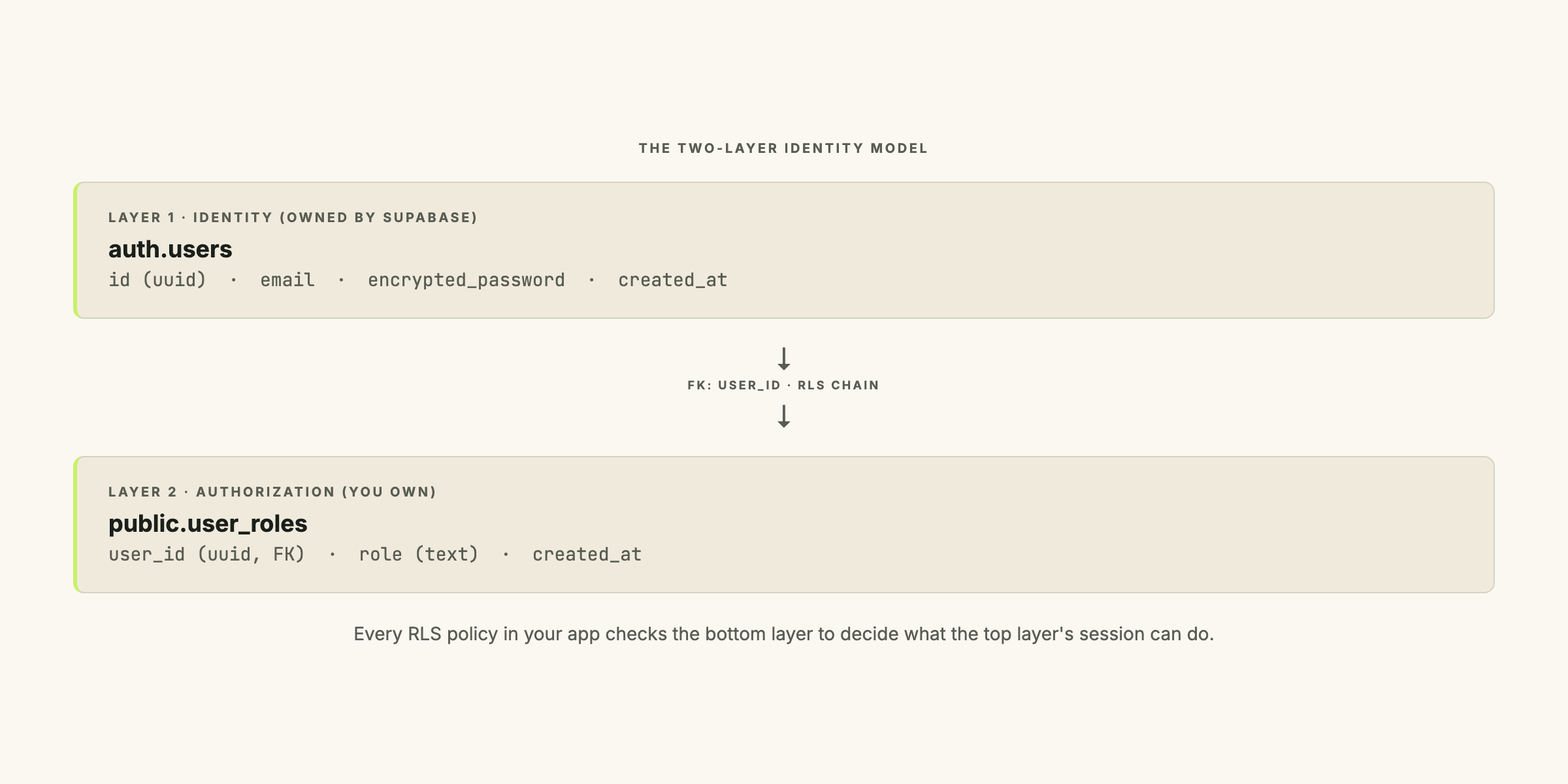
The split is intentional. The auth schema is owned by Supabase and you should not modify it directly. The public schema is yours, and the authorization model lives there.
The failure mode: signed up, no role, nowhere to go
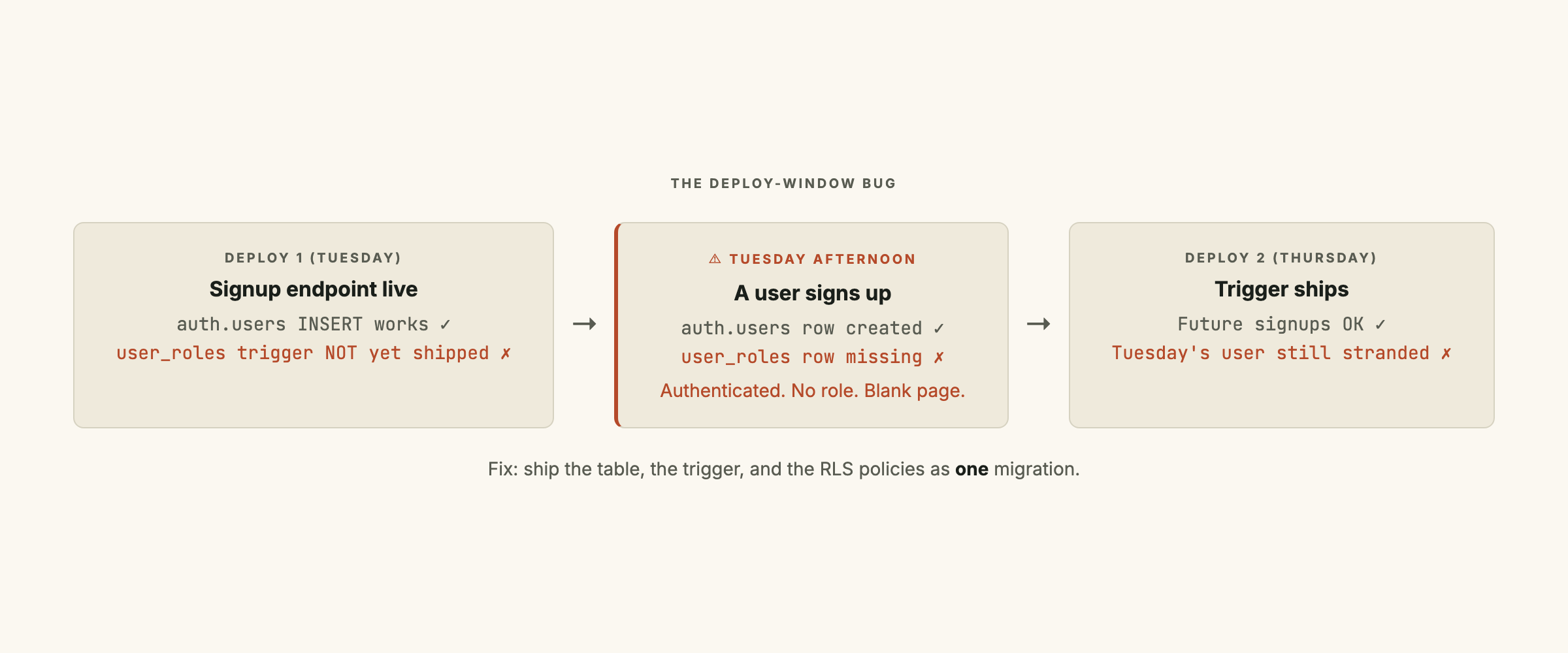
The bug I keep finding:
- The app ships with email signup enabled at both the project level and the frontend.
- The trigger that auto-inserts a default
user_rolesrow whenauth.usersgets anINSERTships in a separate migration. - Somebody signs up between the two deploys.
- They are now authenticated. Their session is valid. They have a JWT.
- But they have no row in
user_roles, so every RLS policy that checks the role returns false. Every query for their own data returns zero rows. - The frontend has no branch for “authenticated but no role.” Blank page.
I have seen this on three inherited projects. Each time the team’s first instinct was “the user did something weird.” It is not the user.
How to wire the trigger correctly
SECURITY DEFINER: A Postgres function attribute that tells the database to run the function with the privileges of whoever owns the function, not the session that called it. Without it, a trigger on
auth.usersruns assupabase_auth_admin, an internal role with no write access to thepublicschema.
The canonical pattern is a Postgres trigger on auth.users that fires AFTER INSERT and writes a default-role row into user_roles. Two non-obvious clauses make it work:
-- Function: assign default role on signup
create or replace function public.handle_new_user()
returns trigger
language plpgsql
security definer
set search_path = ''
as $$
begin
  insert into public.user_roles (user_id, role)
  values (new.id, 'member');
  return new;
end;
$$;

-- Trigger: fire on every auth.users insert
create trigger on_auth_user_created
  after insert on auth.users
  for each row execute function public.handle_new_user();
security definer tells Postgres to run this function as postgres (the function owner), not as supabase_auth_admin. Without it, the insert to public.user_roles fails silently and the signup breaks.
set search_path = '' closes the search-path injection attack that SECURITY DEFINER opens. Without it, an attacker who can create a schema could shadow public.user_roles with their own table and intercept the writes. The empty search path forces every reference to be fully qualified, which the function body already does.
If you want to avoid SECURITY DEFINER entirely, the alternative is an explicit RLS policy that grants supabase_auth_admin insert access:
create policy "auth admin can insert default roles"
on public.user_roles
for insert
to supabase_auth_admin
with check (true);
Drop security definer from the trigger function and it runs as the calling role. The Supabase docs now recommend this approach for new projects because it keeps the function-privilege surface smaller. I have used both. The SECURITY DEFINER pattern is more compact; the policy-based approach is more auditable.
This is the same class of partial-state failure I wrote about in silent failures in data pipelines: the build pipeline cannot detect it, only production traffic can.
The velvet rope is not a lock
On one inherited project, the team had “removed the signup link” by hiding the button and rerouting /signup to a 404. They believed signup was off. It was not.
Anyone with DevTools open can POST directly to /auth/v1/signup. The endpoint was still listening because the project-level setting was untouched. The frontend was a velvet rope.
The actual gate is Authentication > Providers > Email > Enable signups in the Supabase dashboard. With that off, the endpoint returns 403 regardless of where the request comes from.
For an invite-only product:
- Remove the signup UI. Not hidden. Gone. The login page is login-only.
- Disable “Enable email signups” at the project level. This is the only step that actually enforces the restriction.
- Write an invite edge function. Use the service-role key to call
supabase.auth.admin.createUser()for the invited address. The service-role path bypasses the signup toggle by design: it is the controlled way through.
Of those, only the project toggle is load-bearing. The frontend removal is for clarity so a developer reading the codebase knows the intent. The invite path is the mechanism.
Ship all of it as one transaction
Any partial state is broken. The migration order I use:
-- Migration: bootstrap two-layer identity (run as one transaction)
begin;

-- 1. The role table itself
create table public.user_roles ( ... );

-- 2. RLS policies on user_roles
alter table public.user_roles enable row level security;
create policy "users can read own role"
  on public.user_roles for select
  using (auth.uid() = user_id);

-- 3. The trigger function
create function public.handle_new_user() ...;

-- 4. The trigger
create trigger on_auth_user_created ...;

-- 5. Backfill: write default role for any auth.users that exist already
insert into public.user_roles (user_id, role)
select id, 'member' from auth.users
on conflict (user_id) do nothing;

commit;
If any step fails, the whole thing rolls back. If all five succeed, the identity model is wired end to end before anyone can sign up again.
One more thing: the signup-disable toggle is versionable. Supabase’s CLI respects auth-provider settings in supabase/config.toml, so the project-level disable can ship in the same deploy as this migration.
What to audit on an inherited project
Four checks, in order:
- Open the
publicschema and look for a role table. If one exists, check whether the trigger onauth.usersthat populates it also exists. No trigger means run the migration above before signup runs again. - Open Auth > Providers and look at “Enable email signups.” For an invite-only product, this should be off.
- Open the frontend login page. No signup link, no signup form, no
/signuproute. If there is one, it is either dead code or a velvet rope. - Grep for
auth.signUp(. Every call should either be removed or routed through an admin edge function that uses the service role.
If your project went through the publishable-key migration in 2025, the Supabase publishable-keys fix for a Chrome extension covers how the auth layer changed and why a correct two-layer identity model prevents the resulting stranded-user state.
If you want a second set of eyes on your Supabase identity model before the next compliance audit or the next batch of users, get in touch. The audit runs about three hours and covers everything here plus the RLS-policy chains downstream of user_roles.
Frequently asked questions
What is the difference between auth.users and user_roles in Supabase?
`auth.users` is Supabase Auth's built-in table that stores every authenticated identity (email, hashed password, magic-link tokens, OAuth provider info). It exists the moment a user signs up. `user_roles` is a separate table you create in the `public` schema to record what each user is allowed to do (admin, member, freelancer, viewer, etc.). The two tables are connected via a foreign key on `user_id`, and RLS policies (Row-Level Security, Postgres's mechanism for deciding which rows a user can read or write) chain through both.
Why does my Supabase trigger fail to insert into user_roles when it runs?
Because the trigger runs as the `supabase_auth_admin` role, which only has permissions inside the `auth` schema. Writing to `public.user_roles` requires either (a) marking the trigger function `SECURITY DEFINER` so it runs with the function-owner's privileges (usually `postgres`), and adding `set search_path = ''` to prevent search-path injection, or (b) adding an explicit RLS policy that grants `supabase_auth_admin` insert access to `user_roles`. Option (a) is the common pattern; option (b) is what Supabase's docs now recommend if you want to avoid `SECURITY DEFINER` entirely.
Should public signup be disabled at the frontend or the backend?
Both. The frontend toggle is a velvet rope (anyone with DevTools open can POST to `/auth/v1/signup` directly). The actual gate is the Supabase project-level "Enable email signups" setting in Auth Providers. With that off, signup is impossible regardless of what the frontend does. Service-role-keyed paths (like an invite edge function) keep working because they bypass the signup toggle by design.
How do I invite users without enabling public signup?
Write an edge function that uses the service-role key (an admin-level credential that bypasses the signup toggle). The function calls `supabase.auth.admin.createUser({ email, email_confirm: false })` to create the auth row, then inserts the matching `user_roles` row. Send the magic-link invite via `supabase.auth.admin.generateLink({ type: "invite" })` and email it via your transactional provider. Never expose the service-role key to the browser.
Can I split the auth trigger and the role-table migration into two deploys?
Technically yes. Practically, no. Splitting them creates a window where users can sign up (layer 1 succeeds) but the trigger that auto-populates their role does not yet exist (layer 2 fails). Those users land in an authenticated-no-role state with no path forward, and you cannot easily detect the issue from the frontend because the auth session looks valid. Ship the trigger, the role table, the RLS policies, and any default-role insert as one migration.