Article · Mar 27, 2026
How to build a tamper-evident audit log in Postgres with one trigger
Build an audit log table, attach a SECURITY DEFINER trigger that captures every UPDATE and DELETE, lock it down with RLS. Forty lines of SQL.
Sooner or later somebody emails support saying “I never made that change” or “where did my hours go?” If you have an audit log, the answer takes thirty seconds. Without one, the answer takes a day, and the trust cost with that client is real.
This tutorial builds a tamper-evident audit log in Postgres using one trigger per table you want to track. No external service, no log shipper. Just SQL.
When do you need an audit log?
You need one for any table where:
- Money is involved (orders, payments, refunds, invoices).
- Time is involved (hours logged, leave requests, billing windows).
- PII is involved (user profiles, addresses, ID numbers).
- A user can dispute a change and the answer matters legally or operationally.
You probably do not need one for:
- Append-only tables (the
created_atrow is the audit; new inserts are the only operation). - Caching tables (the source of truth lives elsewhere; replay is the audit).
- Tables under 100 rows where a manual inspection covers it.
The cost is a small write amplification on the parent table (every UPDATE and DELETE triggers a second insert) and disk space proportional to your change volume. For most apps, both are negligible.
Compliance frameworks (GoBD, GDPR, HIPAA, SOC 2) require audit logs on most of those table categories by design. If you’re building under GoBD or GDPR specifically, the compliance software developer page goes deeper on the wider posture.
Build the audit-log table
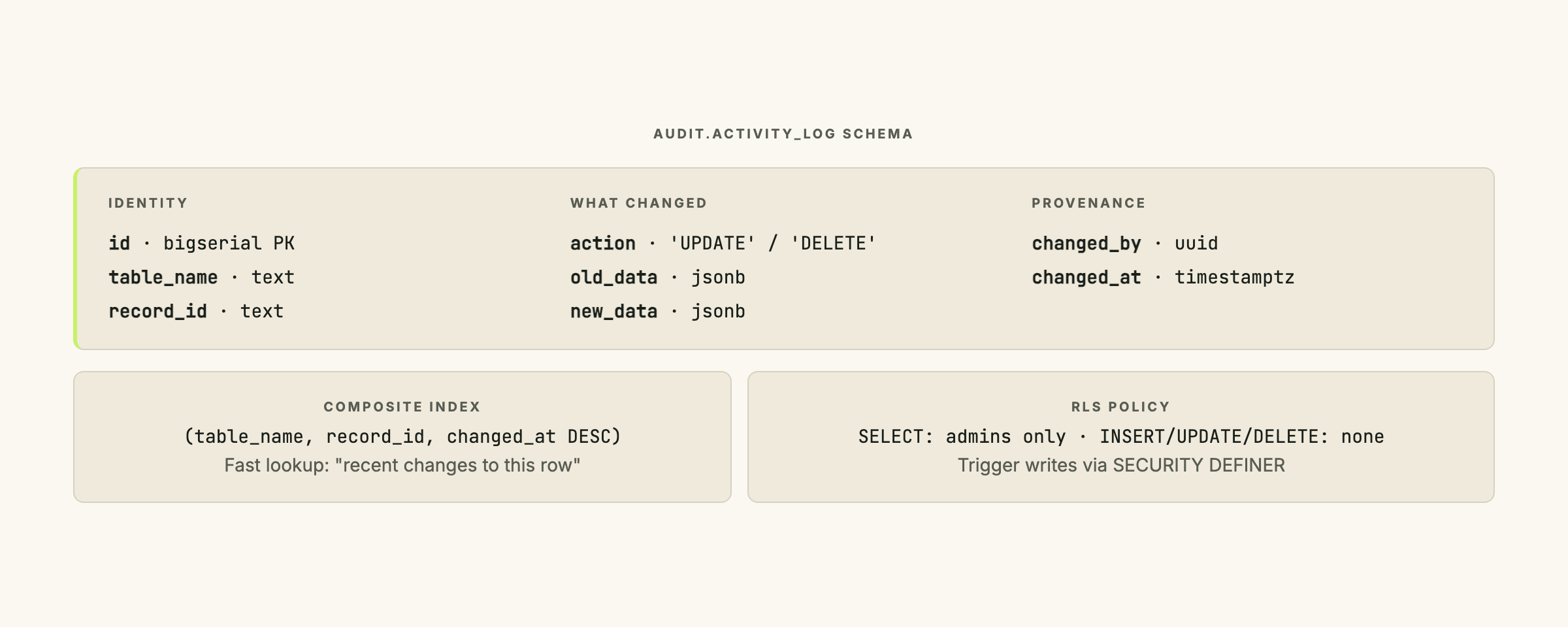
One table catches every change on every parent table you attach the trigger to:
create schema if not exists audit;

create table audit.activity_log (
  id bigserial primary key,
  table_name text not null,
  record_id text not null,
  action text not null check (action in ('UPDATE', 'DELETE')),
  old_data jsonb,
  new_data jsonb,
  changed_by uuid,
  changed_at timestamptz default now()
);

create index activity_log_table_record_idx
on audit.activity_log (table_name, record_id, changed_at desc);JSONB: Postgres’s binary JSON column type. Stores structured data without a fixed schema, supports indexing on nested keys, and lets you add or remove fields at query time using operators like
->(extract object) and->>(extract as text). Used here so one trigger function covers every parent table without schema changes.
A few design decisions worth understanding:
old_data and new_data are JSONB. Postgres serializes the full row as JSON, which means you do not need a separate audit column per parent column. One trigger function covers every table you attach it to.
record_id is text to support any primary-key type (uuid, bigint, text). You cast back at query time.
changed_by is a uuid because most modern apps key identity by Supabase Auth or similar. Change the column type if your identity model differs.
The index is (table_name, record_id, changed_at desc) because the query you actually run is “show me the recent changes to this specific row,” not “show me everything that happened on Tuesday.”
No INSERT action. The original row’s created_at is the insert audit. Adding INSERT doubles every write and gives no new information.
The table lives in a separate audit schema, which keeps it out of your application’s autogenerated TypeScript types and out of the default RLS scope.
Write the trigger function
One function covers every table that opts in:
create or replace function audit.log_changes()
returns trigger
language plpgsql
security definer
set search_path = ''
as $$
declare
  v_old jsonb;
  v_new jsonb;
  v_user uuid;
begin
  -- Strip sensitive columns from the audit payload
  if tg_op = 'UPDATE' then
    v_old := to_jsonb(old) - 'encrypted_password' - 'reset_token';
    v_new := to_jsonb(new) - 'encrypted_password' - 'reset_token';
  elsif tg_op = 'DELETE' then
    v_old := to_jsonb(old) - 'encrypted_password' - 'reset_token';
  end if;

  -- Try to capture the user making the change
  begin
    v_user := auth.uid();
  exception when others then
    v_user := null;
  end;

  insert into audit.activity_log (
    table_name, record_id, action, old_data, new_data, changed_by
  ) values (
    tg_table_name,
    coalesce((new).id::text, (old).id::text),
    tg_op,
    v_old,
    v_new,
    v_user
  );

  return coalesce(new, old);
end;
$$;
SECURITY DEFINER: A Postgres function attribute that causes the function to run with the permissions of its owner, not the caller. This is what prevents an application user from being able to delete their own audit trail: they can update the parent row, but the audit insert runs as the function owner who holds the grant on
audit.activity_log.
Search-path injection: A Postgres attack where a malicious schema placed earlier in the search path shadows a qualified function or table name. A
SECURITY DEFINERfunction is especially vulnerable because it runs with elevated permissions. Settingsearch_path = ''and using fully qualified names (audit.activity_log) closes the vector.
set search_path = '' is mandatory alongside security definer. Every table reference inside the function is fully qualified, so the empty search path is safe.
The to_jsonb(new) - 'encrypted_password' syntax uses the - operator on JSONB to strip a key. Strip any column you would not want in a database export: password hashes, reset tokens, anything that could turn the audit log into a credential store.
The auth.uid() call is the Supabase pattern for “get the current user.” If you are not on Supabase, replace it with whatever your stack exposes, for example a session variable set at the start of each request via set_config. The exception when others block handles changes that happen outside any user session (a migration, a scheduled job, a manual fix from psql) by setting changed_by to NULL.
return coalesce(new, old) returns new on UPDATE and old on DELETE, satisfying Postgres’s trigger contract without branching.
Attach the trigger to each parent table
One trigger per table you want to audit, each pointing at the same function:
create trigger time_entries_audit
  after update or delete on public.time_entries
  for each row execute function audit.log_changes();
The trigger fires AFTER UPDATE OR DELETE so the audit row reflects the change that actually committed, not a change that was later rolled back. for each row means one audit row per affected parent row.
If you have many tables to audit, a do block generates them in bulk:
do $$
declare
  t text;
begin
  for t in select unnest(array[
    'time_entries', 'invoices', 'user_profiles', 'leave_requests'
  ]) loop
    execute format(
      'create trigger %I_audit
         after update or delete on public.%I
         for each row execute function audit.log_changes()',
      t, t
    );
  end loop;
end $$;
Lock the audit table down with RLS
Row Level Security (RLS): A Postgres feature that enforces access policies at the row level inside the database engine, independent of the application layer. When RLS is enabled on a table with no policies, no role can read or write any row, even with a direct database connection.
Two things make the audit log tamper-evident:
-- 1. RLS on, with no default policy. Nobody reads or writes by default.
alter table audit.activity_log enable row level security;

-- 2. Admins (or whatever role is allowed) get explicit read access.
create policy "admins read audit log"
  on audit.activity_log
  for select
  using (
    exists (
      select 1 from public.user_roles
      where user_id = auth.uid() and role = 'admin'
    )
  );

-- 3. Nobody (including admins) can write. The trigger function bypasses RLS
--    because of SECURITY DEFINER; the application path is closed.
-- (No insert/update/delete policies. The absence is the lock.)
The application can write to audit.activity_log via the trigger (which runs as the function owner), but nobody can read except admins, and nobody can insert, update, or delete rows directly.
If your compliance regime requires the audit log to be append-only at the database level rather than just by policy, revoke UPDATE and DELETE from every role on audit.activity_log. The trigger’s SECURITY DEFINER insert path still works because the function owner retains the insert grant.
Run the incident query
When a user comes to you with “I never made that change”:
select
  changed_at,
  action,
  changed_by,
  old_data->>'hours' as old_hours,
  new_data->>'hours' as new_hours,
  jsonb_pretty(old_data) as old_state,
  jsonb_pretty(new_data) as new_state
from audit.activity_log
where table_name = 'time_entries'
  and record_id = 'the-disputed-record-id'
order by changed_at desc
limit 10;
You get back the last ten changes to that row: who made each, when, what the value was before, and what it changed to. The jsonb_pretty formatting and the ->> operator make the result readable in psql. The composite index on (table_name, record_id, changed_at desc) keeps the query fast even on a multi-million-row audit table.
What this pattern does not catch
This trigger pattern captures changes that go through Postgres. It does not capture:
- Reads. If you need to know who looked at what, you need logging at the application layer or
pgauditfor built-in read logging. The trigger pattern only fires on write operations. - Schema changes. A
DROP TABLEdoes not fire row-level triggers. Use Postgres event triggers (ddl_command_end) if you need to audit DDL. - Identity on direct database access. A developer running
UPDATEfrom psql still triggers the row-level audit, butchanged_bywill be NULL becauseauth.uid()is not set outside a request context. The change is captured; who made it is not. For Supabase, the Postgres Roles docs explain which role connects via which path. - Bulk updates at scale. A single
UPDATEstatement touching 10,000 rows generates 10,000 audit rows. That is correct behavior but expensive. If you do regular bulk updates, partitionaudit.activity_logby month so the writes spread across smaller tables.
The “reads” and “schema changes” gaps are worth acknowledging directly rather than papering over. For most application disputes, neither gap matters: the question is always “who changed this value?” not “who looked at it?”
For more on the class of silent failures that audit logs help surface, the silent failures in AI-built data pipelines post covers what shows up when nobody is watching.
Ship it as one migration
The full migration is forty lines of SQL. Ship it as one file so the trigger is live before any user makes any change you might later need to explain. A trigger added after the fact can’t retroactively fill the gap.
When the auth layer is set up correctly, this pattern makes a Supabase project auditable for SOC 2 or any comparable compliance regime. For the auth-layer pattern itself, see two-layer identity models in Supabase. If the table stores reusable client secrets instead of disputed business records, the companion pattern is encrypting client secrets with Supabase Vault.
If you are running a Supabase-backed product and want a second pair of eyes on the audit setup before a compliance review, let’s talk. The audit takes about three hours and covers everything in this post plus the related security patterns in the same series.
Frequently asked questions
What's the difference between SECURITY DEFINER and SECURITY INVOKER in Postgres triggers?
A SECURITY INVOKER function runs with the permissions of the calling user. A SECURITY DEFINER function runs with the permissions of the function owner, regardless of who called it. For audit triggers, SECURITY DEFINER is the right choice: the application user can modify the parent row but cannot reach into the audit schema directly, because the trigger runs as the function owner who holds the insert grant on audit.activity_log. Without SECURITY DEFINER, any user who can update a row could also delete their own audit trail if they had schema access.
Why store old_data and new_data as JSONB instead of separate columns?
JSONB lets one trigger function cover every parent table without schema changes. If you added a column to the parent table tomorrow, the audit log would capture it automatically because to_jsonb() serializes the full row. A column-per-column approach requires updating the trigger function every time the parent table changes. The trade-off is that you query with the ->> operator at read time rather than selecting a typed column, but that cost is negligible for an incident query you run once.
Does the trigger catch changes made directly via psql or a migration script?
Row-level triggers fire on any write that goes through Postgres, including psql sessions and migration scripts. The audit row is recorded. However, changed_by will be NULL because auth.uid() returns nothing outside a Supabase request context. The change is captured; the identity is not. For migration scripts, I add a comment to the audit row via a session variable (set_config('app.migration_name', 'add-billing-columns', true)) so the NULL changed_by is still attributable after the fact.
How do I audit INSERT operations, not just UPDATE and DELETE?
The pattern in this post deliberately omits INSERT because the original row's created_at timestamp already serves as the insert audit. Adding INSERT doubles every write and records no new information for the common dispute case, which is always about a change to an existing row. If your compliance regime requires INSERT capture (some HIPAA audit-log specs do), add AFTER INSERT to the trigger definition and handle the case where OLD is NULL in the trigger function body.
What happens if the audit table runs out of disk space?
The trigger's INSERT into audit.activity_log will fail, which causes the parent transaction to roll back. The change to the parent row does not commit. This is the safe failure mode: better to reject the write than to silently lose the audit record. In practice, partition audit.activity_log by month and add a retention policy that drops partitions older than your compliance window. That keeps the table size bounded without removing active audit data.
Can I use this pattern with Supabase's built-in audit features?
Supabase does not ship a built-in row-level audit log for the public schema. The Vault feature handles secrets storage; the Auth schema has its own audit_log_entries table for authentication events. For your application tables, this trigger pattern is the standard approach. The Supabase Postgres Roles docs cover which roles connect via which path, which matters when you're attributing changes that arrive through the service role versus the anon key.