A Bubble app can look fine on every screen and still be open through one setting. An audit is the slow work of checking each of those settings, one by one.
This is the list I use. It has 8 areas and 44 checks. Bubble publishes its own security checklist, and I took ideas from it and from Bubble forum posts. The grouping and the wording are mine.
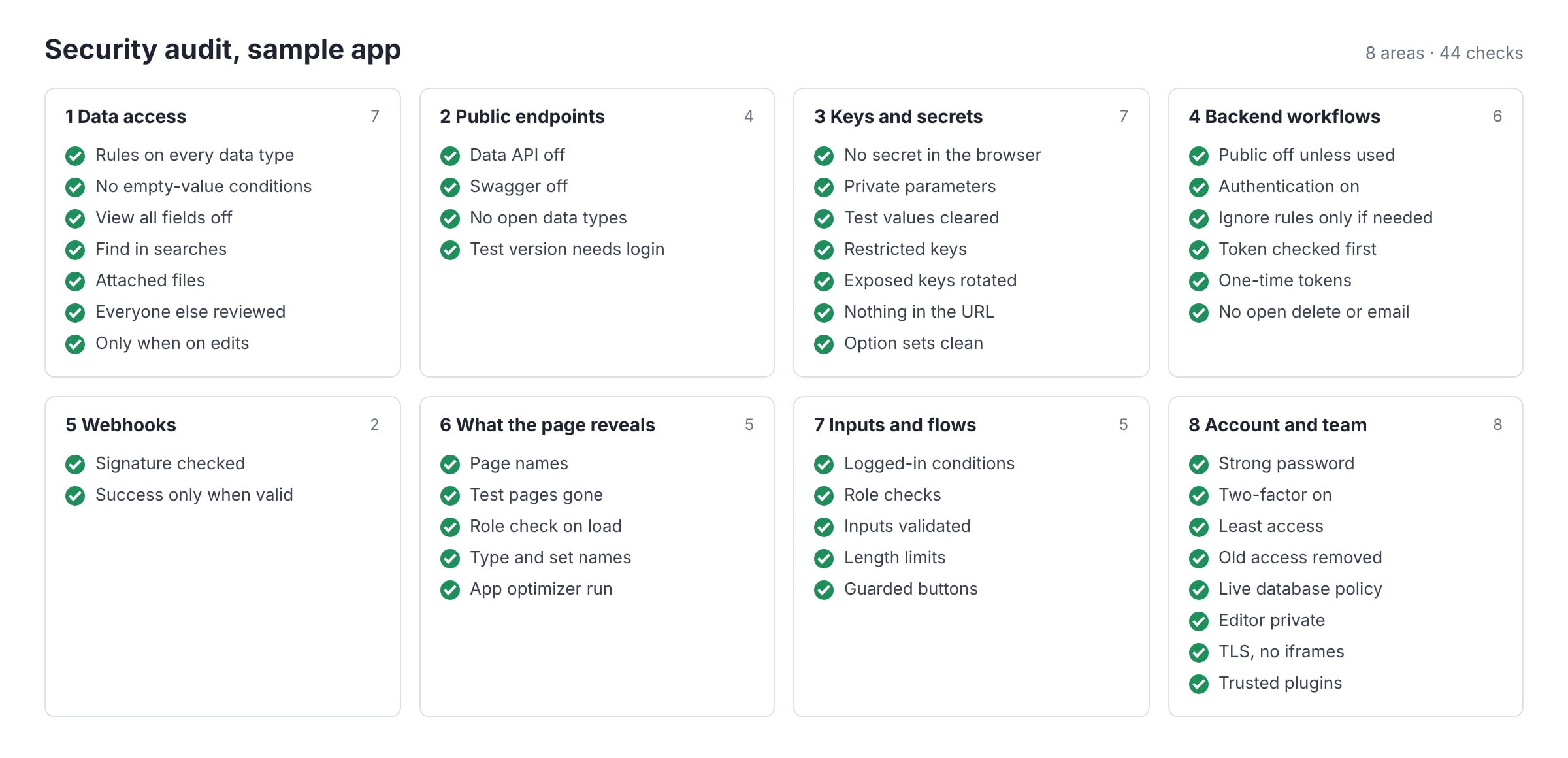
One rule runs through all of it. Test as a logged-out visitor and as a second user. The editor shows you what you built. A visitor sees what Bubble sends them.
1. Data access: Privacy Rules (7 checks)
Privacy Rules: Bubble’s access rules for a data type. They set who can find and view each row and field.
This is where I spend the most time. A data type with no rule is open to everyone.
- There is a rule on every data type that holds private data.
- No rule condition passes when a value is empty.
- “View all fields” is off, and only the fields that are needed are on.
- “Find this in searches” is set on purpose.
- “View attached files” is set on purpose.
- The “Everyone else” rule is checked field by field.
- Edit workflows have “Only when” conditions.
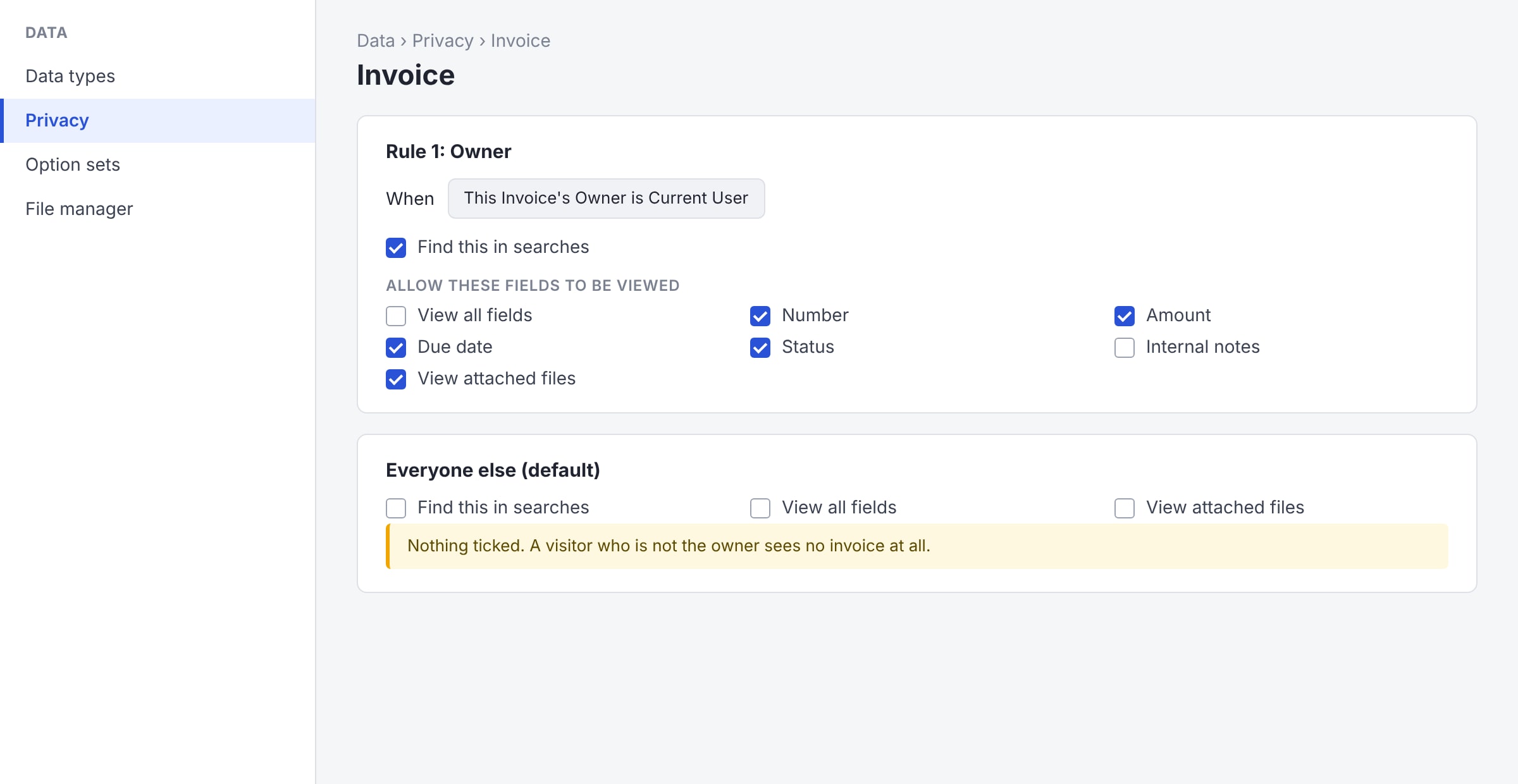
The test is simple. Log in as one user and try to read another user’s data.
2. Public endpoints (4 checks)
Some of Bubble’s doors are open until you close them.
- The Data API is off unless the product needs it.
- The Swagger endpoint is off.
- No data type is open through the API.
- The test version needs a login.
3. Keys and secrets (7 checks)
- No secret key is sent from a call that runs in the browser.
- API Connector parameters that hold secrets are marked private.
- Test values are cleared from the connector.
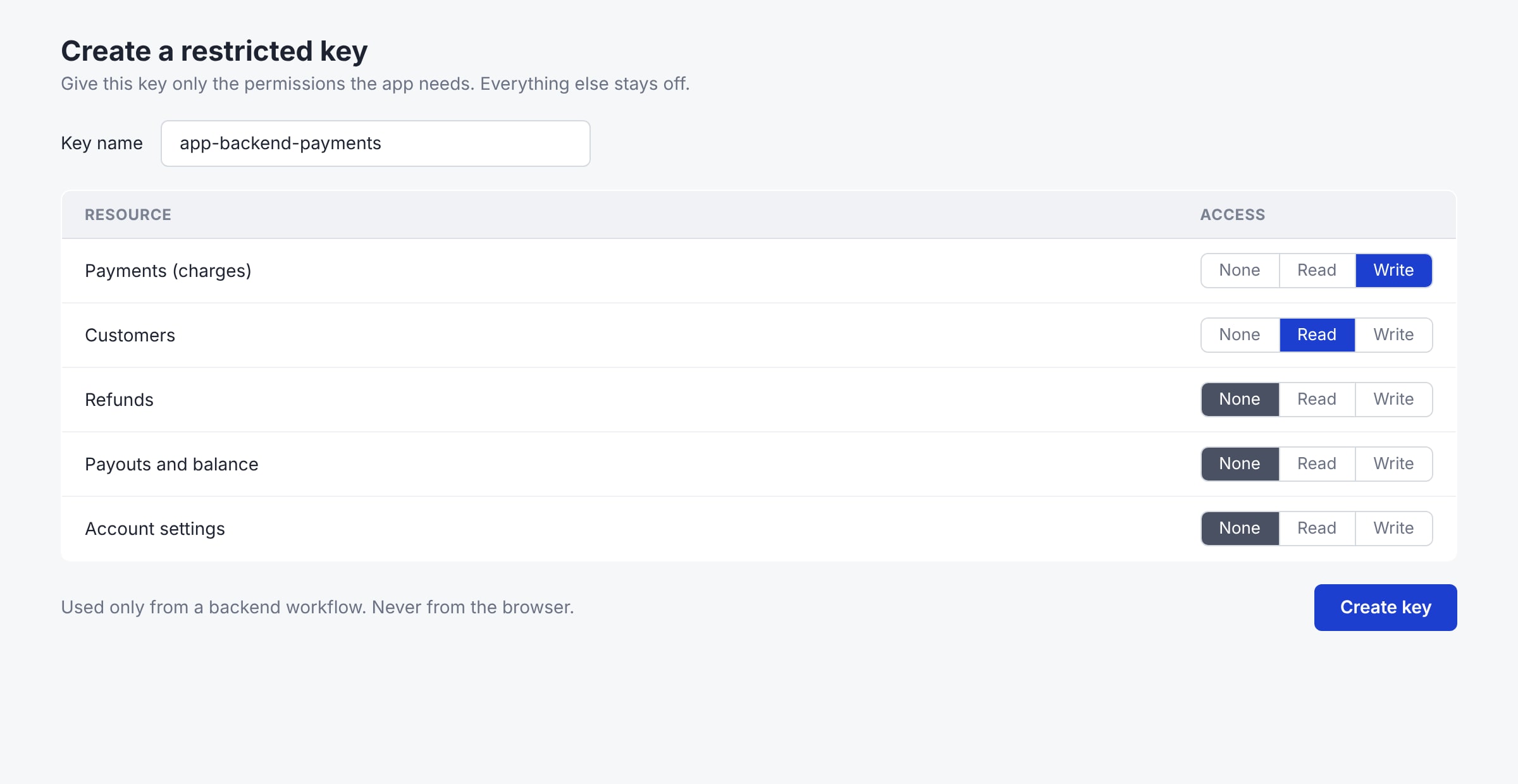
- Keys are restricted, by domain or by permission.
- A key that was ever exposed is rotated.
- Nothing sensitive sits in a URL parameter.
- Option sets, page elements and workflows hold nothing sensitive.
A secret key can do everything the account can do. A restricted key can do only the actions you allow. Payment providers such as Stripe offer restricted keys. If a restricted key ever leaks, the damage is smaller. Use them, and call them only from a backend workflow.
My longer guide to this area is Bubble.io API security best practices.
4. Backend workflows (6 checks)
Backend workflows run on the server, so they feel safe. A public one is a door anyone can knock on.
- Public API workflows are off unless something calls them.
- “Without authentication” is off.
- “Ignore privacy rules” is used only where it is needed.
- A secret token is checked as the first action.
- One-time tokens are used where a private key cannot be sent.
- No public workflow lets a user delete accounts or send email as the app.
Being logged in is rarely enough. Ask what the worst user could do with the workflow.
5. Webhooks (2 checks)
Webhook: A URL that another service calls to tell your app that something happened, such as a payment.
- The signature is verified before any write to the database.
- The workflow returns success only when the check passes.
6. What the page reveals (5 checks)
Bubble sends the browser the names of your pages, data types, option sets and texts. Anyone can read them.
- Page names give nothing away. No “admin” or “secret”.
- Test pages are deleted.
- Page access is checked on load, by role.
- Data type, option set and text names are reviewed for what they reveal.
- The App optimizer has been run to remove deleted data from the code.
7. Inputs and flows (5 checks)
- Workflows have logged-in or logged-out conditions.
- Admin actions check the user’s role.
- Text inputs are trimmed and validated.
- Text inputs have length limits.
- Buttons are guarded by conditions, not only hidden.
8. Account and team (8 checks)
- The Bubble account has a strong password.
- Two-factor sign-in is on.
- Collaborators have the least access they need.
- Collaborators are removed when the work ends.
- There is a policy for who may touch the live database.
- Editor access is private.
- TLS is on and iframe embedding is blocked.
- Plugins come from authors you trust.
How I use the list
I go area by area and test each check as a visitor, not only read the setting. Then I fix what is open and run the area again.
The numbers show why it is worth the time. The forum author I mentioned reported that about 30% of the apps he scanned leaked at least one API key or secret. They are one person’s findings, not an official figure. Still, they match what I see.
If you took over an app and want the first four places to look, read what to check first when you take over a Bubble app. How I work on live apps is on my Bubble.io developer page.
Common questions
How long does a Bubble security audit take?
It depends on the size of the app. A small app can be checked in a day. A large app with many data types, backend workflows and integrations takes longer, because each Privacy Rule and each public workflow has to be tested, not only read.
What is the most common Bubble security problem?
Privacy Rules that are wider than the product needs. A Bubble forum author who scanned 11,026 apps reported gaps in 79% of them. Those are his own numbers, not Bubble's.
Can I audit my own Bubble app?
Yes. Start with Bubble's own security checklist and the list in this article. Test as a logged-out visitor and as a second user, because the editor shows you more than they see.
Is a restricted API key really safer than a secret key?
A secret key can do everything the account can do. A restricted key can do only the actions you allow. If either leaks, the restricted key can do far less. Neither should ever be sent from the browser.