Article · Oct 22, 2024
Bubble.io Tips - 3
Learn essential Bubble.io privacy and security tips, optimize API calls, and implement best practices to protect your data and improve performance
1. Privacy Rules Comparing One thing’s Data with Another thing’s Data
Let me explain the problem here:
- In Bubble.io, a privacy rule like “This thing’s salesforce is the current user’s salesforce” can be risky if the “salesforce” field is empty for both the item and the user. When both are empty, the condition is seen as true, allowing access to data that should be private. This can accidentally expose data (like access_token, refresh_token, etc.) for the entire data table because the rule doesn’t differentiate between matching specific values and matching due to being empty.
Here’s how to fix it:
- Improve the privacy rule by adding another condition: “This thing’s salesforce is the current user’s salesforce AND the current user’s salesforce is not empty.” or “This thing’s salesforce is another thing’s salesforce AND another thing’s salesforce is not empty.”
Why does this solve the problem?
- By adding “current user’s salesforce is not empty,” the rule only allows matches when both fields are filled, stopping empty fields from matching by mistake.
This change stops data leaks by making sure only users with a valid, non-empty entry can see the data, keeping privacy intact.
2.Initialized API calls have unnecessary data
Plenty of times, I am unaware of which data from API responses I will need so I initialize the call and save all the responses. The time I am clear which data I need and which I don’t do the following in this special case.
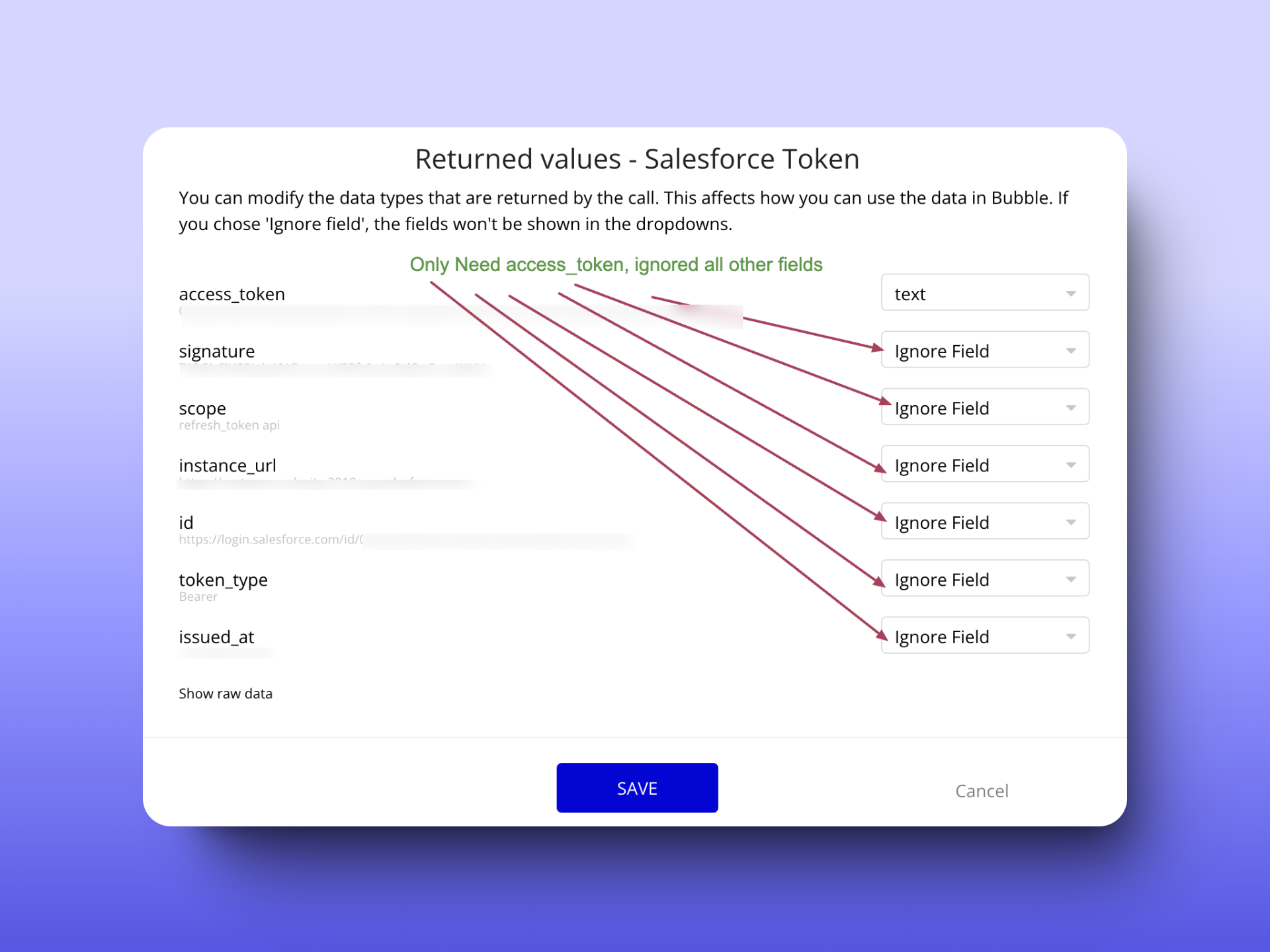
In the image below, you can see I have successfully initialized the API Call and it is showing me all the data I am getting in my API call like access_token, signature, scope, instance_url, id, token_type, and issued_at.
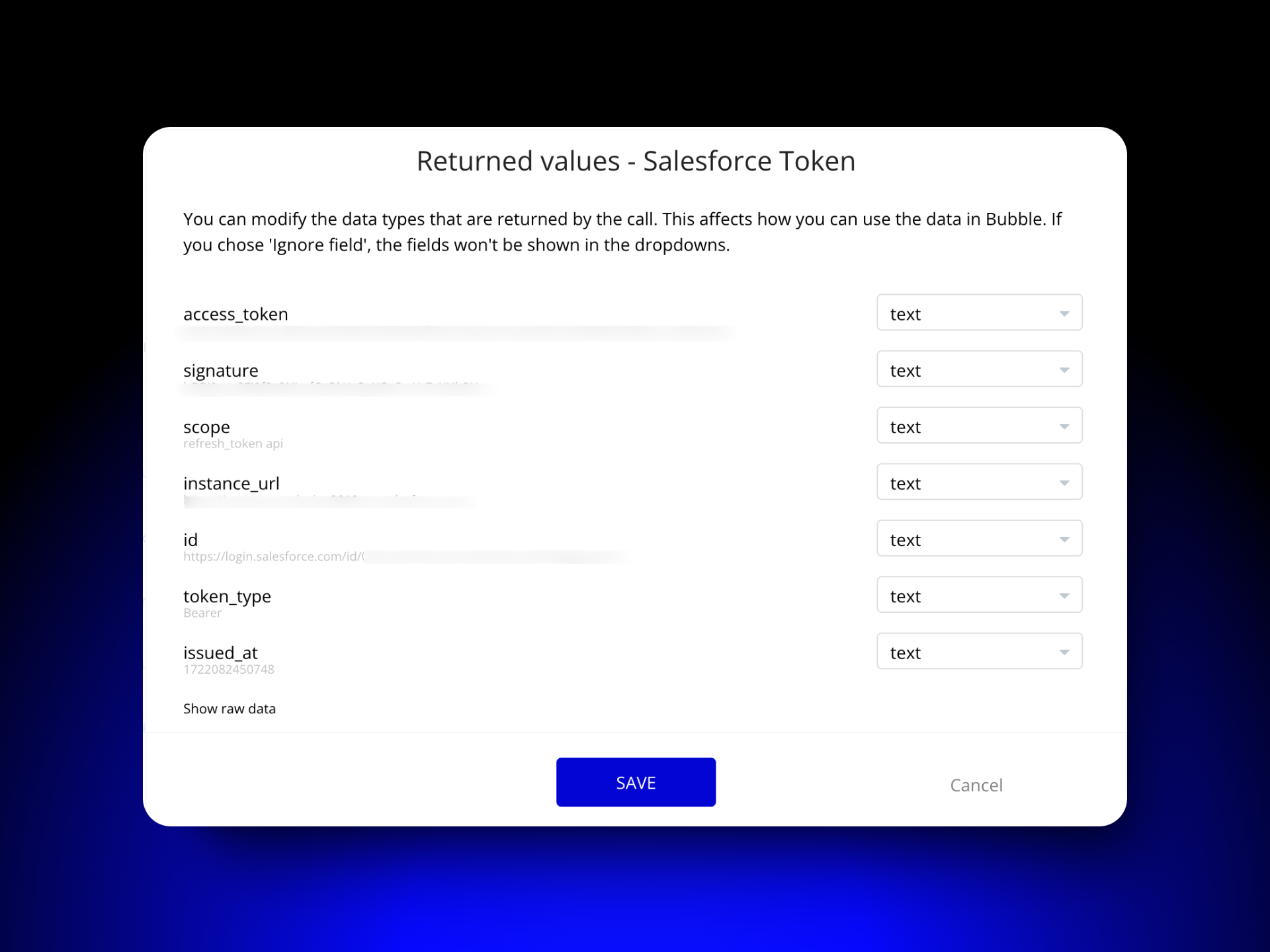
But from this, I need only access_token. So in this successful API call, I can tell bubble to only accept access_token. It doesn’t make sense to receive all data when you need only a few So ignore the fields you don’t need as shown in the image below. The basic idea is to only have the data that the app needs to function properly.
3. Same authentication for every API Call
If the following conditions are met,
-
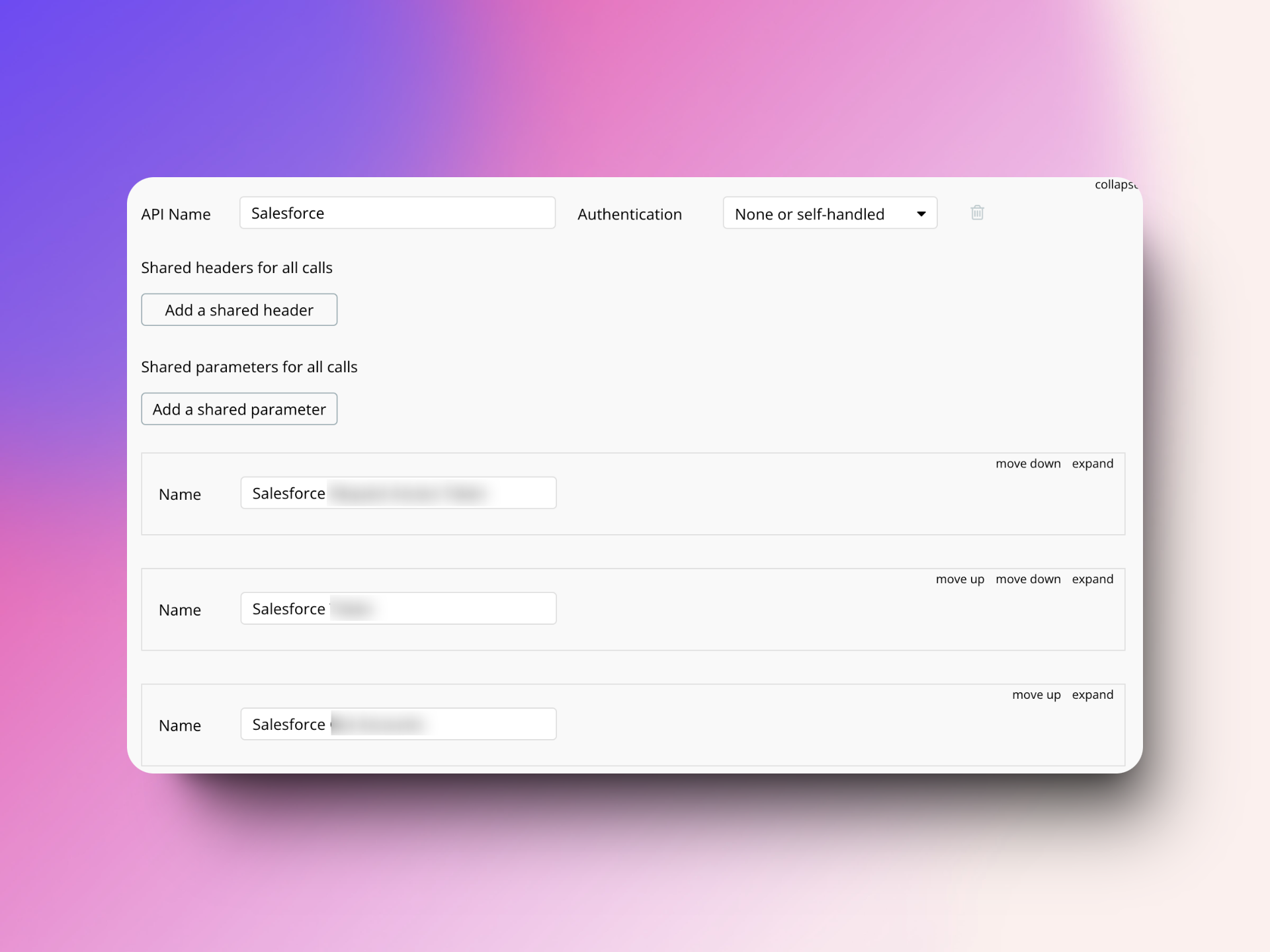
There are multiple API Calls in a single API in a bubble.io API Connector
-
-
The same Private key/authentication token is being used for all the calls separately in their respective API Calls
-
The Private key/authentication token is static
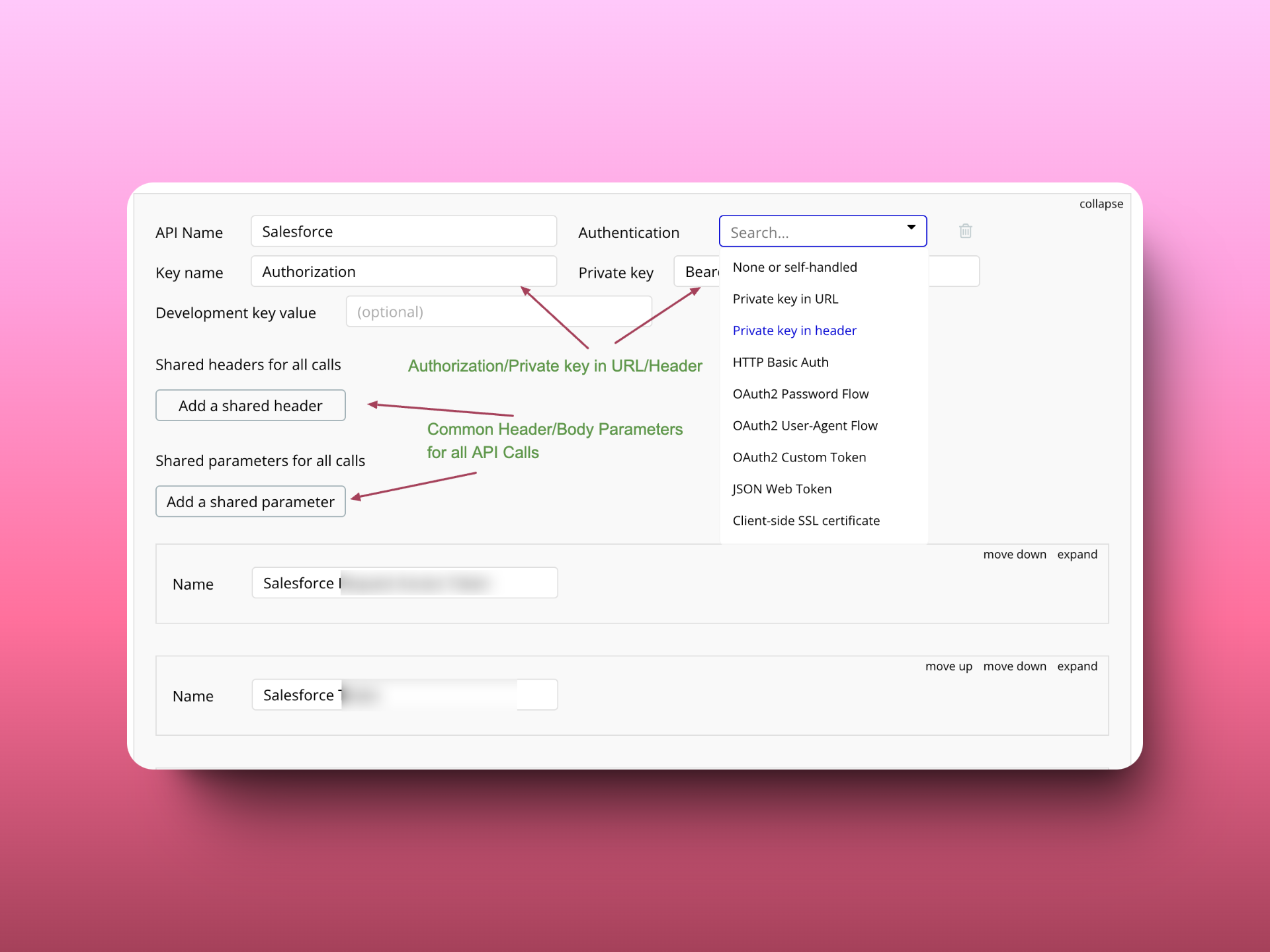
Then Use the Private key in the Header and provide the same private key for all the headers in a single place.
If there are static parameters (header parameters/body parameters) common for all API calls you can define them in Shared headers for all calls and Shared parameters for all calls.
4. Don’t use HTTP Endpoints
Many times, I discovered that API initialization showed an error about missing SSL, so I changed the endpoint from HTTPS to HTTP, and it worked. This is a warning sign.
Always make sure your API calls use HTTPS to protect your data from being intercepted by unauthorized parties. Check that the API base URL starts with https:// in the API connector settings. Doing this ensures your application only interacts with APIs that support secure connections, which is important for keeping the data private and intact. Additionally, using HTTPS helps prevent security risks that could occur from using insecure HTTP connections, protecting both your application and its users.
5.Use the principle of least privilege (PoLP)
Definition: The principle of least privilege (PoLP) is an information security concept that states users and applications should only have access to the data and operations necessary to perform their tasks.
In which areas this principle is applicable when working with APIs in bubble.io?
-
Limit the Scope of API Access: Only add the permissions you need right now. Add more later if necessary.
-
Limit API Key Permissions: For example, in Stripe, create restricted keys that can only do specific tasks, like creating charges but not processing refunds.
-
Minimize Data in the API Request Body: See Tip 2 for more details.
-
Role-Based API Workflows: Allow only admin roles to perform sensitive API tasks, like managing users or handling financial transactions. Restrict basic users or customers to actions that only retrieve information, such as viewing data without updating or deleting it. Use conditional logic in Bubble to stop unauthorized roles from triggering certain API workflows.
-
Limit Developer Access: Only allow Live branch data access to certain developers who need it.
Read my full guide on Bubble.io API Security best practices.
Frequently asked questions
What is the most common privacy-rule mistake in Bubble.io?
Comparing two empty fields. A rule like "This Thing's salesforce is the current user's salesforce" returns true when both fields are empty, exposing rows that should be private. The fix is to AND the rule with "and the current user's salesforce is not empty" so the empty case can't match.
Should I ignore unused API response fields in the Bubble.io API Connector?
Yes. Every field returned by an API call costs a workload unit when initialized and stays in memory for the page lifetime. Mark every field your app does not need as "Ignore field" after the initial call. Smaller response payloads also reduce the surface area if the call is later inspected by an attacker via DevTools.
How do I avoid duplicating authentication across multiple API calls in one Bubble.io API connector?
Configure the private key or token once at the API level under "Shared headers for all calls" rather than per individual call. Same for shared body or query parameters that are static across endpoints. One place to rotate a key when it changes; zero risk of one call drifting out of sync.
Is HTTP ever acceptable for API calls from a Bubble.io app?
No. If an API initialization fails with an SSL error, the right move is to ask the API provider why their HTTPS endpoint is misconfigured, not to fall back to HTTP. HTTP exposes the entire request and response (including auth headers) to anyone on the network path. Always require https:// in the API Connector base URL.
How do I apply least-privilege to Bubble.io API integrations?
Four places: limit the scope when you request the key (Stripe restricted keys, Salesforce scopes, etc.), strip unused fields from the response, gate sensitive API workflows behind role checks, and restrict Live-branch data access to the developers who actually need it.