Article · May 22, 2026
Chrome extension version-bump discipline: pre-commit + GitHub Actions
The Chrome Web Store rejects re-uploads with the same manifest version. Catch the missed bump locally in a pre-commit hook; gate it again in CI.
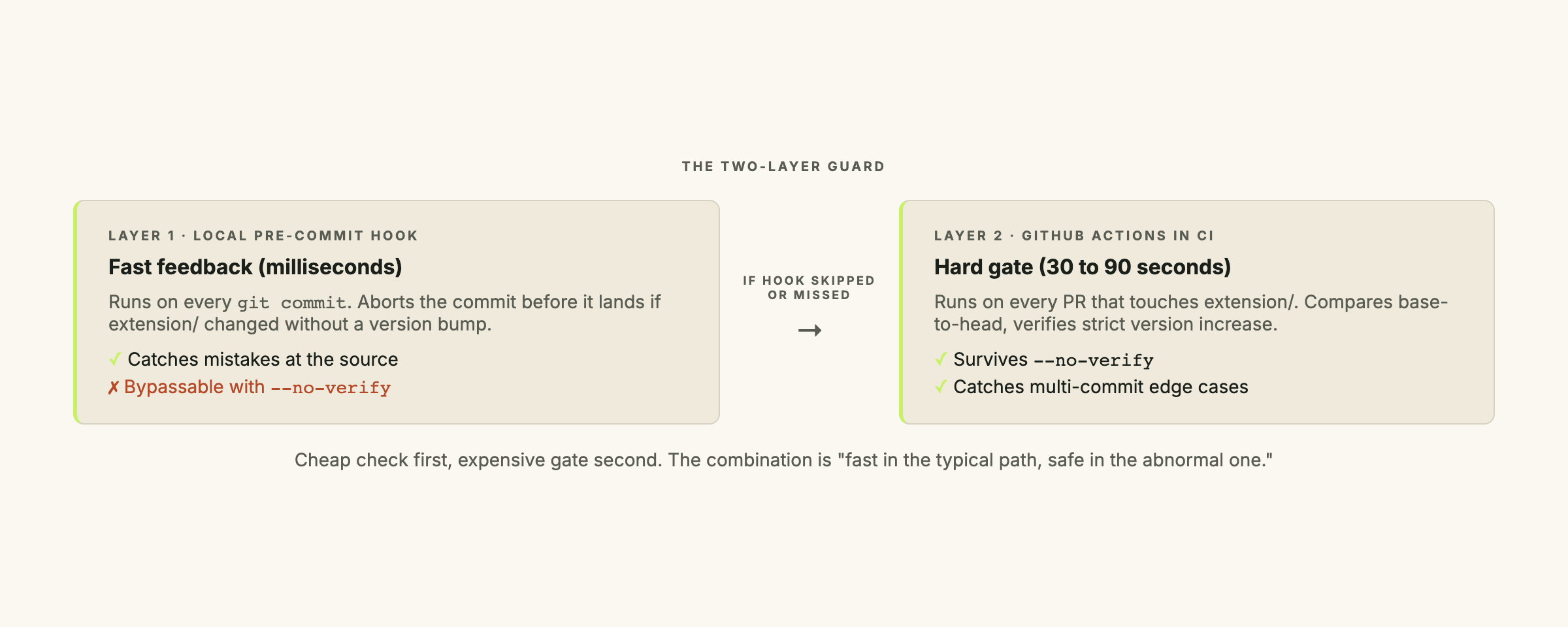
The Chrome Web Store rejects any re-upload whose manifest.json version field is not strictly greater than the published version. Forget the bump and you get a rejected submission, a rebuild, a re-upload, and a 1 to 3 day wait for re-review. The fix is a two-layer guard: a pre-commit hook for fast local feedback, a GitHub Actions workflow for the gate that survives git commit --no-verify.
Why the Web Store cares about monotonic versions
Monotonic versioning: a release scheme where each new version is strictly greater than the previous one. The Chrome Web Store compares version strings as four dot-separated integers (e.g.
1.2.3.4). Semantic versioning (MAJOR.MINOR.PATCH) fits this scheme. The Web Store does not care which scheme you use, only that each release is greater than the last.
The rejection error is “the version of the uploaded package is not later than the published version.” Beyond the rejection: Chrome uses the version field to decide whether to push an update to already-installed clients. A re-upload with the same version suppresses the update silently for existing users, even if the build is accepted.
The pre-commit hook
Pre-commit hook: a script that git runs automatically before creating a commit. If the script exits with a non-zero code, the commit is aborted and the working tree is left intact. Hooks live in
.git/hooks/by default, but a shared.githooks/folder in the repo lets you version-control them.
The hook checks whether any file under extension/ is staged, and if so, verifies that extension/manifest.json is also staged with an actual change to the version field. If extension files changed without a version bump, the commit is blocked.
#!/usr/bin/env bash
# .githooks/pre-commit
# Block commits that modify extension/ without bumping extension/manifest.json version.

set -euo pipefail

# Files staged for this commit
STAGED=$(git diff --cached --name-only)

# Did any file under extension/ change?
EXT_CHANGED=$(echo "$STAGED" | grep -E '^extension/' || true)
if [ -z "$EXT_CHANGED" ]; then
  # No extension changes, nothing to check
  exit 0
fi

# Was extension/manifest.json staged?
MANIFEST_STAGED=$(echo "$STAGED" | grep -E '^extension/manifest\.json$' || true)
if [ -z "$MANIFEST_STAGED" ]; then
  echo "✗ extension/ changed but extension/manifest.json was not staged."
  echo "  Bump the version field in extension/manifest.json before committing."
  exit 1
fi

# Was the "version" field actually changed in the staged diff?
STAGED_DIFF=$(git diff --cached extension/manifest.json)
if ! echo "$STAGED_DIFF" | grep -E '^\+\s*"version"' > /dev/null; then
  echo "✗ extension/manifest.json was staged but the version field did not change."
  echo "  Bump the version field before committing."
  exit 1
fi

echo "✓ Extension version bump detected."
Save as .githooks/pre-commit, mark it executable, and point git at the folder:
chmod +x .githooks/pre-commit
git config core.hooksPath .githooks
The hook runs in milliseconds. A failed check leaves the working tree intact; fix the version and re-run git commit.
Installing the hook across a team
The .git/ directory is not committed to the repo, so a fresh clone has no hooks. Two ways to solve this.
Option 1: shared .githooks/ folder with a manual git config.
The hook scripts live in the repo. Each developer runs git config core.hooksPath .githooks once after cloning. No dependencies. For a team of one to three, this is the right call.
Option 2: Husky.
npm install --save-dev husky
npx husky install
echo 'bash .githooks/pre-commit' > .husky/pre-commit
chmod +x .husky/pre-commit
Husky’s prepare script adds a postinstall hook so npm install configures core.hooksPath automatically. New clones get the hook for free. The cost is an npm dependency that can break across Node version upgrades.
The GitHub Actions workflow
The pre-commit hook is bypassable: git commit --no-verify skips it entirely. A developer in a hurry, an automated tool, a teammate who cloned without running git config: all skip the check. The CI workflow is the actual lock.
# .github/workflows/extension-version-check.yml
name: Extension version check

on:
  pull_request:
    paths:
      - 'extension/**'

jobs:
  check-version-bump:
    runs-on: ubuntu-latest
    steps:
      - name: Check out PR branch
        uses: actions/checkout@v5
        with:
          fetch-depth: 0  # Need full history to compare against base

      - name: Compute base SHA
        id: base
        run: echo "sha=$(git merge-base origin/${{ github.base_ref }} HEAD)" >> $GITHUB_OUTPUT

      - name: Verify manifest.json version increased
        run: |
          BASE_VERSION=$(git show ${{ steps.base.outputs.sha }}:extension/manifest.json | jq -r .version)
          HEAD_VERSION=$(cat extension/manifest.json | jq -r .version)

          echo "Base version: $BASE_VERSION"
          echo "Head version: $HEAD_VERSION"

          if [ "$BASE_VERSION" = "$HEAD_VERSION" ]; then
            echo "✗ extension/manifest.json version did not change between base and head."
            echo "  Bump the version before merging."
            exit 1
          fi

          # Parse as dot-separated integers and compare lexicographically by part
          if [ "$(printf '%s\n%s\n' "$BASE_VERSION" "$HEAD_VERSION" | sort -V | head -n 1)" != "$BASE_VERSION" ]; then
            echo "✗ Head version ($HEAD_VERSION) is not greater than base version ($BASE_VERSION)."
            echo "  The Chrome Web Store requires monotonically increasing versions."
            exit 1
          fi

          echo "✓ Version bumped: $BASE_VERSION → $HEAD_VERSION"
The CI check does two things the pre-commit hook does not.
It compares base-to-head, not just the staged diff on the current commit. This matters when a developer commits the extension change in one commit and adds the version bump in a follow-up. The Web Store cares about the cumulative diff against the published version; the CI check enforces that boundary.
It also verifies the version actually increased, not just changed. The pre-commit hook looks for a + line with "version" in the diff, which catches the obvious case but misses an accidental downgrade. The CI check uses sort -V to confirm head is strictly greater than base.
Edge cases worth knowing
A PR with no extension changes. The on.pull_request.paths filter means the workflow only fires when files under extension/ appear in the diff. A documentation PR never triggers it.
A version bump spread across multiple commits. The base-to-head comparison handles this correctly. If the bump lands in commit three of five, the check passes. If the bump appears in commit one and gets reverted in commit two, the check fails. Both are the right outcomes.
Force-pushed branches. fetch-depth: 0 pulls full history, so the merge-base lookup finds the correct ancestor even after a rebase or force push. Slower on very large repos, but not a concern for any normal extension project.
Why keep the hook if CI catches everything
The hook fails in under a second. CI fails in 30 to 90 seconds, after the runner spins up, clones the repo, and runs the check. By then the context is cold and there are other PRs in the queue.
The asymmetry matters too. The hook is opt-out (--no-verify). Skipping CI requires actively changing the workflow or pushing directly to main: neither happens by accident. The combination means the normal path has instant feedback, and the abnormal path still has a hard gate.
Where else this pattern applies
The same structure works for any artifact that must be in a specific state before it ships:
package.jsonfor npm packages. npm rejects re-publishes of the same version. Replaceextension/manifest.jsonwithpackage.json; the hook and workflow structure are identical.- Supabase migration files. A migration with a duplicate timestamp is ambiguous and causes apply failures. A pre-commit check that scans
supabase/migrations/for timestamp collisions catches this before the branch is reviewed. - i18n JSON files. If all locale files must share the same key set, a pre-commit hook that diffs key lists across files enforces parity without relying on a reviewer to catch the gap.
The version check for Chrome extensions is one instance of “if forgetting this costs you a wasted submission or a broken deploy, gate it twice.”
Where this fits in the Chrome extension lifecycle
This is the third post in the chrome-extension-lifecycle series. The first, shipping a Manifest V3 Chrome extension to the Web Store, covers the publication gates. The second, building a Chrome extension popup with Supabase Auth, covers the auth setup most internal extensions need.
If you are shipping a Chrome extension and still bumping the version manually before each release, let’s talk. Setting up both layers takes about 30 minutes and removes one item from the release checklist permanently.
Frequently asked questions
Why does the Chrome Web Store require a version bump on every update?
The Web Store compares your uploaded manifest.json version against the currently published version. If the version string is not strictly greater, the upload is rejected with 'the version of the uploaded package is not later than the published version.' Chrome also uses the version to decide whether to push an update to already-installed clients, so re-using a version would silently suppress the update.
What happens if a developer runs `git commit --no-verify`?
The pre-commit hook is skipped entirely. That is why the GitHub Actions workflow exists: it runs on every PR regardless of how commits were made. The only way past the CI check is to actually bump the version.
Does the CI workflow trigger on every commit, or only extension-related ones?
Only extension-related ones. The workflow uses `on.pull_request.paths: ['extension/**']`, so a PR that touches only docs or src never triggers it. No false positives.
What if the version bump is spread across multiple commits in the same PR?
The CI check compares base-branch to PR head, not commit-by-commit. If the bump lands in the third of three commits, the check passes. If the bump appears in the first commit and gets reverted in the second, the cumulative diff shows no change and the check fails. That is the correct behavior.
Does this pattern work for npm packages or Docker images?
Yes. Replace `extension/manifest.json` with `package.json` for npm packages (which also reject re-publishes of the same version). For Docker, where registry policy determines overwrite behavior, the same pre-commit plus CI structure applies: swap the file path and the version comparison logic.