Article · Aug 4, 2025
How to Let Admins Access User Accounts in Bubble.io Without Credentials
Add admin impersonation to Bubble.io: let admins log in as any user without storing credentials. Built with a short-lived token generated by a backend API workflow.
TL;DR:
Let your admins log in as any user in Bubble.io — no passwords, no backend workflows.
Just:
Generate a magic login link (without emailing it),
Grab the link using a Toolbox Server Script, and
Instantly redirect the admin to log in as that user.
Perfect for support, QA, and testing — all in 3 simple steps.
🧐 Use Case
Let’s say your APP admin wants to see what a specific user sees in their account. Instead of asking for login credentials, you provide a “Run as” button next to every user in your Admin panel.
With one click, your app logs the admin in as that user and redirects them to the user’s dashboard.
✅ Requirements
-
Bubble app with user roles (admin/user)
-
Toolbox Plugin
-
Admin Panel, which only the Admin can access
🚀 Step-by-Step: Implement “Run as User” in Bubble
✅ Step 1: Add “Run as” Button in Admin Panel User list

✅ Step 2: Set up the Magic link workflow on button click
Make sure to just create a token and not send an email. Here is what it will look like
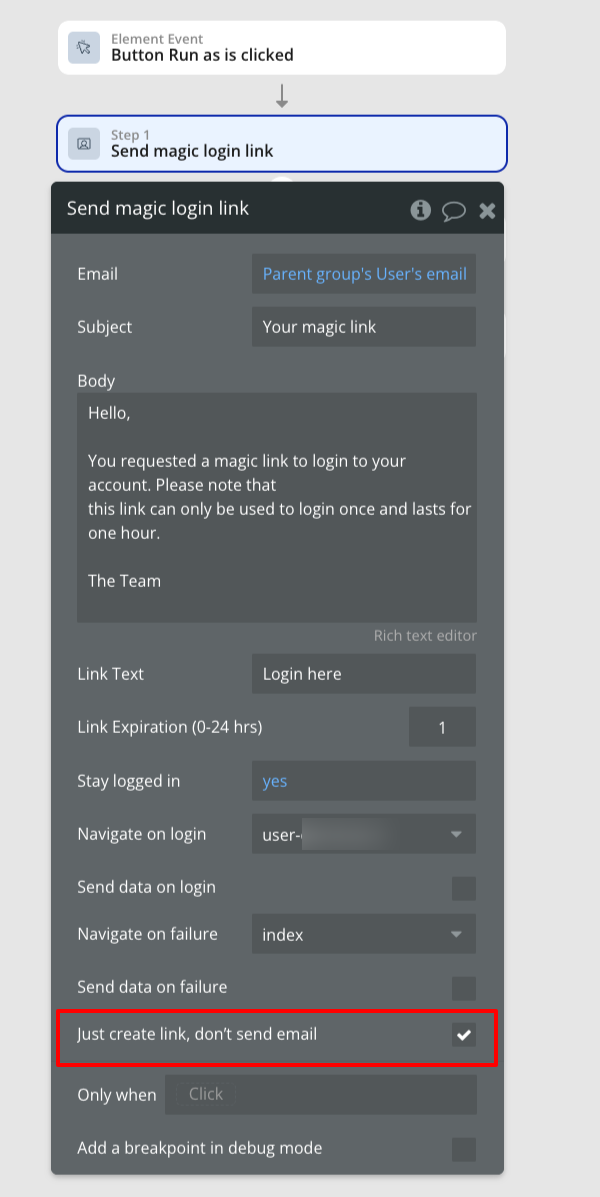
⚠️ This sends a login link to the backend. It won’t send an actual email and you’re just using the generated login link internally.
✅ Step 3: Use Server Script (Toolbox)
Add a “Server Script” action from the Toolbox plugin right after the magic link action.
In the script box, extract the login link like this:
let link = "Result of step 1 (Send magic login link)";
link;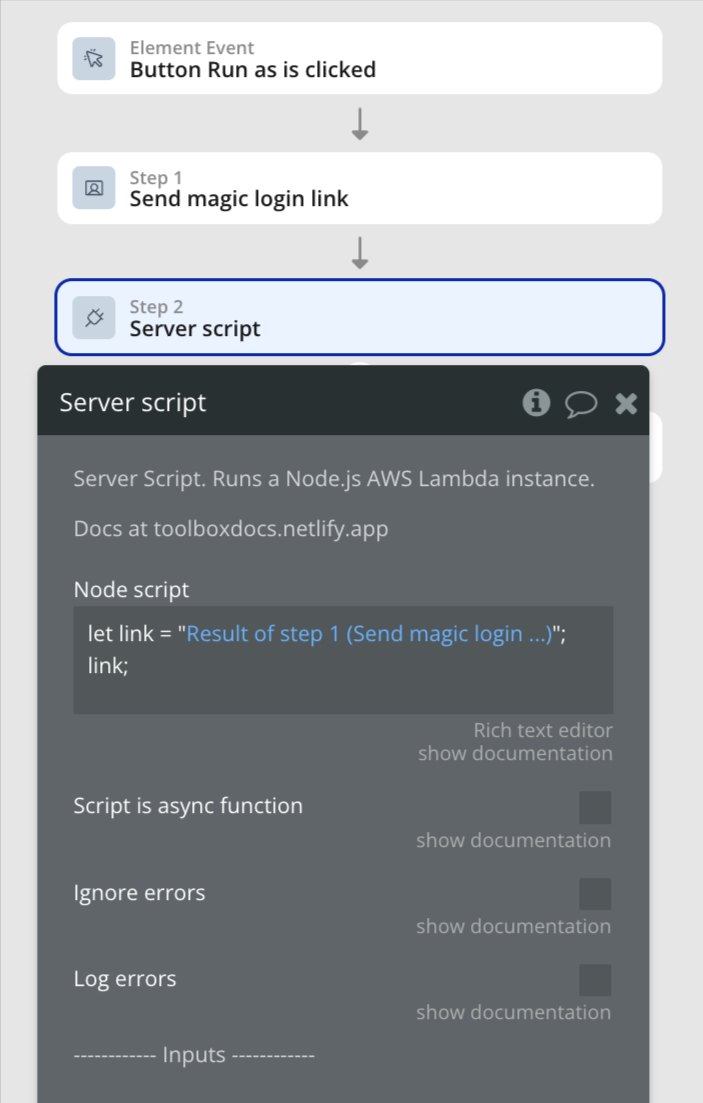
Make sure to set the return type as text.
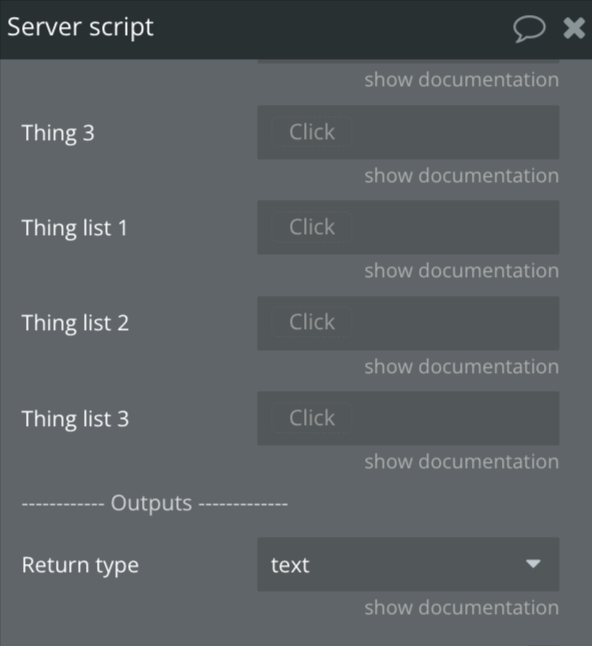
✅ Step 4: Redirect Using “Open External Website”
Add a final workflow step:
-
Action: Open an external website
-
URL:
Result of Step 2 (Server Script)
This step instantly redirects the admin to the magic login link, logging them in as the selected user!
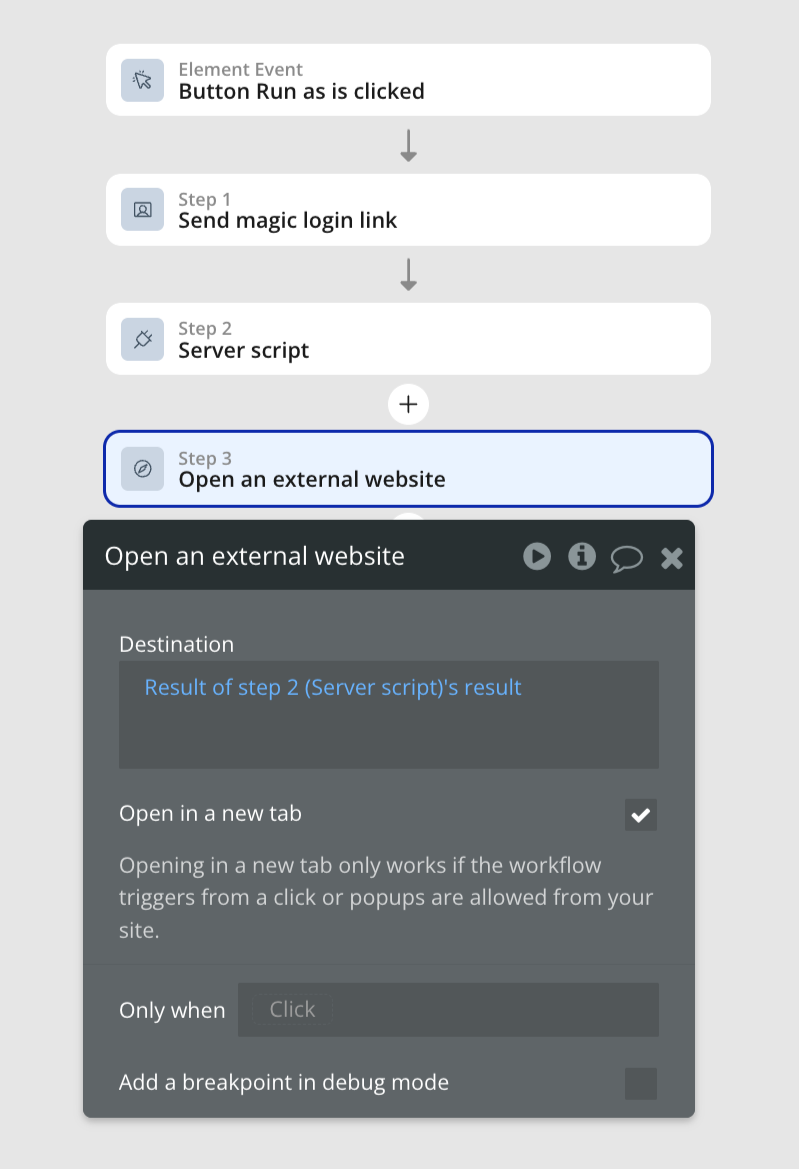
With this, the admin user will be logged out, and the admin will be signed in as a user to whose email was used in to create the magic link.
🔐 Security Best Practices
-
✅ Only show the “Run as” button to users with the Admin role.
-
✅ Add privacy rules to restrict access.
-
✅ Log impersonation actions (optional but good for audit trail).
-
✅ In multi-tenant SaaS, the impersonation flow should respect the tenant boundary (an admin can only impersonate users inside their own tenant). See multi-tenant SaaS developer for the Privacy Rules patterns that enforce this at the data-type level.
🧩 Final Outcome
Your admin can now:
-
Click “Run as” on any user
-
Instantly be redirected to the app, logged in as that user
-
Provide support, test behavior, or troubleshoot without credentials
❓ FAQ
What is the “Run as User” feature in Bubble.io?
It’s a functionality that allows admins to log in as any user in the app without knowing their credentials. It’s useful for support, debugging, and user experience testing.
Is it secure to log in as a user without a password?
Yes, if implemented properly. The magic login link is time-bound and only accessible to admins. Ensure your workflows are protected with role-based privacy rules.
Does the user receive an email when I use “Send magic login link”?
No. While Bubble’s action generates a login link, it only sends an email if explicitly configured. In this case, the link is used internally and not emailed.
Do I need backend workflows to implement this?
No. This method uses only front-end workflows and the Toolbox plugin, making it easier and faster to set up.
Can I choose which page the admin lands on after impersonation?
Yes. The “Send magic login link” action allows you to define a redirect URL. You can set this to any page (like dashboard, settings, etc.).
Will the actual user be logged out when I log in as them?
No. This creates a new session for the admin. The original user remains unaffected and logged in on their own device.
How long is the login token valid?
You can set the token expiration manually in the “Send magic login link” action, usually anywhere from 1 minute to 24 hours.