Article · Mar 13, 2026
Silent timezone bugs in JavaScript date arithmetic
`new Date().toISOString().split('T')[0]` returns the UTC date, not the user's local date. The bug, the fix, and why it only shows up in production.
A user emails support: “I logged six hours on Thursday and they are showing up under Wednesday.” The entry in the database is dated Wednesday. The frontend is sending new Date().toISOString().split('T')[0]. The timestamp on the entry: 8:14pm Eastern Time.
One line of code. A freelancer lost most of a billing period before anyone noticed.
The one-line bug that ate a week of time-entry data
Here is the call that does the damage:
const today = new Date().toISOString().split('T')[0];It reads like “give me today’s date as a YYYY-MM-DD string.” Most people think that is what it does. What it actually does:
- Create a
Dateobject representing the current moment in time (correctly). - Convert that moment to its UTC equivalent.
- Format the UTC equivalent as an ISO 8601 string (
2026-01-22T01:14:00.000Z). - Take the first ten characters.
Step 2 is the problem. If the user is in EST (UTC minus 5) at 8:14pm on Wednesday, the UTC equivalent is 1:14am Thursday. The string is 2026-01-23T01:14:00.000Z. The first ten characters are 2026-01-23. The user just logged time for the next day.
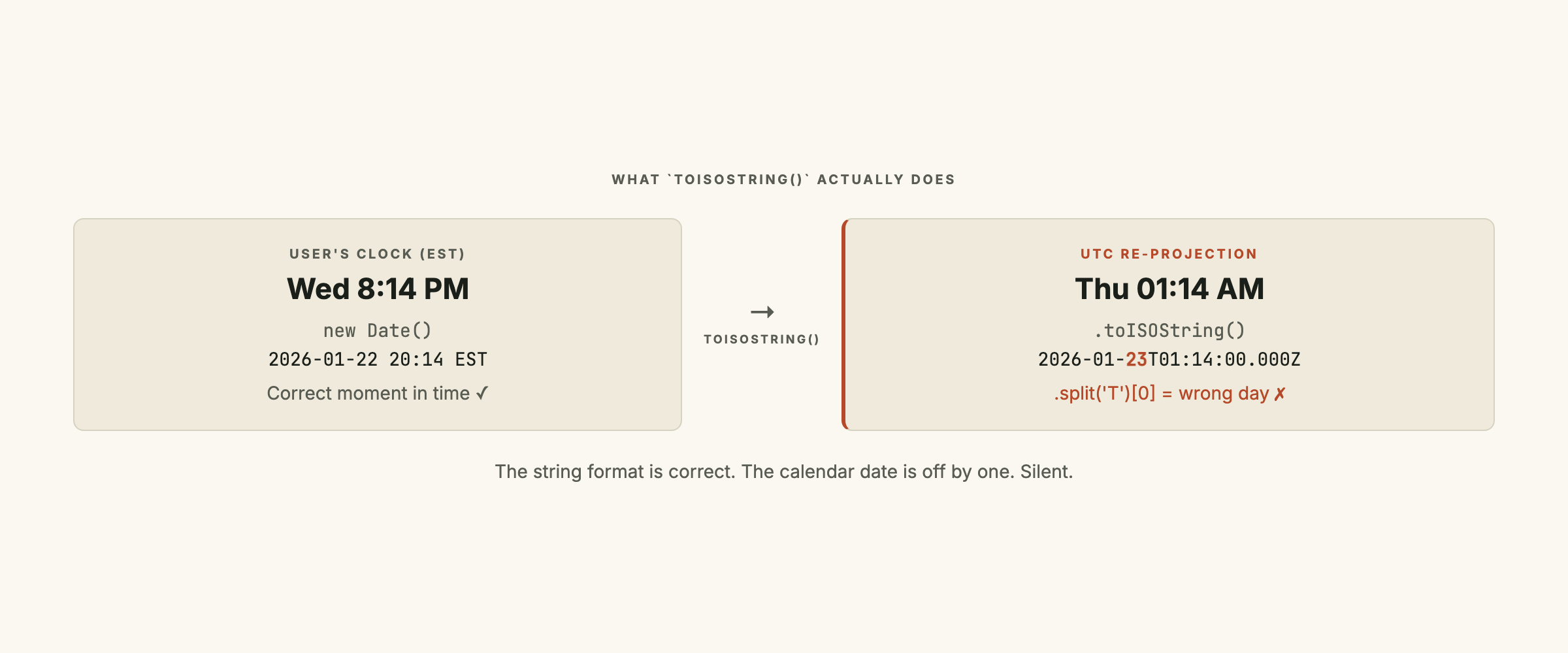
The bug is silent for two reasons. The string looks right (ten characters, correct format). And dev environments often run in UTC, so the developer testing the feature in a local container never sees the shift.
Why dev environments hide it
UTC (Coordinated Universal Time): the single global time standard with no offset. All timezones are defined as “UTC plus or minus N hours.” Servers, databases, and most CI pipelines default to UTC. Browser tabs do not.
Dev containers (Docker, GitHub Codespaces, most Vercel preview deployments) run on Linux servers configured to UTC. Node respects the TZ environment variable, and most CI setups set TZ=UTC.
So when you write a test like:
test('records today', () => {
  const result = recordTime();
  expect(result.date).toBe(new Date().toISOString().split('T')[0]);
});
It passes. Both sides of the equality use the UTC date. Both are wrong by the same amount. The test catches nothing.
To catch this in CI, you either (a) run the test under a non-UTC TZ env var (TZ=America/New_York npm test), or (b) mock the user’s timezone via mockdate plus Intl.DateTimeFormat overrides. Most teams do neither.
What toISOString() actually does
From the MDN spec:
The
toISOString()method ofDateinstances returns a string representing this date in the date time string format, a simplified format based on ISO 8601, which is always 24 or 27 characters long (YYYY-MM-DDTHH:mm:ss.sssZor±YYYYYY-MM-DDTHH:mm:ss.sssZ, respectively). The timezone is always UTC, as denoted by the suffixZ.
The Z suffix is “Zulu,” military shorthand for UTC. It is not optional. There is no way to make toISOString() return a non-UTC string.
toISOString() is correct for storage (moments in time should live in UTC) and correct for transport (server-to-server APIs should exchange UTC). It is wrong for picking a calendar date the user thinks of as “today.”
The localToday() fix
Intl.DateTimeFormat: the browser’s built-in Internationalization API, available in every modern browser and in Node since version 13. It formats dates according to locale rules and, unlike
toISOString(), respects the runtime’s timezone by default.
The five-line replacement:
// Returns today's date in the user's local timezone as a YYYY-MM-DD string.
function localToday() {
  return new Intl.DateTimeFormat('en-CA').format(new Date());
}
Intl.DateTimeFormat uses the runtime’s timezone by default. In the browser, that is the user’s OS timezone. On a server, it is whatever TZ is set to.
The en-CA locale formats as YYYY-MM-DD natively. US is M/D/YYYY, UK is D/M/YYYY. Picking en-CA is a deliberate choice: ISO-like format, local zone awareness.
If you want to pin to a specific timezone regardless of the user’s machine (always show business dates in America/New_York, for instance), pass it as an option:
function todayInZone(timeZone) {
  return new Intl.DateTimeFormat('en-CA', { timeZone }).format(new Date());
}
Pass 'America/New_York' and you get the calendar date in that zone. Pass 'UTC' and you get back to the original behavior, when that is genuinely what you want.
Where else this pattern leaks
The toISOString().split('T')[0] pattern is one face of a larger class of bug. Same shape, different hiding places:
- Database DATE columns. Postgres
DATEhas no timezone. When the application writes a calendar day, it has to pick the right one before the INSERT. UsingtoISOString().split('T')[0]here writes UTC-day to a “local-day” column. Same one-day skew, silently. - Scheduled cron jobs. A “send daily digest at 6am local time” cron that runs on a UTC server fires at 6am UTC: 1am EST, 11pm Hawaii. The scheduler needs to know whose 6am it is respecting.
- Calendar invites. The
.icsformat encodes events in UTC by default. Off-by-one-hour errors hide here, especially around DST transitions. - CSV exports. “All entries for last week”: is that the calendar week in the user’s zone or in UTC? The two differ by at least a row at each boundary.
The common thread: a calendar concept (a day, a week, a month) is being encoded as a moment in time. Calendar concepts are zone-dependent. Moments in time are not. Decide which one you have before you serialize.
This class of failure is closely related to the silent-failure patterns I documented in silent failures in data pipelines: the system reports success because the call returned without error, while the data quietly drifts.
Pre-launch checklist for timezone-sensitive features
For any feature that records or displays calendar dates:
- Grep the codebase for
toISOStringandsplit('T')[0]. Every match is a candidate bug. If the surrounding code is computing a calendar date for storage or display, replace withIntl.DateTimeFormat. - Run one test under a non-UTC zone.
TZ=America/New_York npm test. If anything that depends on “today” breaks, you have a hidden timezone assumption. - Pick column types deliberately. Calendar values go in
DATE; moments in time go inTIMESTAMPTZ. Mixing them is the slow-burn version of the same bug. - Display always specifies the zone. Use
Intl.DateTimeFormatwith{ timeZone }or the user’s locale. NevertoLocaleStringwithout thinking about which zone is in scope. - Schedule with care. Any “at X every day” workflow needs to know whose X it respects. If it is the system’s UTC X, document that. If it is each user’s local X, the scheduler needs the zone.
The audit takes an hour. The bug it prevents is the kind that gets escalated because a user feels their data was lost. For more on the “report success while quietly losing data” class of failure, I wrote up the patterns I see most often in idempotent pipelines with natural-key fingerprints.
If you are building a product where users record time, schedule events, or report on calendar windows, and you are not sure whether the dates are landing in the right zone, reach out. A timezone audit is a half-day of work and clears a whole class of incident permanently.
Frequently asked questions
Why does `new Date().toISOString().split('T')[0]` return the wrong date?
Because `toISOString()` always returns UTC. If the user is in EST (UTC minus 5) and clicks submit at 8pm local time, `new Date()` is correct (it knows the wall-clock time), but `toISOString()` converts to UTC, which is already the next day at 1am. Slicing the first ten characters gives you tomorrow's date in the user's frame of reference. The bug is silent because the call returns a string that looks right; only the date part is wrong by one day.
How do I get today's date in the user's local timezone in JavaScript?
Use the Intl.DateTimeFormat API with the `en-CA` locale (which formats as YYYY-MM-DD by default). The five-line helper is `const today = new Intl.DateTimeFormat('en-CA').format(new Date())`. Intl.DateTimeFormat respects the user's system timezone by default, so the returned string is the user's local date. For an explicit timezone (e.g. always EST regardless of where the user is), pass `{ timeZone: 'America/New_York' }` as the formatter option.
Does date-fns handle timezones correctly?
The core date-fns library treats dates as timezone-naive (it uses whatever zone the JS runtime is in). For explicit timezone handling, you need date-fns-tz, which adds `formatInTimeZone` and `zonedTimeToUtc`. Day.js has the same split with its timezone plugin. As of 2026 the recommended modern approach is the Intl API for formatting and the Temporal proposal (currently in TC39 Stage 3) for arithmetic. For now, Intl plus a thin wrapper covers most production needs.
When should I store dates as DATE versus TIMESTAMPTZ in Postgres?
Use TIMESTAMPTZ for any moment in time you might want to display in a user's local zone later (when something happened, when a job ran, when an email was sent). Use DATE for calendar-style values that are not tied to a moment (a user's birthday, the date a leave request applies to, the day a time entry counts toward). DATE has no timezone associated with it; the application is responsible for picking the right calendar day before it writes to the column.